
jsc反编译工具编写探索之路对于经常做游戏安全逆向的读者来说,可能会经常遇到Cocos2dx编写的游戏。这个国产开源的游戏开发引擎支持多种编程语言进行游戏开发:发括主流的C/C++/JavaScrip 2018-11-22 20:04:17 Author: zhuanlan.zhihu.com(查看原文) 阅读量:1662 收藏
jsc反编译工具编写探索之路
对于经常做游戏安全逆向的读者来说,可能会经常遇到Cocos2dx编写的游戏。这个国产开源的游戏开发引擎支持多种编程语言进行游戏开发:发括主流的C/C++/JavaScript/Lua,之前,与大家讨论的Lua软件安全系列的文章,讨论的是采用Cocos2dx+Lua开发的游戏。而今天要聊的是基于JavaScript开发的游戏Cocos2dx+js。
在新版本Cocos2dx+js的组合下,开发的游戏最终打包时,会将js编写的游戏代码编译生成jsc文件,这个经过编译并二进制优化后的脚本文件,在提升游戏运行性能的同时,也显著的提高了逆向分析的门槛。今天的主要思路是,想办法编写一款针对jsc文件的二进制反编译器。
初步分析
研究逆向先看正向,这通常是一个好的出发点。
jsc游戏打包流程
我们下载好Cocos2dx,这里选择的是cocos2d-x-3.16版本。安装配置好后,执行如下命令:
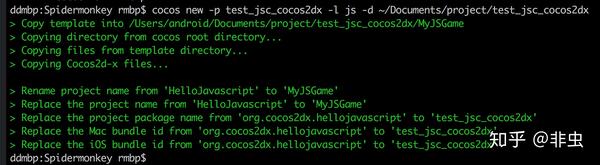
$ cocos new -p test_jsc_cocos2dx -l js -d ~/Documents/project/test_jsc_cocos2dx
本人使用的分析与开发平台是macOS 10.12系统,其他平台的读者可能需要调事路径参数。命令执行完成后,会生成一个JavaScript的游戏工程test_jsc_cocos2dx。效果如图所示:
可以执行如下命令查看项目中有很多js源文件:
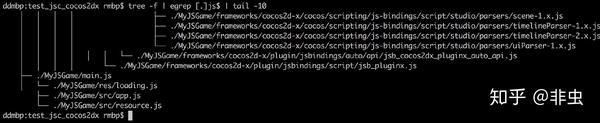
$ tree -f | egrep [.]js$ | tail -10
tree命令以树的形式显示目录层次,"-f"参数显示完整的路径;egrep工具用来正式表达式方式过滤结果,“[.]js$”表示js扩展名的文件;tail -10表示只输出结果的前10行。输出效果如图所示:
我这里选择macOS平台进行编译,执行如下命令:
$ cd MyJSGame
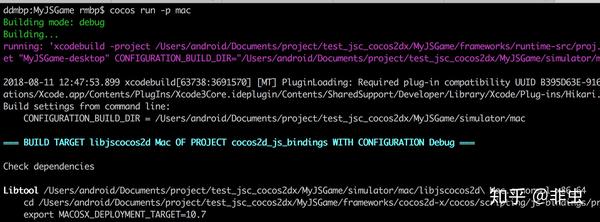
$ cocos run -p mac
效果如图所示:
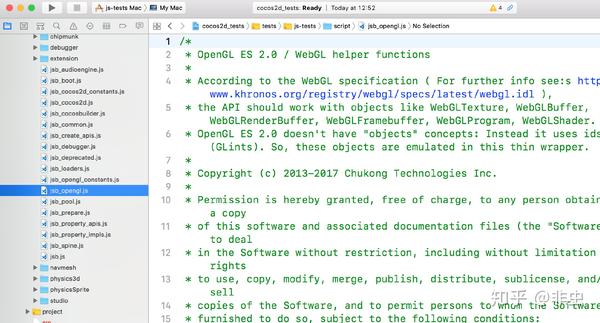
当然,你也可以选择更直观的IDE方式进行编译,使用Xcode打开文件,选择js-tests Mac进行编译即可。如图所示:
编译完成会在test_jsc_cocos2dx/MyJSGame/simulator/mac目录下生成MyJSGame-desktop.app游戏程序。并自动运行,如图所示:
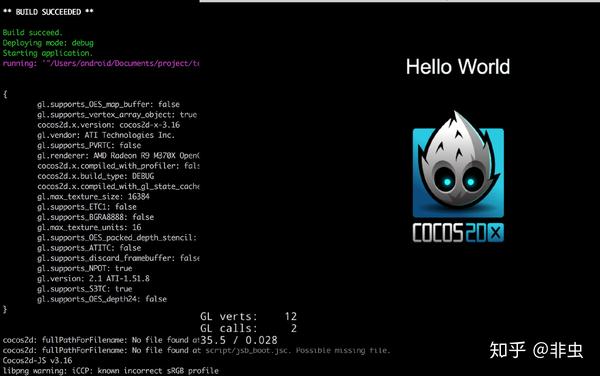
我们来看看生成的MyJSGame-desktop.app游戏程序里面的代码,执行如下命令:
$ tree -f simulator/mac/MyJSGame-desktop.app/Contents | egrep [.]js$ | tail -20
$ file simulator/mac/MyJSGame-desktop.app/Contents/Resources/script/jsb_property_apis.js
效果如图所示:
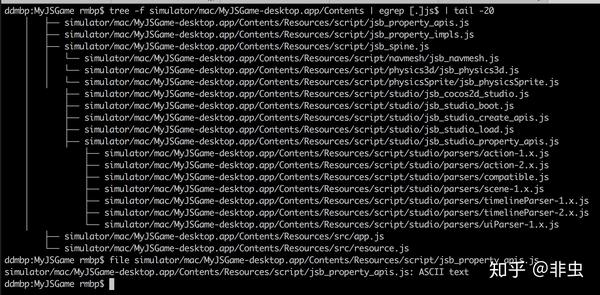
你看到的没错,默认生成的游戏程序的js文件是没有加密的,需要手动生成jsc。执行cocos -h可以看到如下输出:
$ cocos -h

~/cocos2d-x-3.16/tools/cocos2d-console/bin/cocos.py 2.3 - cocos console: A command line tool for Cocos2d-x.

Available commands:
	run              Compiles, deploy and run project on the target.
	gen-libs         Generate prebuilt libs of engine. The libs will be placed in 'prebuilt' folder of the engine root path.
	luacompile       Encrypt and/or compile lua files.
	deploy           Compile and deploy a project to a device/simulator.
	package          Manage package for cocos.
	compile          Compile projects to binary.
	gen-simulator    Generate Cocos Simulator.
	new              Creates a new project.
	jscompile        Compile and/or compress js files.

Available arguments:
	-h, --help			Show this help information.
	-v, --version			Show the version of this command tool.
	--ol ['en', 'zh', 'zh_tr']	Specify the language of output messages.
	--agreement ['y', 'n']		Skip the agreement with specified value.

Example:
	cocos new --help
	cocos run --help
jscompile是一个有用的命令行选项,支持将js编译成jsc。执行下面的命令生成jsc:
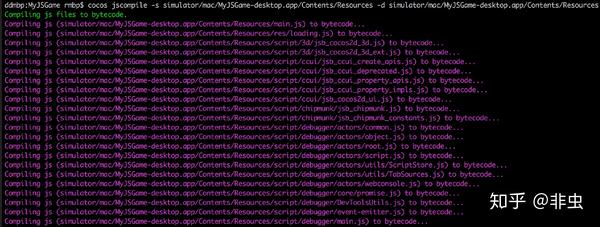
$ cocos jscompile -s simulator/mac/MyJSGame-desktop.app/Contents/Resources -d simulator/mac/MyJSGame-desktop.app/Contents/Resources
效果如图所示:
执行下面的命令查看是否生成成功:
$ tree -f simulator/mac/MyJSGame-desktop.app/Contents | egrep [.]jsc$ | tail -20
效果如图所示:
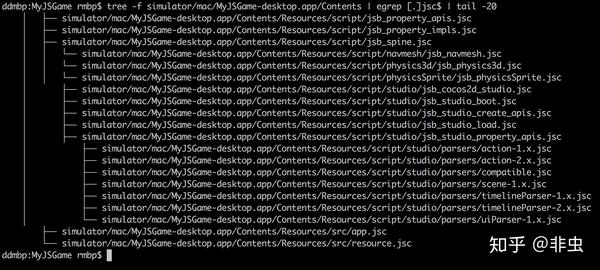
很好很可以!一切都没有问题。执行如下面命令将未加密的js源文件删除:
$ find simulator/mac/MyJSGame-desktop.app/Contents/Resources -type f -name "*.js"| xargs rm -rf
完事以后,双击MyJSGame-desktop.app游戏程序,可以运行起来,没事没问题!
以上演示了完整的Cocos2dx+JavaScript创建与打包jsc游戏的完整过程。下面看看这些生成的jsc文件吧!
jsc反编译探索
我们来看下游戏的main.jsc文件。执行如下命令:
$ file simulator/mac/MyJSGame-desktop.app/Contents/Resources/main.jsc
$ xxd simulator/mac/MyJSGame-desktop.app/Contents/Resources/main.jsc | tail -20
效果如图所示:
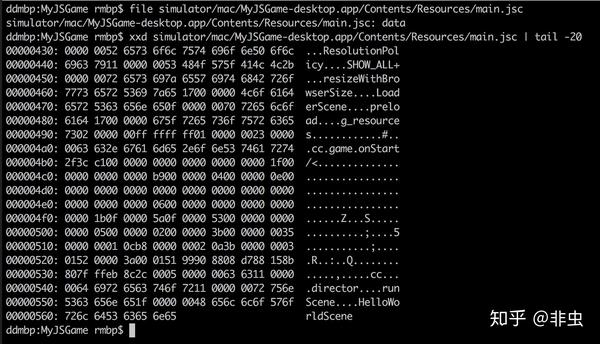
显然这是一个特定格式的十六进制文件!
在实际逆向分析过程中,遇到这类程序,该如何动手分析与破解呢?!这是一个值得思考的问题。
带着试一试的心态,在网络上搜索jsc反编译工具。结果找到了这个仓库:https://github.com/molnarg/dead0007。
编译好程序,执行反编译,提示:"[no source]"。
看来是失败了,网络上有网友的解释如下:
SpiderMonkey编译JS的时候默认会把源代码附在字节码里面,方便调试,这个就是把源代码取出来,其实根本不是反编译。。。Cocos2d-x 默认已经禁用附带源代码,用这个方法得到的结果就是字符串"[no source]"。
这种说法是否成立,还需要自己动手验证,但打算直接从网络上找工具这条路是失败了!
SpiderMonkey
从上面的下载的项目dead0007与网友的回复上来看,jsc的反编译与SpiderMonkey有着很大的关联。在网络上搜索SpiderMonkey,了解到这是由Mozilla公司开发的一款JavaScript执行引擎。使用C/C++语言开发的程序,可以通过调用SpiderMonkey提供的API接口,很方便的执行与编译js脚本文件。
查看dead0007.c文件中关于反编译相关的代码。代码不长,直接帖出来:
int main(int argc, char *argv[])
{
    JSRuntime *rt;
    JSContext *cx;
    JSObject  *glob;
    long       rtsize = 8;      /* Runtime size allocated in MB */
    JSBool     status;
    JSScript  *script;
    jsval      rval;

    JSClass dj_Global = { "global", JSCLASS_HAS_PRIVATE,
                          JS_PropertyStub, JS_PropertyStub,
                          JS_PropertyStub, JS_PropertyStub,
                          JS_EnumerateStub, JS_ResolveStub,
                          JS_ConvertStub,  JS_FinalizeStub,
                          NULL, NULL, NULL, NULL, NULL, NULL, NULL, 0
                        };

    rt = JS_NewRuntime(1024L * 1024L * rtsize);
    if (rt == NULL)
    {
        printf("Cannot initialise javascript runtime\n");
        return ERROR;
    }

/* Create a javascript context and associate it with the JS runtime */
    cx = JS_NewContext(rt, CONTEXT_SIZE);
    if (cx == NULL)
    {
        printf("Cannot initialise javascript context\n");
        return ERROR;
    }

/* Create a global object */
    glob = JS_NewObject(cx, &dj_Global, NULL, NULL);
    if (glob == NULL)
    {
        printf("Cannot create javascript global object\n");
        return ERROR;
    }

/* Create the standard classes */
    status = JS_InitStandardClasses(cx, glob);
    if (status == JS_FALSE)
    {
        printf("Cannot initialise javascript standard classes\n");
        return ERROR;
    }

/* XDR script */
    JSXDRState *xdr = JS_XDRNewMem(cx, JSXDR_DECODE);
    if ((xdr != NULL)) {
      void* f = fopen(argv[1], "rb");
      fseek(f, 0, SEEK_END);
      int len = ftell(f);
      fseek(f, 0, SEEK_SET);
      void* data = malloc(len);
      fread(data, 1, len, f);
      JS_XDRMemSetData(xdr, data, len);
      if (JS_XDRScript(xdr, &script) != JS_TRUE) {
        printf("Decompilation error\n");
      };
    }

/* Decompile script */
    JSString *sourcecode = JS_DecompileScript(cx, script, "proba.js", 2);
    char *sourcecode_str = JS_GetStringBytes(sourcecode);
    printf("%s", sourcecode_str);

/* Destroy context */
    JS_DestroyContext(cx);

/* Destroy runtime */
    JS_DestroyRuntime(rt);

    return 0;
}
代码首先调用JS_NewRuntime()初始化JS环境;接着调用JS_NewContext()创建一个上下文环境;然后调用JS_NewObject()创建一个全局对象; 然后调用JS_InitStandardClasses()加载JS标准类;然后调用JS_XDRNewMem()、JS_XDRMemSetData()、JS_XDRScript()等函数生成内存script对象; 最后,调用JS_DecompileScript()进行反编译工作,然后调用JS_GetStringBytes()获取反汇编的结果。
这一系列的流程,即使没有进行过Spidermonkey相关的接口调用开发,也能够从这些API的调用上,初步了解jsc反编译工作的流程。显然,JS_DecompileScript()是最重要的一环,由它完成所有的反编译工作。
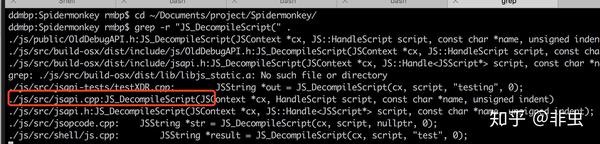
到网上找到Spidermonkey的代码地址:https://github.com/cocos2d/Spidermonkey,下载下来后,查看它的源码。执行如下命令查找它的实现代码:
$ cd ~/Documents/project/Spidermonkey/
$ grep -r "JS_DecompileScript(" .
结果如图所示:
JS_DecompileScript
JS_DecompileScript()的实现代码位于js/src/jsapi.cpp文件中,实现如下:
JS_PUBLIC_API(JSString *)
JS_DecompileScript(JSContext *cx, HandleScript script, const char *name, unsigned indent)
{
    JS_ASSERT(!cx->runtime()->isAtomsCompartment(cx->compartment()));

    AssertHeapIsIdle(cx);
    CHECK_REQUEST(cx);
    script->ensureNonLazyCanonicalFunction(cx);
    RootedFunction fun(cx, script->functionNonDelazifying());
    if (fun)
        return JS_DecompileFunction(cx, fun, indent);
    bool haveSource = script->scriptSource()->hasSourceData();
    if (!haveSource && !JSScript::loadSource(cx, script->scriptSource(), &haveSource))
        return nullptr;
    return haveSource ? script->sourceData(cx) : NewStringCopyZ<CanGC>(cx, "[no source]");
}
看到“[no source]”了,发现当haveSource判断失败就返回这个值,看来与上面网友回复的是一样了。
JS_DecompileFunction()可能也是一个需要注意的函数,它的代码如下:
JS_PUBLIC_API(JSString *)
JS_DecompileFunction(JSContext *cx, HandleFunction fun, unsigned indent)
{
    JS_ASSERT(!cx->runtime()->isAtomsCompartment(cx->compartment()));
    AssertHeapIsIdle(cx);
    CHECK_REQUEST(cx);
    assertSameCompartment(cx, fun);
    return FunctionToString(cx, fun, false, !(indent & JS_DONT_PRETTY_PRINT));
}
内部调用了FunctionToString(),后者的代码也需要搜一搜。执行如下命令:
$ grep -r "FunctionToString(" .
结果如图所示:
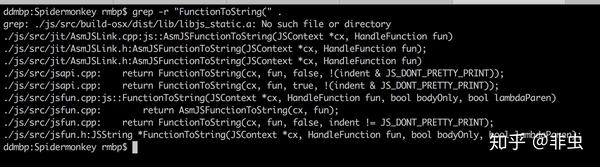
实现代码位于js/src/jsfun.cpp文件中。代码比较长,我这里精减后的流程如下:
JSString *
js::FunctionToString(JSContext *cx, HandleFunction fun, bool bodyOnly, bool lambdaParen)
{
    if (fun->isInterpretedLazy() && !fun->getOrCreateScript(cx))
        return nullptr;

    if (IsAsmJSModule(fun))
        return AsmJSModuleToString(cx, fun, !lambdaParen);
    if (IsAsmJSFunction(fun))
        return AsmJSFunctionToString(cx, fun);

    StringBuffer out(cx);
    RootedScript script(cx);

    if (fun->hasScript()) {
        script = fun->nonLazyScript();
        ...
    }
    if (!bodyOnly) {
        ...
    }
    bool haveSource = fun->isInterpreted() && !fun->isSelfHostedBuiltin();
    if (haveSource && !script->scriptSource()->hasSourceData() &&
        !JSScript::loadSource(cx, script->scriptSource(), &haveSource))
    {
        return nullptr;
    }
    if (haveSource) {
        Rooted<JSFlatString *> src(cx, script->sourceData(cx));
        if (!src)
            return nullptr;
        ...
    } else if (fun->isInterpreted() && !fun->isSelfHostedBuiltin()) {
        if ((!bodyOnly && !out.append("() {\n    ")) ||
            !out.append("[sourceless code]") ||
            (!bodyOnly && !out.append("\n}")))
            return nullptr;
        if (!lambdaParen && fun->isLambda() && !fun->isArrow() && !out.append(")"))
            return nullptr;
    } else {
        JS_ASSERT(!fun->isExprClosure());

        if ((!bodyOnly && !out.append("() {\n    "))
            || !out.append("[native code]")
            || (!bodyOnly && !out.append("\n}")))
        {
            return nullptr;
        }
    }
    return out.finishString();
}
反汇编函数成功的前提是fun->hasScript()执行返回为真,即这个函数包括script,取出来后,还有这么一行:
bool haveSource = fun->isInterpreted() && !fun->isSelfHostedBuiltin();
当haveSource的值为真时,表示函数里面包括了程序打包时的源码,然后检查script->scriptSource()->hasSourceData(),只有包含了源码数据,故事才会往下演!可以看到,Spidermonkey反编译功能本质上只是取打包进jsc文件的源码数据!这与反编译关系本质上已经不大了!
那Cocos2dx编译出的jsc不能反编译,显然是打包时没有包括源码进jsc。这一点我们可以通过跟踪jsc代码的编译流程来验证。
jsc代码编译流程
Cocod2dx中关于jscompile的调用插件,位于cocos2d-x-3.16/tools/cocos2d-console/plugins/plugin_jscompile,它的底层是调用其目录下的bin/jsbcc程序来编译js脚本。后者在发布时以二进制形式打包进来,可以通过如下的Github PR记录看到它的实现代码:https://github.com/cocos2d/cocos2d-x/pull/2706/commits/96721466341d6e7e43087e7d8d4e31f5922062b2。
它的核心代码位于CompileFile()函数,精减代码如下:
bool CompileFile(const std::string &inputFilePath, const std::string &outputFilePath) {
    ...
    JSRuntime * runtime = JS_NewRuntime(10 * 1024 * 1024, JS_NO_HELPER_THREADS);
    JSContext *context = JS_NewContext(runtime, 10240);
    JS_SetOptions(context, JSOPTION_TYPE_INFERENCE);
    JS_SetVersion(context, JSVERSION_LATEST);
    JS_SetOptions(context, JS_GetOptions(context) & ~JSOPTION_METHODJIT);
    JS_SetOptions(context, JS_GetOptions(context) & ~JSOPTION_METHODJIT_ALWAYS);
	JSObject* global = JS_NewGlobalObject(context, &GlobalClass, NULL);
    JS_SetErrorReporter(context, &ReportError);
	if (JS_InitStandardClasses(context, global)) {
        JS::CompileOptions options(context);
        options.setUTF8(true);
        options.setSourcePolicy(JS::CompileOptions::NO_SOURCE);
        js::RootedObject rootedObject(context, global);
        std::cout << "Compiling ..." << std::endl;
        JSScript *script = JS::Compile(context, rootedObject, options, inputFilePath.c_str());
        if (script) {
            void *data = NULL;
            uint32_t length = 0;
            std::cout << "Encoding ..." << std::endl;
            data = JS_EncodeScript(context, script, &length);
            if (data) {
                if (WriteFile(ofp, data, length)) {
                    std::cout << "Done! " << "Output file: " << ofp << std::endl;
                    result = true;
                }
            }
        }
    }
    if (context) {
        JS_DestroyContext(context);
        context = NULL;
    }
    if (runtime) {
        JS_DestroyRuntime(runtime);
        runtime = NULL;
    }
    return result;
}
JS::Compile()负责处理JavaScript代码,在内存中生成好script对象;然后调用JS_EncodeScript()来编码生成jsc文件。值得注意的JS::Compile()的编译选项options的设置有如下一行代码:
options.setSourcePolicy(JS::CompileOptions::NO_SOURCE);
也就是编译的时候,不包含上代码,这意味着生成的jsc在反编译的时候,只会返回"[no source]"。
JS_DecodeScript
既然JS_EncodeScript()是表示将script脚本编译成二进制的jsc,那会不会有一个函数用来解码二进制呢?我根据函数名相关的原则,在jsapi.h中搜索JS_DecodeScript(),果不其然,有这么一个函数,而且还发现了另外一个函数js_Disassemble(),从名字上就可以判断它能完成jsc的反汇编工作。那么调用试试看吧。
编写代码decode_jsc()函数如下:
bool decode_jsc(const std::string &jsc_file_path) {
    if (!JS_Init()) {
        std::cerr << "init error." << std::endl;
        return false;
    }
    bool ret = false;
    JSRuntime *rt = JS_NewRuntime(32L * 1024L * 1024L);
    JS_SetGCParameter(rt, JSGCParamKey::JSGC_MAX_BYTES, 0xffffffff);
    JS_SetGCParameter(rt, JSGCParamKey::JSGC_MODE, JSGC_MODE_COMPARTMENT);
    JS_SetNativeStackQuota(rt, JSB_MAX_STACK_QUOTA);

    JS::RuntimeOptionsRef(rt).setIon(true);
    JS::RuntimeOptionsRef(rt).setBaseline(true);

    if (rt) {
        JSContext *ctx = JS_NewContext(rt, 32 * 1024);
        if (ctx) {
            JS_SetErrorReporter(ctx, report_error);
            std::string bytecode_data(load_string_from_file(jsc_file_path));
            if (!bytecode_data.empty()) {
               // _global = new (std::nothrow) JS::PersistentRootedObject(rt, NewGlobalObject(ctx));
                /*
                RootedScript script(ctx);
                js::gc::AutoSuppressGC suppressGC(cx);
                 */

                JS::PersistentRootedScript *script = new JS::PersistentRootedScript(ctx);
                *script = JS_DecodeScript(ctx, bytecode_data.c_str(), static_cast<uint32_t>(bytecode_data.length()), nullptr);

                //JS::js_DumpScript(ctx, script);
            }

            JS_DestroyContext(ctx);
            std::cout << "run ok." << std::endl;
            ret = true;
        }
        JS_DestroyRuntime(rt);
    }
    return ret;
}
然后编写一个main(),创建一个CMakeLists.txt文件,代码如下:
cmake_minimum_required(VERSION 3.8)
project(jsc_dumper)

set(CMAKE_CXX_STANDARD 11)

set(SOURCE_FILES main.cpp)
add_executable(jsc_dumper ${SOURCE_FILES})
add_definitions(-DDEBUG=1)

include_directories(/usr/local/opt/spidermonkey_cocos2dx/include/mozjs-33)
link_directories(/usr/local/opt/spidermonkey_cocos2dx/lib)
link_directories(/usr/local/lib)

set_target_properties(jsc_dumper PROPERTIES
        LINK_FLAGS "-ljs_static -lz"
)
这代码看上去很正规,但编译运行,跑起来直接“code 11”返回错误!这让人揪心,难道接口没使用对吗?!
换个姿势,再写个测试代码:
void test() {
    if (!JS_Init()) {
        std::cerr << "init error." << std::endl;
        return;
    }
    JSRuntime *rt = JS_NewRuntime(32L * 1024L * 1024L);
    JS_SetGCParameter(rt, JSGCParamKey::JSGC_MAX_BYTES, 0xffffffff);
    JS_SetGCParameter(rt, JSGCParamKey::JSGC_MODE, JSGC_MODE_COMPARTMENT);
    JS_SetNativeStackQuota(rt, JSB_MAX_STACK_QUOTA);

    JS::RuntimeOptionsRef(rt).setIon(true);
    JS::RuntimeOptionsRef(rt).setBaseline(true);

    if (rt) {
        JSContext *ctx = JS_NewContext(rt, 32 * 1024);
        if (ctx) {

            const char src[] =
                    "function f() { return 1; }\n"
                            "f;\n";

            JS::RootedObject global(ctx, JS::CurrentGlobalOrNull(ctx));
            JS::RootedScript script(ctx, CompileScriptForPrincipalsVersionOrigin(ctx, global, nullptr,
                                                                                  src, strlen(src), "test", 1, JSVERSION_DEFAULT));
            script = FreezeThaw(ctx, script);
            JS_DestroyContext(ctx);
        }
        JS_DestroyRuntime(rt);
    }
}
同样的编译运行,直接“code 11”返回错误!别问我代码为什么是这么写,我网上抄的!别人给的代码就是这样,但跑不起来。于是,还是只能继续网上找怎么用这些接口们,因为它们的参数太多太细了,又没有文档。最终,我在https://developer.mozilla.org/en-US/docs/Mozilla/Projects/SpiderMonkey/How_to_embed_the_JavaScript_engine这里发现了玄机!
奇葩的是,这SpiderMonkey每次更新都换接口!接口参数没设置对就得Die!我拿官网的样例代码进行测试,分别测试了31与38版本,当使用31版本时,代码能正常跑起来了。
使用JS_DecodeScript()解码指令后,还需要调用js_Disassemble()来反汇编代码。接下来,我在jsapi.cpp文件中添加了一个反汇编函数js_DumpJSC(),它的代码如下:
JS_PUBLIC_API(bool)
JS::js_DumpJSC(JSContext *cx, JSScript *scriptArg)
{
    js::gc::AutoSuppressGC suppressGC(cx);
    Sprinter sprinter(cx);
    if (!sprinter.init())
        return false;
    RootedScript script(cx, scriptArg);
    bool ok = js_Disassemble(cx, script, true, &sprinter);
    fprintf(stdout, "%s", sprinter.string());
    return ok;
}
当然,在macOS上直接编译SpiderMonkey并不能成功,需要对编译脚本做一些简单的修改。当然,这些我都处理并生成好了dumpjsc.patch脚本文件,如下所示:
git format-patch -1 v33  --stdout > ~/Desktop/dumpjsc.patch

From 3a910c0c63ee9d227240dd862084c2f2d5524034 Mon Sep 17 00:00:00 2001
From: fei_cong <fei_cong.hotmail.com>
Date: Thu, 11 Aug 2018 09:57:56 +0800
Subject: [PATCH] add js_DumpJSC().

---
js/src/build-osx/build.sh | 8 ++++----
js/src/jsapi.cpp | 13 +++++++++++++
js/src/jsapi.h | 2 ++
3 files changed, 19 insertions(+), 4 deletions(-)

diff --git a/js/src/build-osx/build.sh b/js/src/build-osx/build.sh
index 242d1fb0f..9d529c24a 100755
--- a/js/src/build-osx/build.sh
+++ b/js/src/build-osx/build.sh
@@ -1,17 +1,17 @@
#!/bin/sh
cpus=$(sysctl hw.ncpu | awk '{print $2}')
-
+# remove --enable-optimize=-O3 --disable-debug
# configure
../configure --disable-tests --disable-shared-js \
--enable-strip --enable-strip-install \
--disable-gcgenerational --disable-exact-rooting \
- --disable-root-analysis --enable-gcincremental --enable-optimize=-O3 \
+ --disable-root-analysis --enable-gcincremental \
--enable-llvm-hacks \
- --disable-debug \
+ --enable-debug \
--disable-gczeal \
--without-intl-api \
- --disable-threadsafe
+ --disable-threadsafe --enable-exact-rooting --prefix=/usr/local/opt/spidermonkey_cocos2dx
# make
xcrun make -j$cpus
diff --git a/js/src/jsapi.cpp b/js/src/jsapi.cpp
index 4a953b31f..a02bdde60 100644
--- a/js/src/jsapi.cpp
+++ b/js/src/jsapi.cpp
@@ -6627,3 +6627,16 @@ JS::CaptureCurrentStack(JSContext *cx, JS::MutableHandleObject stackp, unsigned
stackp.set(frame.get());
return true;
}
+
+JS_PUBLIC_API(bool)
+JS::js_DumpJSC(JSContext *cx, JSScript *scriptArg)
+{
+ js::gc::AutoSuppressGC suppressGC(cx);
+ Sprinter sprinter(cx);
+ if (!sprinter.init())
+ return false;
+ RootedScript script(cx, scriptArg);
+ bool ok = js_Disassemble(cx, script, true, &sprinter);
+ fprintf(stdout, "%s", sprinter.string());
+ return ok;
+}
\ No newline at end of file
diff --git a/js/src/jsapi.h b/js/src/jsapi.h
index 4b5a4ce1f..5efb5131a 100644
--- a/js/src/jsapi.h
+++ b/js/src/jsapi.h
@@ -5244,6 +5244,8 @@ SetOutOfMemoryCallback(JSRuntime *rt, OutOfMemoryCallback cb, void *data);
extern JS_PUBLIC_API(bool)
CaptureCurrentStack(JSContext *cx, MutableHandleObject stackp, unsigned maxFrameCount = 0);
+extern JS_PUBLIC_API(bool)
+js_DumpJSC(JSContext *cx, JSScript *scriptArg);
} /* namespace JS */
#endif /* jsapi_h */
--
2.14.2
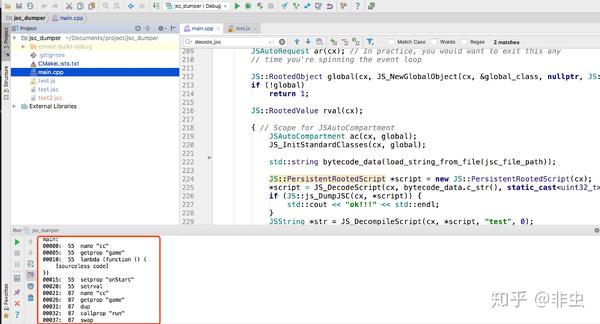
下面是运行跑起来成功的效果:
仍需努力
到这里,jsc反编译工具编写的探索之路就暂时结束了。最后,我们完成了jsc文件的反汇编功能,但没有实现反编译功能,要基于jsc的机器码实现反编译功能是一个高级的话题,希望以后有机会与大家一起探讨这其中的原理与开发技术。
更多精彩内容,欢迎关注微信公众号【feicong_sec】

如有侵权请联系:admin#unsafe.sh