
在 Java 中,Runtime.getRuntime().exec方法是经典执行命令的一个方法. 本篇文章将分析该方法的调用链, 在分析底层源码途中写出多种命令执行的方法.由于 Java 是跨平台语 2024-9-17 14:13:38 Author: www.freebuf.com(查看原文) 阅读量:11 收藏
在 Java 中,Runtime.getRuntime().exec方法是经典执行命令的一个方法. 本篇文章将分析该方法的调用链, 在分析底层源码途中写出多种命令执行的方法.
由于 Java 是跨平台语言, 所以在这里 JDK 源码中两者的调用方式也是不一样, 笔者在这里准备好Windows && Linux系统环境进行探究这两种系统的Runtime到底有何区别.
Runtime ProcessBuilder API
为了研究 Runtime, ProcessBuilder 之间的关系, 我们需要将它们的常用方法, 构造器, 先列出来, 以便脑海中有一个概念.
# Runtime.exec 中多个exec的方法重写
public Process exec(String command) throws IOException { // 调用 exec(String command, String[] envp, File dir) 做处理
    return exec(command, null, null);
}

public Process exec(String command, String[] envp) throws IOException {
    return exec(command, envp, null);
}

public Process exec(String command, String[] envp, File dir)
    throws IOException {
    if (command.length() == 0)
        throw new IllegalArgumentException("Empty command");

    StringTokenizer st = new StringTokenizer(command);
    String[] cmdarray = new String[st.countTokens()];
    for (int i = 0; st.hasMoreTokens(); i++)
        cmdarray[i] = st.nextToken();
    return exec(cmdarray, envp, dir);
}

public Process exec(String cmdarray[]) throws IOException { // 最终调用到  exec(String[] cmdarray, String[] envp, File dir)
    return exec(cmdarray, null, null);
}

public Process exec(String[] cmdarray, String[] envp) throws IOException {
    return exec(cmdarray, envp, null);
}

public Process exec(String[] cmdarray, String[] envp, File dir) // 最终调用到该方法
    throws IOException {
    return new ProcessBuilder(cmdarray)
        .environment(envp)
        .directory(dir)
        .start();
}
可以看到, 我们的Runtime.exec重写了很多方法, 我们把重点关注到exec(String command) && exec(String[] cmdarray, String[] envp, File dir) 方法上.
而ProcessBuilder的构造器只允许传入String类型的数组, 或现成的ArrayList进来, 如下:
public ProcessBuilder(List<String> command) {
    if (command == null)
        throw new NullPointerException();
    this.command = command;
}

public ProcessBuilder(String... command) {
    this.command = new ArrayList<>(command.length);
    for (String arg : command)
        this.command.add(arg);
}
那么下面我们进行分析它们之间到底干了什么.
Runtime 命令执行
因为 Runtime 实际上还是调用的是ProcessBuilder, 所以笔者先在这里准备一个命令执行的DEMO, 随后边分析边开拓新的命令执行姿势.
public class MyCmdTester {
    @Test
    public void t1() {
        try {
            InputStream is = Runtime.getRuntime().exec("whoami").getInputStream(); // 得到 InputStream
            ByteArrayOutputStream resData = new ByteArrayOutputStream(); // 准备放置命令执行的结果

            byte[] buffer = new byte[1024]; // 准备 1024 字节缓冲区
            int len;
            while ((len = is.read(buffer)) > 0) { // 读取 1024 字节给 buffer
                resData.write(buffer, 0, len); // 将 buffer 中的值给 ByteArrayOutputStream
            }

            System.out.println("命令执行结果: " + new String(resData.toByteArray())); // heihubook\administrator
        } catch (IOException e) {
            throw new RuntimeException(e);
        }
    }
}
调用链分析 [Windows]
Runtime.getRuntime().exec() 做了什么
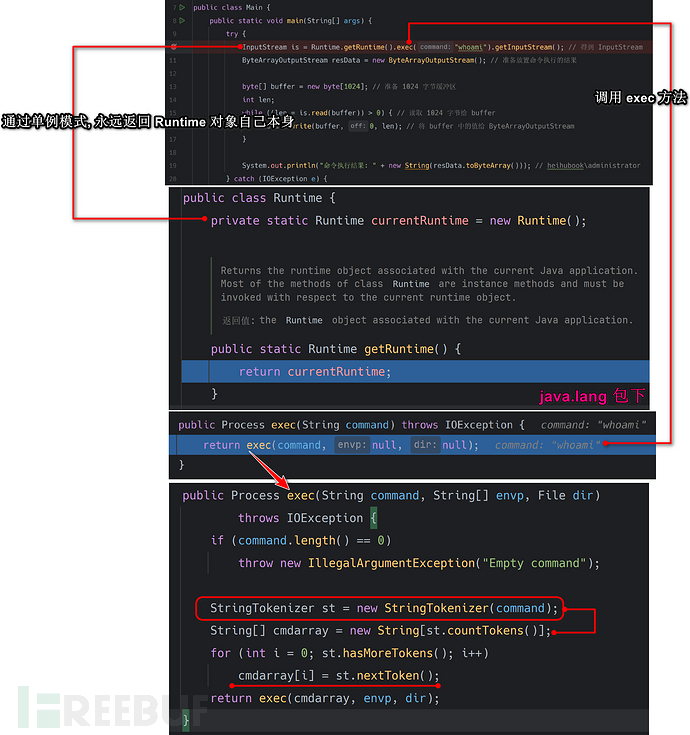
根据上述代码可以看到,public Process exec(String command)方法最终调用了public Process exec(String command, String[] envp, File dir), 这里参与进来了StringTokenizer类, 该类是用来干嘛的?我们并不知道, 所以这里可以查一下官方 API 文档说明:
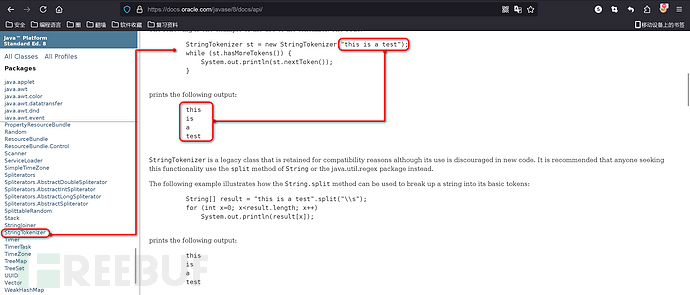
很简洁明了, 将字符串通过空格分隔, 依次得到值, 所以这里我们使用whoami命令做测试看不到效果, 这里使用ping www.baidu.com进行做测试:
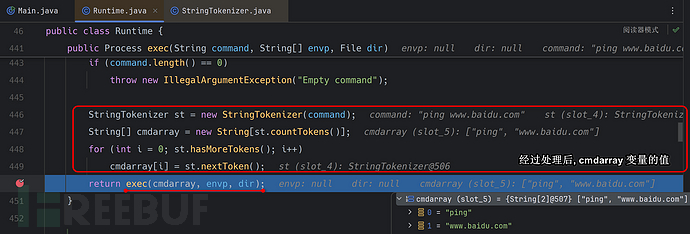
可以看到, 成功分割成了一个字符数组, 这里StringTokenizer在Linux中会导致一个命令执行失败的问题, 后面我们会再次提及.
紧接着代码调用了exec方法, 我们跟进看一下.

这里我们可以看到,Runtime.getRuntime().exec()方法只不过是ProcessBuilder类的包装调用. 那么我们可以本地调用ProcessBuilder类进行执行命令的一个操作.
new ProcessBuilder 命令执行 - 直接实例化
那么我们可以直接通过实例化 ProcessBuilder类进行调用系统命令, 这里我们做一下测试:
public class T1 {
    public static void main(String[] args) {
        try {
            Process process = new ProcessBuilder(new String[]{"whoami"}).start(); // 直接调用 start 方法
            InputStream inputStream = process.getInputStream();
            byte[] buffer = new byte[1024];
            int len;
            while ((len = inputStream.read(buffer)) > 0) {
                System.out.println(new String(buffer, 0, len)); // heihubook\administrator
            }
        } catch (IOException e) {
            throw new RuntimeException(e);
        }
    }
}
可以看到的是, 我们可以直接通过ProcessBuilder进行命令执行操作.
ProcessBuilder 的调用过程分析
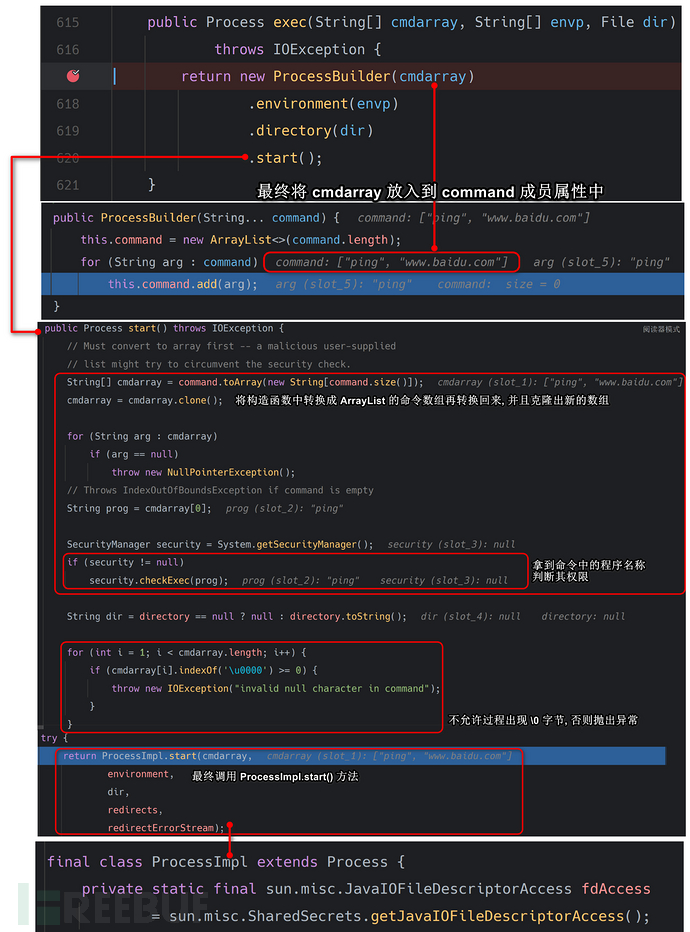
由于ProcessImpl的类属性修饰符不为public, 所以我们无法在任意包下进行调用该类方法的一个操作, 但是这里我们可以通过反射|Unsafe进行调用该类.
ProcessImpl.start 命令执行 - 反射
根据模仿上述逻辑, 我们可以编写出如下命令执行代码:
public class T2 {
    public static void main(String[] args) {
        try {
            Class<?> clazz = Class.forName("java.lang.ProcessImpl");
            /**
            static Process start(String[] cmdarray,
                     java.util.Map<String,String> environment,
                     String dir,
                     ProcessBuilder.Redirect[] redirects,
                     boolean redirectErrorStream)
            */
            Method start = clazz.getDeclaredMethod("start",
                    String[].class, Map.class, String.class, ProcessBuilder.Redirect[].class, boolean.class);
            start.setAccessible(true);
            Process process = (Process) start.invoke(null,
                    new String[]{"whoami"}, null, null, null, false);
            InputStream inputStream = process.getInputStream();
            byte[] buffer = new byte[1024];
            int len;
            while ((len = inputStream.read(buffer)) > 0) {
                System.out.println(new String(buffer, 0, len)); // heihubook\administrator
            }
        } catch (Exception e) {
            throw new RuntimeException(e);
        }
    }
}
最终通过反射, 成功调用了ProcessImpl::start方法.
ProcessImpl::start 调用过程分析

new ProcessImpl 命令执行 - 反射
我们可以看到,ProcessImpl::start最终也只是调用了new ProcessImpl操作, 由于ProcessImpl访问修饰符不为public, 所以这里我通过反射进行执行命令. 模仿底层代码如下:
public class T4 {
    public static void main(String[] args) {
        try {
            Class<?> clazz = Class.forName("java.lang.ProcessImpl");
            /*
                private ProcessImpl(String cmd[],
                        final String envblock,
                        final String path,
                        final long[] stdHandles,
                        final boolean redirectErrorStream)
            */
            Constructor<?> constructor = clazz.getDeclaredConstructor(String[].class, String.class, String.class, long[].class, boolean.class);
            constructor.setAccessible(true);
            Process process = (Process) constructor.newInstance(new String[]{"whoami"}, null, null, new long[]{-1, -1, -1}, false);
            InputStream inputStream = process.getInputStream();
            byte[] buffer = new byte[1024];
            int len;
            while ((len = inputStream.read(buffer)) > 0) {
                System.out.println(new String(buffer, 0, len)); // heihubook\administrator
            }
        } catch (Exception e) {
            throw new RuntimeException(e);
        }
    }
}
new ProcessImpl 执行流程
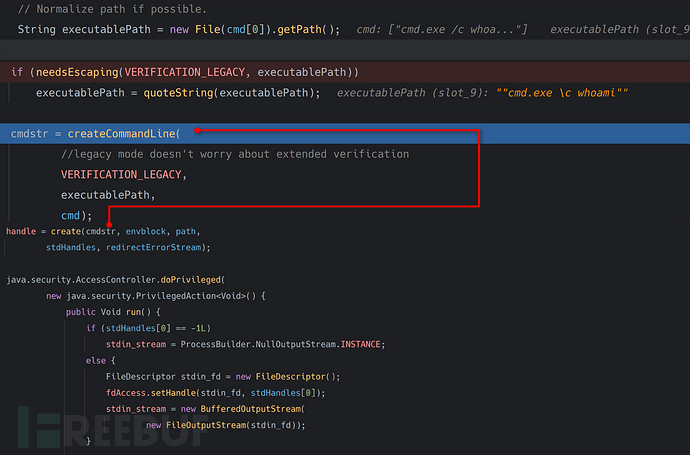
String executablePath = new File(cmd[0]).getPath();将传入过来命令行, 使用new File().getPath()的原因也是将C:/Windows/System32/cmd.exe路径转化为Windows可识别路径C:\\Windows\\System32\\cmd.exeneedsEscaping函数分析
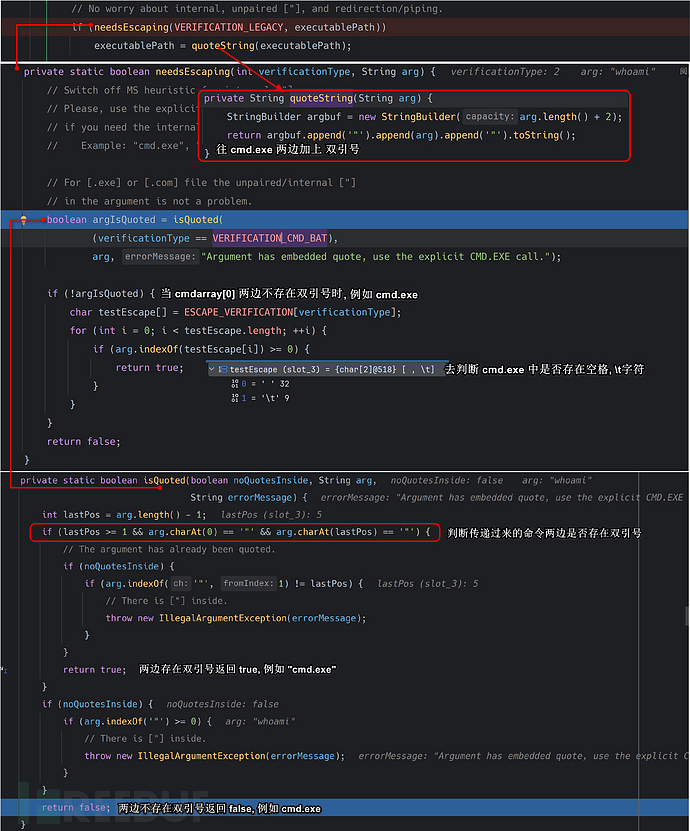
简单就两句话: 要么你传递过来的两边带有双引号, 要么你传递过来的中间不能带空格, \t字符. 否则我就给你两边加上双引号.
其实这么做的方式也能够理解, 因为如果要执行C:\\Program Files\\MyApp的话, 这里会执行C:\\Program.exe, 语义就发生了改变, 这里加上双引号也是为了能让C:\\Program Files\\MyApp.exe文件正确执行.
createCommandLine函数分析
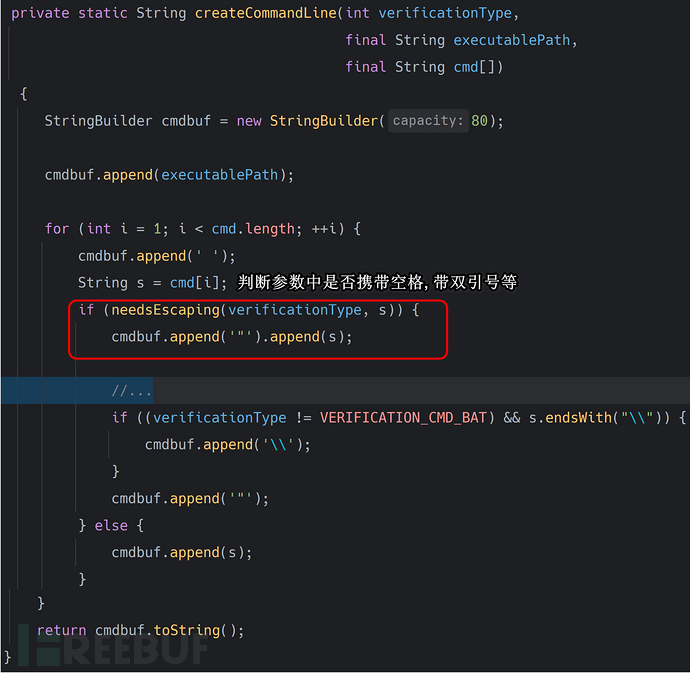
最后进行一系列参数拼接操作. 把cmd[]这个数组又重新拼接成了执行命令的字符串. 而这些操作完成后将最终的字符串丢进create方法进行执行命令, 如下:
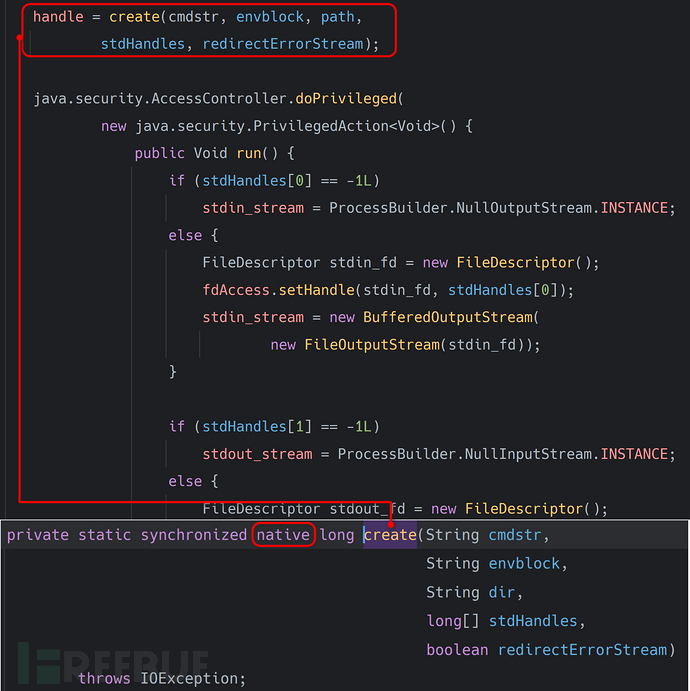
最终会调用到native方法中, 从openjdk中翻出来它的函数定义如下:
// https://github.com/bpupadhyaya/openjdk-8/blob/master/jdk/src/windows/native/java/lang/ProcessImpl_md.c
JNIEXPORT jlong JNICALL
Java_java_lang_ProcessImpl_create(JNIEnv *env, jclass ignored,
                                  jstring cmd,
                                  jstring envBlock,
                                  jstring dir,
                                  jlongArray stdHandles,
                                  jboolean redirectErrorStream)
{
    jlong ret = 0;
    if (cmd != NULL && stdHandles != NULL) {
        const jchar *pcmd = (*env)->GetStringChars(env, cmd, NULL);
        if (pcmd != NULL) {
            const jchar *penvBlock = (envBlock != NULL)
                ? (*env)->GetStringChars(env, envBlock, NULL)
                : NULL;
            const jchar *pdir = (dir != NULL)
                ? (*env)->GetStringChars(env, dir, NULL)
                : NULL;
            jlong *handles = (*env)->GetLongArrayElements(env, stdHandles, NULL);
            if (handles != NULL) {
                ret = processCreate( // 使用 processCreate 进行命令执行调用
                    env,
                    pcmd,
                    penvBlock,
                    pdir,
                    handles,
                    redirectErrorStream);
                (*env)->ReleaseLongArrayElements(env, stdHandles, handles, 0);
            }
            if (pdir != NULL)
                (*env)->ReleaseStringChars(env, dir, pdir);
            if (penvBlock != NULL)
                (*env)->ReleaseStringChars(env, envBlock, penvBlock);
            (*env)->ReleaseStringChars(env, cmd, pcmd);
        }
    }
    return ret;
}

static jlong processCreate(
    JNIEnv *env,
    const jchar *pcmd,
    const jchar *penvBlock,
    const jchar *pdir,
    jlong *handles,
    jboolean redirectErrorStream)
{
    jlong ret = 0L;
    STARTUPINFOW si = {sizeof(si)};

    /* Handles for which the inheritance flag must be restored. */
    HANDLE stdIOE[HANDLE_STORAGE_SIZE] = {
        /* Current process standard IOE handles: JDK-7147084 */
        INVALID_HANDLE_VALUE, INVALID_HANDLE_VALUE, INVALID_HANDLE_VALUE,
        /* Child process IOE handles: JDK-6921885 */
        (HANDLE)handles[0], (HANDLE)handles[1], (HANDLE)handles[2]};
    BOOL inherit[HANDLE_STORAGE_SIZE] = {
        FALSE, FALSE, FALSE,
        FALSE, FALSE, FALSE};

    {
        /* Extraction of current process standard IOE handles */
        DWORD idsIOE[3] = {STD_INPUT_HANDLE, STD_OUTPUT_HANDLE, STD_ERROR_HANDLE};
        int i;
        for (i = 0; i < 3; ++i)
            /* Should not be closed by CloseHandle! */
            stdIOE[i] = GetStdHandle(idsIOE[i]);
    }

    prepareIOEHandleState(stdIOE, inherit);
    {
        /* Input */
        STDHOLDER holderIn = {{INVALID_HANDLE_VALUE, INVALID_HANDLE_VALUE}, OFFSET_READ};
        if (initHolder(env, &handles[0], &holderIn, &si.hStdInput)) {

            /* Output */
            STDHOLDER holderOut = {{INVALID_HANDLE_VALUE, INVALID_HANDLE_VALUE}, OFFSET_WRITE};
            if (initHolder(env, &handles[1], &holderOut, &si.hStdOutput)) {

                /* Error */
                STDHOLDER holderErr = {{INVALID_HANDLE_VALUE, INVALID_HANDLE_VALUE}, OFFSET_WRITE};
                BOOL success;
                if (redirectErrorStream) {
                    si.hStdError = si.hStdOutput;
                    /* Here we set the error stream to [ProcessBuilder.NullInputStream.INSTANCE]
                       value. That is in accordance with Java Doc for the redirection case.
                       The Java file for the [ handles[2] ] will be closed in ANY case. It is not
                       a handle leak. */
                    handles[2] = JAVA_INVALID_HANDLE_VALUE;
                    success = TRUE;
                } else {
                    success = initHolder(env, &handles[2], &holderErr, &si.hStdError);
                }

                if (success) {
                    PROCESS_INFORMATION pi;
                    DWORD processFlag = CREATE_UNICODE_ENVIRONMENT;

                    /* Suppress popping-up of a console window for non-console applications */
                    if (GetConsoleWindow() == NULL)
                        processFlag |= CREATE_NO_WINDOW;

                    si.dwFlags = STARTF_USESTDHANDLES;
                    if (!CreateProcessW(
                        NULL,             /* executable name */
                        (LPWSTR)pcmd,     /* command line */
                        NULL,             /* process security attribute */
                        NULL,             /* thread security attribute */
                        TRUE,             /* inherits system handles */
                        processFlag,      /* selected based on exe type */
                        (LPVOID)penvBlock,/* environment block */
                        (LPCWSTR)pdir,    /* change to the new current directory */
                        &si,              /* (in)  startup information */
                        &pi))             /* (out) process information */
                    {
                        win32Error(env, L"CreateProcess");
                    } else {
                        closeSafely(pi.hThread);
                        ret = (jlong)pi.hProcess;
                    }
                }
                releaseHolder(ret == 0, &holderErr);
                releaseHolder(ret == 0, &holderOut);
            }
            releaseHolder(ret == 0, &holderIn);
        }
    }
    restoreIOEHandleState(stdIOE, inherit);

    return ret;
}
底层调用的是CreateProcessW这个Windows API:
#include <windows.h>
#include <stdio.h>

int main() {
    STARTUPINFOA si;
    PROCESS_INFORMATION pi;
    ZeroMemory(&si, sizeof(si));
    si.cb = sizeof(si);
    si.dwFlags = STARTF_USESHOWWINDOW;
    si.wShowWindow = SW_SHOW; // Let the new window be visible
    LPSTR cmdLine = "C:\\Windows\\System32\\cmd.exe /c notepad & calc";
    if (!CreateProcessA(NULL, cmdLine, NULL, NULL, FALSE, CREATE_NEW_CONSOLE , NULL, NULL, &si, &pi)) {
        DWORD errorCode = GetLastError();
        printf("CreateProcessA failed (%d).\n", errorCode);
        return 1;
    }
    WaitForSingleObject(pi.hProcess, INFINITE);
    CloseHandle(pi.hProcess);
    CloseHandle(pi.hThread);
    return 0;
}
这个API是无法执行whoami & calc命令的, 如果想要执行该命令, 必须调用C:\\Windows\\System32\\cmd.exe /c whoami & calc进行执行.
总结: new ProcessImpl() 最终调用了 ProcessImpl.create 方法
ProcessImpl.create 是利用 WindowsAPI - CreateProcessW 进行命令执行的 CreateProcessW 只能启动一个SHELL, 如果我们想要执行批处理命令, 必须通过 cmd.exe /c 进行调用.
ProcessImpl.create 命令执行 - 反射
public class T5 {
    public static void main(String[] args) {
        try {
            Class<?> clazz = Class.forName("java.lang.ProcessImpl");
            /*
            private static synchronized native long create(String cmdstr,
                                  String envblock,
                                  String dir,
                                  long[] stdHandles,
                                  boolean redirectErrorStream)
            */
            Method createMethod = clazz.getDeclaredMethod("create", String.class, String.class, String.class, long[].class, boolean.class);
            createMethod.setAccessible(true);
            long pid = (long) createMethod.invoke(null, "cmd /c calc",
                    null, null, new long[]{-1, -1, -1}, false); // 返回 PID
        } catch (Exception e) {
            throw new RuntimeException(e);
        }
    }
}
运行后会弹出计算器.
调用链分析 [Linux]
为什么本篇文章还将 Linux 写出来, 其核心原因则是, 有如下代码, 在 Linux 中与在 Windows 中调用的结果是不一样的.
Windows && Linux 写文件引出问题
Windows 中:
public static void main(String[] args) {
    try {
        Runtime.getRuntime().exec("cmd.exe /c \"echo 123 > D:/a.txt\"");
    } catch (IOException e) {
        throw new RuntimeException(e);
    }
}
运行成功后, D盘会多出a.txt文件, 内容为123, 命令可以正常运行.
Linux 中:
public static void main(String[] args) throws IOException {
    Process process = Runtime.getRuntime().exec("/bin/sh -c \"echo 123 > /tmp/1.txt\"");
    InputStream errorStream = process.getErrorStream();
    byte[] buffer = new byte[1024];
    int len;
    while((len = errorStream.read(buffer)) > 0){
        System.out.println(new String(buffer, 0, len)); // 123: 1: Syntax error: Unterminated quoted string
    }
}
不但运行失败, 并且从错误流中也可以拿到错误信息, 下面我们从源码中进行分析这里面到底做了什么.
Runtime.getRuntime().exec() 做了什么
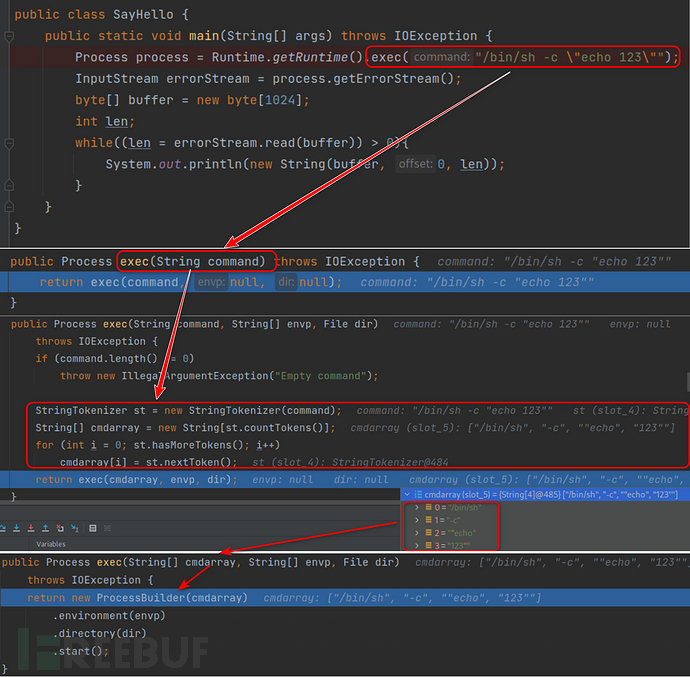
通过我们刚刚Windows分析时的调用流程, 理论上来说经过StringTokenizer处理是无所谓的, 因为在Windows中经过处理完毕之后, 又会转化回来字符串, 但在这里Linux中会存在一些问题, 我们先在这里提点一下, 后面我们再看一下出现了什么问题.
new ProcessBuilder 命令执行 - 直接实例化
因为这里的处理过程, 与 Windows 基本一致, 所以我们仍然可以通过new ProcessBuilder进行命令执行:
public static void main(String[] args) {
    try {
        Process process = new ProcessBuilder(new String[]{"whoami"}).start(); // 直接调用 start 方法
        InputStream inputStream = process.getInputStream();
        byte[] buffer = new byte[1024];
        int len;
        while ((len = inputStream.read(buffer)) > 0) {
            System.out.println(new String(buffer, 0, len)); // root
        }
    } catch (IOException e) {
        throw new RuntimeException(e);
    }
}
ProcessBuilder 的调用过程分析
我们继续跟进ProcessBuilder的构造方法, 看一下做了什么处理.
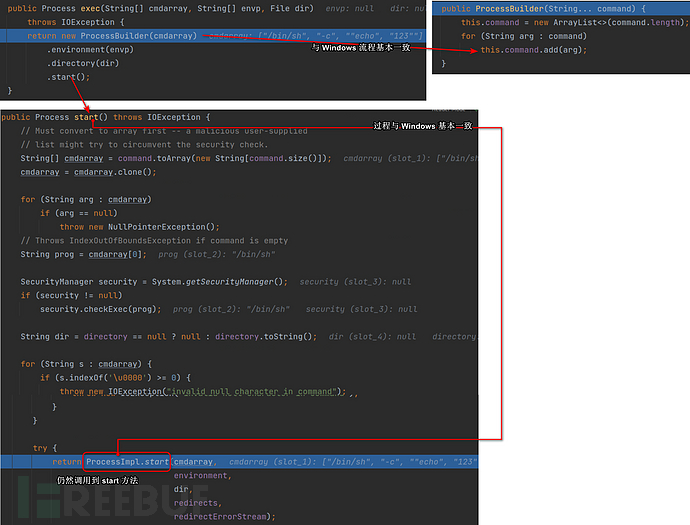
这里可以看到, 与 Windows 没什么区别, 所以当然这里也可以进行命令执行.
ProcessImpl.start 命令执行 - 反射
仍然使用之前 Windows 的方式, 仍然可以执行命令:
try {
        Class<?> clazz = Class.forName("java.lang.ProcessImpl");
        /**
        static Process start(String[] cmdarray,
                 java.util.Map<String,String> environment,
                 String dir,
                 ProcessBuilder.Redirect[] redirects,
                 boolean redirectErrorStream)
        */
        Method start = clazz.getDeclaredMethod("start",
                String[].class, Map.class, String.class, ProcessBuilder.Redirect[].class, boolean.class);
        start.setAccessible(true);
        Process process = (Process) start.invoke(null,
                new String[]{"whoami"}, null, null, null, false);
        InputStream inputStream = process.getInputStream();
        byte[] buffer = new byte[1024];
        int len;
        while ((len = inputStream.read(buffer)) > 0) {
            System.out.println(new String(buffer, 0, len)); // root
        }
    } catch (Exception e) {
        throw new RuntimeException(e);
    }
ProcessImpl::start 调用过程分析
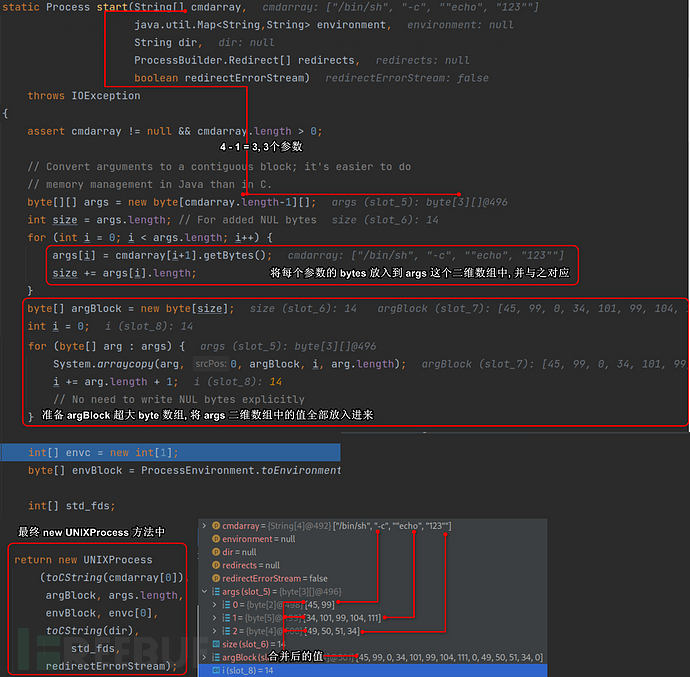
可以明显的看到, 因为StringTokenizer的处理从字符串变为了数组. 而Linux-ProcessImpl::start方法中的处理过程与Windows-ProcessImpl::start方法中的处理过程不相同,Windows-ProcessImpl::start方法中原封不动的将数组传递给new ProcessImpl的构造函数进行处理, 而new ProcessImpl最终又将传递过来的数组重新转换回来字符串, 所以Windows几乎不会受StringTokenizer的影响, 但Linux会因为StringTokenizer的空格切割将-c,"echo,123"都视为了命令行的参数, 并且将每个参数放入到args这个二维数组中, 那么这里就会产生歧义, 导致命令执行失败!
当然如果想要正确执行命令,-c,echo 123视为参数才是正确的. 讨论解决方法之前, 我们看一下toCString的方法到底做了什么事情:
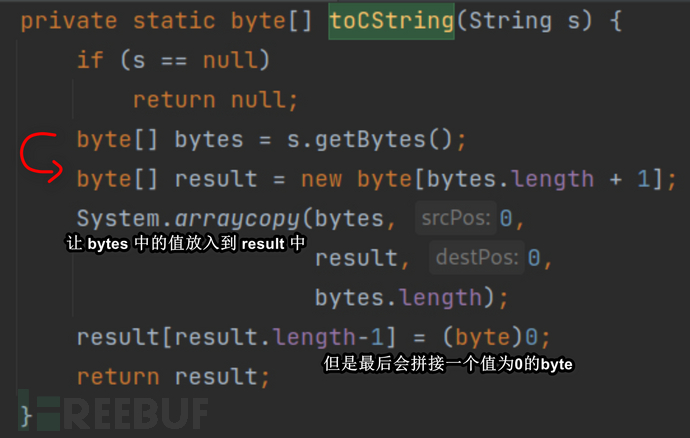
这段代码相对来说比较容易理解, 我们后续在调用new UNIXProcess进行命令执行时, 通过模仿它的逻辑, 进行编写代码.
Linux 受 StringTokenizer 影响的解决方法
而我们知道的是, 在Runtime.getRuntime().exec方法中重写了很多exec方法, 经过StringTokenizer处理的模型也就是接收String类型的方法:
public Process exec(String command) throws IOException {
    return exec(command, null, null);
}

// 随后调用到如下方法

public Process exec(String command, String[] envp, File dir)
    throws IOException {
    if (command.length() == 0)
        throw new IllegalArgumentException("Empty command");

    StringTokenizer st = new StringTokenizer(command);
    String[] cmdarray = new String[st.countTokens()];
    for (int i = 0; st.hasMoreTokens(); i++)
        cmdarray[i] = st.nextToken();
    return exec(cmdarray, envp, dir);
}

// 显然经过了 StringTokenizer, 所以产生了歧义.
而未经过StringTokenizer类处理的方法模型为如下:
public Process exec(String cmdarray[]) throws IOException {
    return exec(cmdarray, null, null);
}

// 最终调用如下方法

public Process exec(String[] cmdarray, String[] envp, File dir) // 最终调用到该方法
    throws IOException {
    return new ProcessBuilder(cmdarray)
        .environment(envp)
        .directory(dir)
        .start();
}
所以我们将POC改为如下情况即可避免歧义:
public static void main(String[] args) throws IOException {
    Process process = Runtime.getRuntime().exec(new String[]{"/bin/sh", "-c", "echo 123 > /tmp/1.txt"});
    InputStream errorStream = process.getErrorStream();
    byte[] buffer = new byte[1024];
    int len;
    while((len = errorStream.read(buffer)) > 0){
        System.out.println(new String(buffer, 0, len));
    }
}
而因为StringTokenizer会对空格,/t进行分割, 分割后cmdarray[0]当做主要运行程序,cmdarray[n]当作参数处理, 所以当我们的实际参数不存在空格, 是可以进行避免StringTokenizer分割的.
public class T3 {
    public static void main(String[] args) throws IOException {
        Process process = Runtime.getRuntime().exec("bash -c echo${IFS}heihu577");
        InputStream inputStream = process.getInputStream();
        byte[] buffer = new byte[1024];
        int len;
        while((len = inputStream.read(buffer)) > 0){
            System.out.println(new String(buffer, 0, len)); // heihu577
        }
    }
}
当然了,bash -c echo${IFS}666这个字符串在实际的Linux环境中会运行不起来, 原因则是echo${IFS}666两边没有加双引号包裹.
而Java中运行成功的原因则是因为StringTokenizer的分割已经将其视为了参数, 所以无需加引号.
new UNIXProcess 命令执行 - 反射
与Windows-ProcessImpl::start方法不同的也是最后Linux将其调用入new UNIXProcess的构造函数中, 所以在这里我们就不能通过new ProcessImpl进行反射调用了, 而是通过new UNIXProcess, 在这里模仿底层逻辑即可:
public class T4 {
    public static void main(String[] args) {
        try {
            Class<?> clazz = Class.forName("java.lang.UNIXProcess");
            /**
             *     UNIXProcess(final byte[] prog,
             *                 final byte[] argBlock, final int argc,
             *                 final byte[] envBlock, final int envc,
             *                 final byte[] dir,
             *                 final int[] fds,
             *                 final boolean redirectErrorStream)
             */
            Constructor<?> declaredConstructor = clazz.getDeclaredConstructor(byte[].class, byte[].class,
                    int.class, byte[].class, int.class, byte[].class, int[].class, boolean.class);
            declaredConstructor.setAccessible(true);
            Object result = declaredConstructor.newInstance("/bin/sh ".replace(" ", "\0").getBytes(),
                    "-c whoami ".replace(" ", "\0").getBytes(), 2,
                    null, 0, null, new int[]{-1, -1, -1}, false);
            // 参数1: /bin/sh+空格, 模仿 toCString 的运行逻辑
            // 参数2: -c+空格+whoami+空格, 模仿 toCString 的运行逻辑
            // 参数3: -c 和 whoami 是两个参数, 所以传递 2
            Method inputStreamMethod = clazz.getDeclaredMethod("getInputStream");
            inputStreamMethod.setAccessible(true);
            InputStream inputStream = (InputStream) inputStreamMethod.invoke(result);
            byte[] buffer = new byte[1024];
            int len;
            while((len = inputStream.read(buffer)) > 0){
                System.out.println(new String(buffer, 0, len)); // root
            }
        } catch (Exception e) {
            e.printStackTrace();
        }
    }
}
new UNIXProcess 执行流程
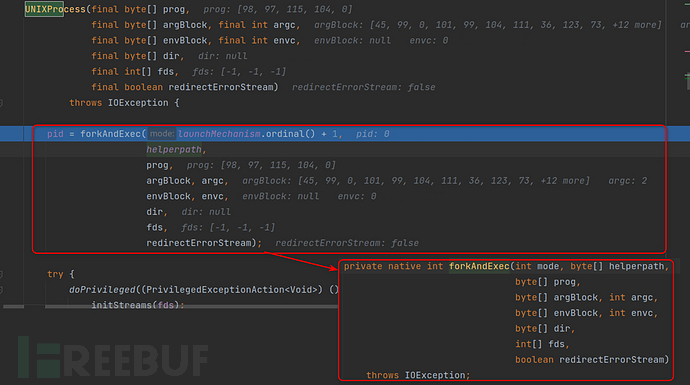
这个构造函数比较直接, 直接调用了forkAndExec方法, 该方法是native方法, 它的源码如下:
// https://github.com/bpupadhyaya/openjdk-8/blob/master/jdk/src/solaris/native/java/lang/UNIXProcess_md.c
JNIEXPORT jint JNICALL
Java_java_lang_UNIXProcess_forkAndExec(JNIEnv *env,
                                       jobject process,
                                       jint mode,
                                       jbyteArray helperpath,
                                       jbyteArray prog,
                                       jbyteArray argBlock, jint argc,
                                       jbyteArray envBlock, jint envc,
                                       jbyteArray dir,
                                       jintArray std_fds,
                                       jboolean redirectErrorStream)
{
    int errnum;
    int resultPid = -1;
    int in[2], out[2], err[2], fail[2], childenv[2];
    jint *fds = NULL;
    const char *phelperpath = NULL;
    const char *pprog = NULL;
    const char *pargBlock = NULL;
    const char *penvBlock = NULL;
    ChildStuff *c;

    in[0] = in[1] = out[0] = out[1] = err[0] = err[1] = fail[0] = fail[1] = -1;
    childenv[0] = childenv[1] = -1;

    if ((c = NEW(ChildStuff, 1)) == NULL) return -1;
    c->argv = NULL;
    c->envv = NULL;
    c->pdir = NULL;
    c->clone_stack = NULL;

    /* Convert prog + argBlock into a char ** argv.
     * Add one word room for expansion of argv for use by
     * execve_as_traditional_shell_script.
     * This word is also used when using spawn mode
     */
    assert(prog != NULL && argBlock != NULL);
    if ((phelperpath = getBytes(env, helperpath))   == NULL) goto Catch;
    if ((pprog     = getBytes(env, prog))       == NULL) goto Catch;
    if ((pargBlock = getBytes(env, argBlock))   == NULL) goto Catch;
    if ((c->argv = NEW(const char *, argc + 3)) == NULL) goto Catch;
    c->argv[0] = pprog;
    c->argc = argc + 2;
    initVectorFromBlock(c->argv+1, pargBlock, argc);

    if (envBlock != NULL) {
        /* Convert envBlock into a char ** envv */
        if ((penvBlock = getBytes(env, envBlock))   == NULL) goto Catch;
        if ((c->envv = NEW(const char *, envc + 1)) == NULL) goto Catch;
        initVectorFromBlock(c->envv, penvBlock, envc);
    }

    if (dir != NULL) {
        if ((c->pdir = getBytes(env, dir)) == NULL) goto Catch;
    }

    assert(std_fds != NULL);
    fds = (*env)->GetIntArrayElements(env, std_fds, NULL);
    if (fds == NULL) goto Catch;

    if ((fds[0] == -1 && pipe(in)  < 0) ||
        (fds[1] == -1 && pipe(out) < 0) ||
        (fds[2] == -1 && pipe(err) < 0) ||
        (pipe(childenv) < 0) ||
        (pipe(fail) < 0)) {
        throwIOException(env, errno, "Bad file descriptor");
        goto Catch;
    }
    c->fds[0] = fds[0];
    c->fds[1] = fds[1];
    c->fds[2] = fds[2];

    copyPipe(in,   c->in);
    copyPipe(out,  c->out);
    copyPipe(err,  c->err);
    copyPipe(fail, c->fail);
    copyPipe(childenv, c->childenv);

    c->redirectErrorStream = redirectErrorStream;
    c->mode = mode;

    resultPid = startChild(env, process, c, phelperpath);
    assert(resultPid != 0);

    if (resultPid < 0) {
        switch (c->mode) {
          case MODE_VFORK:
            throwIOException(env, errno, "vfork failed");
            break;
          case MODE_FORK:
            throwIOException(env, errno, "fork failed");
            break;
          case MODE_POSIX_SPAWN:
            throwIOException(env, errno, "spawn failed");
            break;
        }
        goto Catch;
    }
    close(fail[1]); fail[1] = -1; /* See: WhyCantJohnnyExec  (childproc.c)  */

    switch (readFully(fail[0], &errnum, sizeof(errnum))) {
    case 0: break; /* Exec succeeded */
    case sizeof(errnum):
        waitpid(resultPid, NULL, 0);
        throwIOException(env, errnum, "Exec failed");
        goto Catch;
    default:
        throwIOException(env, errno, "Read failed");
        goto Catch;
    }

    fds[0] = (in [1] != -1) ? in [1] : -1;
    fds[1] = (out[0] != -1) ? out[0] : -1;
    fds[2] = (err[0] != -1) ? err[0] : -1;

 Finally:
    free(c->clone_stack);

    /* Always clean up the child's side of the pipes */
    closeSafely(in [0]);
    closeSafely(out[1]);
    closeSafely(err[1]);

    /* Always clean up fail and childEnv descriptors */
    closeSafely(fail[0]);
    closeSafely(fail[1]);
    closeSafely(childenv[0]);
    closeSafely(childenv[1]);

    releaseBytes(env, prog,     pprog);
    releaseBytes(env, argBlock, pargBlock);
    releaseBytes(env, envBlock, penvBlock);
    releaseBytes(env, dir,      c->pdir);

    free(c->argv);
    free(c->envv);
    free(c);

    if (fds != NULL)
        (*env)->ReleaseIntArrayElements(env, std_fds, fds, 0);

    return resultPid;

 Catch:
    /* Clean up the parent's side of the pipes in case of failure only */
    closeSafely(in [1]); in[1] = -1;
    closeSafely(out[0]); out[0] = -1;
    closeSafely(err[0]); err[0] = -1;
    goto Finally;
}
在Linux中,Runtime.getRuntime().exec中所有的调用过程, 都调用到底层的这个UNIXProcess.forkAndExec成员方法中去. 我们也可以构造出UNIXProcess.forkAndExec的命令执行代码段, 但毫无意义, 因为是成员方法, 自然也需要UNIXProcess这个类的实例.
在Windows中,Runtime.getRuntime().exec中所有的调用过程, 都调用到底层的ProcessImpl.create静态方法中去. 对于我们构造命令执行代码段还是有意义的, 因为我们只需要静态调用即可, 不依赖任何对象.
这两种方式因为底层代码不同, 所以源码中的过程也不同, Windows 接收了一个字符串类型的命令串, Linux 接收了一些命令数组, 就导致在 Linux 环境下命令执行时如果出现空格, 会出现一系列非预期的问题, 本篇文章将这些情况以及原因都一一解释了.
Ending...
探究Runtime.getRuntime().exec底层机制还是很有意思的, 这里网上有师傅已经写好了Runtime工具, 以避免在实战中出现Runtime无法执行的问题, 这里就分享一下吧, 工具很不错:
<!DOCTYPE html>
<html lang="en">
 <head>
  <title>java.lang.Runtime.exec() Payload Workarounds - @Jackson_T</title>
  <meta charset="utf-8" />
  <meta name="viewport" content="width=device-width, initial-scale=1.0" />
  <!-- <link rel="stylesheet" href="./css/main.css" type="text/css" /> -->
  <style>
body {
	margin: 0;
	padding: 10px 0;
	text-align: center;
	font-family: 'Ubuntu Condensed', sans-serif;
	color: #585858;
  background-color: #fff;
	font-size: 13px;
	line-height: 1.4
}
::selection {
	background: #fff2a8;
}
pre, code {
	font-family: 'Ubuntu Mono', 'Consolas', Monospace;
  font-size: 13px;
  background-color: #E5F5E5;
  color: #585858;
  padding-left: 0.25em;
  padding-right: 0.25em;
	/*display: block;*/
}
#wrap {
	margin-left: 1em;
	margin-right: 1em;
	text-align: left;
	font-size: 13px;
	line-height: 1.4
}
	#wrap {
		width: 820px;
	}
	#container {
		float: right;
		width: 610px;
	}
.entry {
	font-size: 14px;
	line-height: 20px;
	hyphens: auto;
	font-family: 'Roboto', sans-serif, 'Inconsolata', Monospace;
}
</style>
 </head>
 <body>
  <div id="wrap">
   <div id="container">
    <div class="entry">
     <article>
      <p>偶尔有时命令执行有效负载<code>Runtime.getRuntime().exec()</code>失败. 使用 web shells, 反序列化漏洞或其他向量时可能会发生这种情况.</p>
      <p>有时这是因为重定向和管道字符的使用方式在正在启动的进程的上下文中没有意义. 例如 <code>ls > dir_listing</code> 在shell中执行应该将当前目录的列表输出到名为的文件中 <code>dir_listing</code>. 但是在 <code>exec()</code> 函数的上下文中,该命令将被解释为获取 <code>></code> 和 <code>dir_listing</code> 目录.</p>
      <p>其他时候,其中包含空格的参数会被StringTokenizer类破坏.该类将空格分割为命令字符串. 那样的东西 <code>ls "My Directory"</code> 会被解释为 <code>ls '"My' 'Directory"'</code>.</p>
      <p>在Base64编码的帮助下, 下面的转换器可以帮助减少这些问题. 它可以通过调用Bash或PowerShell再次使管道和重定向更好,并且还确保参数中没有空格.</p>
      <p>Input type: <input type="radio" id="bash" name="option" value="bash" onclick="processInput();" checked="" /><label for="bash">Bash</label> <input type="radio" id="powershell" name="option" value="powershell" onclick="processInput();" /><label for="powershell">PowerShell</label> <input type="radio" id="python" name="option" value="python" onclick="processInput();" /><label for="python">Python</label> <input type="radio" id="perl" name="option" value="perl" onclick="processInput();" /><label for="perl">Perl</label></p>
      <p><textarea rows="10" style="width: 100%; box-sizing: border-box;" id="input" placeholder="Type input here..."></textarea> <textarea rows="5" style="width: 100%; box-sizing: border-box;" id="output" onclick="this.focus(); this.select();" readonly=""></textarea></p>
      <script>
  var taInput = document.querySelector('textarea#input');
  var taOutput = document.querySelector('textarea#output');

  function processInput() {
    var option = document.querySelector('input[name="option"]:checked').value;

    switch (option) {
      case 'bash':
        taInput.placeholder = 'Type Bash here...'
        taOutput.value = 'bash -c {echo,' + btoa(taInput.value) + '}|{base64,-d}|{bash,-i}';
        break;
      case 'powershell':
        taInput.placeholder = 'Type PowerShell here...'
        poshInput = ''
        for (var i = 0; i < taInput.value.length; i++) { poshInput += taInput.value[i] + unescape("%00"); }
        taOutput.value = 'powershell.exe -NonI -W Hidden -NoP -Exec Bypass -Enc ' + btoa(poshInput);
        break;
      case 'python':
        taInput.placeholder = 'Type Python here...'
        taOutput.value = "python -c exec('" + btoa(taInput.value) + "'.decode('base64'))";
        break;
      case 'perl':
        taInput.placeholder = 'Type Perl here...'
        taOutput.value = "perl -MMIME::Base64 -e eval(decode_base64('" + btoa(taInput.value) + "'))";
        break;
      default:
        taOutput.value = ''
    }

    if (!taInput.value) taOutput.value = '';
  }

  taInput.addEventListener('input', processInput, false);
</script>
     </article>
    </div>
   </div>
  </div>
 </body>
</html>
如有侵权请联系:admin#unsafe.sh