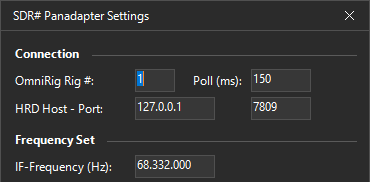
Thank you to Marco Argilli (IU4HMY) for writing in and sharing with us the release of a new SDR# Panadapter plugin that turns the popular RTL-SDR- and Airspy-compatible program SDR# into a panadapter for your transceiver. A panadapter gives you a live spectrum and waterfall view of the band around your radio's tuned frequency, which makes it much easier to spot activity, find clear frequencies, and visually navigate a busy band. Synchronization between the radio and SDR# is handled by OmniRig, so as you tune your transceiver, the panadapter display follows along.
To use the plugin, you connect your SDR to your transceiver's IF or antenna output, then set the receiver IF frequency and a per-mode offset in the plugin settings, with changes saved to a JSON config file. The plugin also has band presets, where a right-click on a preset button stores a snapshot of frequency, demodulation mode, and zoom level, so you can recall a favorite spot instantly. SDR# version 1921 or newer and the .NET 9 framework are required, and it runs on Windows 8, 10, and 11.
There are a couple of limitations worth noting. Marco recommends using Center Frequency mode for the best performance, and because OmniRig exposes the frequency as a 32 bit COM value, frequencies above around 2.1 GHz are not supported. The plugin does not appear to be open-source, but it is free for personal and non-commercial use.