
In a previous diary, I talked about stack strings[1] with a practical example of them. Since my SEC 2026-6-24 06:29:3 Author: isc.sans.edu(查看原文) 阅读量:22 收藏
In a previous diary, I talked about stack strings[1] with a practical example of them. Since my SEC670 class, I’m even more interested in malware obfuscation techniques. I had a look at process names. When you list running processes on a computer, can you trust what you see? If you're facing a rootkit, malicious processes can be simply hidden (the API calls or commands to list processed have been tampered). But a malicious process can also mimic a non-suspicious name by masquerading their name. This technique (T1036 in the MITRE ATT&CK framework[2]) has been used by attackers in many campaigns. A good example of the Velvet Ant Chinese group[3]. The goal is to hide the “malware” process name by replacing it with something that won’t attract the Security Analyst’s eyes or defeat security controls.
First of all, you need to remember that the process name can be stored in different locations:
In /proc/<pid>/comm: This file contains the process name (max 15 characters). This is what the default ‘ps’ and ‘top’ commands show. Example:
remnux@remnux:~$ pgrep container
855
remnux@remnux:~$ cat /proc/855/comm
containerd
In /proc/<pid>/cmdline: We find the full command line (read: we see the argv array). This is used by the ‘ps aux’, ‘pf -f’ or ‘pgrep -f’ commands. Example:
remnux@remnux:~$ ps aux|grep container
root         855  0.0  0.2 1719236 11684 ?       Ssl  May15  14:21 /usr/bin/containerd
remnux    130783  0.0  0.0   4092  2048 pts/5    S+   14:26   0:00 grep --color=auto container
remnux@remnux:~$ cat /proc/855/cmdline
/usr/bin/containerd
To alter the process name in ‘comm’, you just have to call prctl[4]:
prctl(PR_SET_NAME)
To alter the process name in ‘cmdline’ but… there is a limitation in this case! argv[0] is a fixed-size buffer!. You can't just point it somewhere else, because the kernel reports the original memory region. To bypass this constraint, you have to spill into the contiguous argv[1..n] / environ block.
I wrote a quick PoC to demonstrate this:
#include <stdio.h>
#include <string.h>
#include <unistd.h>
#include <sys/prctl.h>
#include <linux/prctl.h>

extern char **environ;

/*
 * Overwrite the argv (and, if needed, environ) memory region so that
 * /proc/<pid>/cmdline reports `new_name`.
 */
static void set_cmdline(int argc, char **argv, const char *new_name)
{
    char  *start = argv[0];
    char  *end   = argv[0];
    int    i;

    /* Find the end of the contiguous argv + environ block. */
    for (i = 0; i < argc; i++)
        if (argv[i])
            end = argv[i] + strlen(argv[i]) + 1; /* +1 for the NUL */

    for (i = 0; environ[i]; i++)
        end = environ[i] + strlen(environ[i]) + 1;

    size_t avail = (size_t)(end - start);

    /* Zero the whole region so leftover bytes don't leak into cmdline. */
    memset(start, 0, avail);

    /* Copy in the new name, leaving room for a terminating NUL. */
    size_t n = strlen(new_name);
    if (n >= avail)
        n = avail - 1;
    memcpy(start, new_name, n);
    start[n] = '\0';
}

int main(int argc, char **argv)
{
    const char *disguise = (argc > 1) ? argv[1] : "[kworker/0:1-events]";

    /* Masquerade 'comm' */
    if (prctl(PR_SET_NAME, "kworker/0:1", 0, 0, 0) != 0)
        perror("prctl(PR_SET_NAME)");

    /* Masquerade 'cmdline' */
    set_cmdline(argc, argv, disguise);

    printf("PID %d now masquerading.\n", getpid());
    printf("  ps      -> reads /proc/%d/comm\n", getpid());
    printf("  ps aux  -> reads /proc/%d/cmdline\n", getpid());
    printf("Press CTRL-C to quit.\n");
    fflush(stdout);
    for (;;)
        pause();
    return 0;
}
Let’s compile and execute it:
remnux@remnux:~$ gcc -o ps-masquerade ps-masquerade.c
remnux@remnux:~$ ./ps-masquerade
PID 130888 now masquerading.
  ps          -> reads /proc/130888/comm
  ps aux      -> reads /proc/130888/cmdline
Press CTRL-C to quit.
Spawn another shell:
remnux@remnux:~$ ps aux|grep kworker/0
root          43  0.0  0.0      0     0 ?        I<   May15   0:07 [kworker/0:1H-kblockd]
root         533  0.0  0.0      0     0 ?        I<   May15   0:00 [kworker/0:2H-kblockd]
root      130203  0.0  0.0      0     0 ?        I    06:58   0:01 [kworker/0:1-cgroup_destroy]
root      130627  0.0  0.0      0     0 ?        I    10:21   0:01 [kworker/0:2-events]
remnux    130888  0.0  0.0   2680  1408 pts/5    S+   14:39   0:00 [kworker/0:1-events]
remnux    130892  0.0  0.0   4092  2048 pts/6    S+   14:40   0:00 grep --color=auto kworker/0
remnux@remnux:~$ cat /proc/130888/comm
kworker/0:1
remnux@remnux:~$ cat /proc/130888/cmdline
[kworker/0:1-events]
And from a htop:
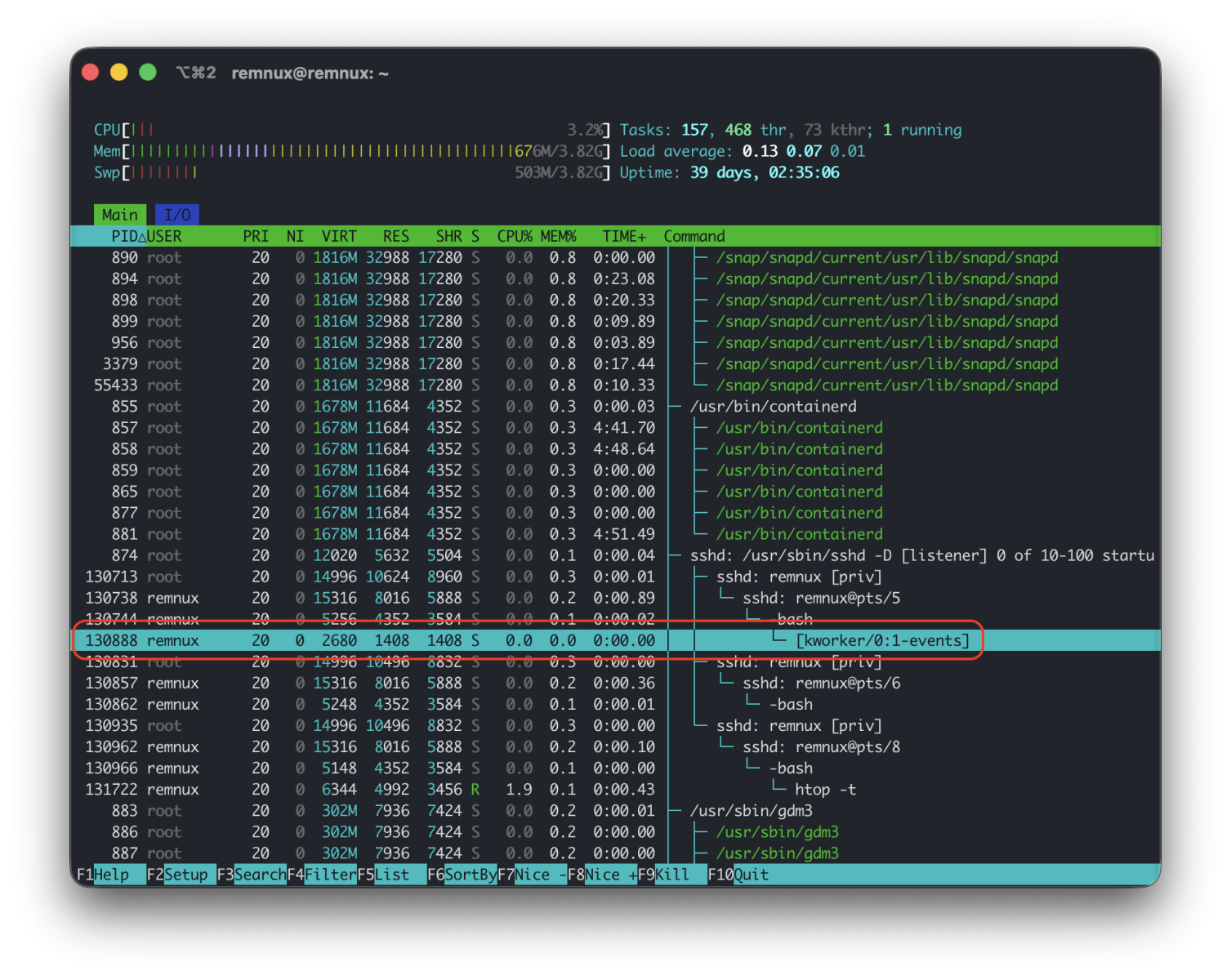
A good news is that tools like Kunai[5] (based on eBPF) will catch the real command line but won't be able to find back the exec name. This is a nice way to detect process name masquerading:
root@remnux:/var/log/kunai# grep 130888 kunai.json | jq . | head -20
{
  "data": {
    "ancestors": "/usr/lib/systemd/systemd|/usr/sbin/sshd|/usr/sbin/sshd|/usr/sbin/sshd|/usr/bin/bash",
    "parent_command_line": "-bash",
    "parent_exe": "/usr/bin/bash",
    "command_line": "./ps-masquerade",
    "exe": {
      "path": "/home/remnux/ps-masquerade",
      "md5": "",
      "sha1": "",
      "sha256": "",
      "sha512": "",
      "size": 0,
      "error": "file not found"
    }
  },
  [...]
What about Windows operating systems? It’s a bit tricky because the kernel is involved. Process names are stored in the Process Environment Block (PEB) which can be modified by the process itself (in user land) The PEB holds ImagePathName and CommandLine as UNICODE_STRINGs. These are writable from within the process. Task Manager, WMI's CommandLine, and a lot of tooling read from here.
In kernel model, EPROCESS holds ImageFileName (a 15-char ASCII field like the Linux comm) and SeAuditProcessCreationInfo.ImageFileName (the full NT path). These are populated by the kernel from the image that was actually mapped, so from user mode you can't simply rewrite them.
[1] https://isc.sans.edu/diary/An+Example+of+Stack+String+in+High+Level+Language/33008
[2] https://attack.mitre.org/techniques/T1036/
[3] https://www.sygnia.co/blog/operation-highland-velvet-ant/
[4] https://man7.org/linux/man-pages/man2/prctl.2.html
[5] https://why.kunai.rocks
Xavier Mertens (@xme)
Xameco
Senior ISC Handler - Freelance Cyber Security Consultant
PGP Key
如有侵权请联系:admin#unsafe.sh