Stated plainly: iOS Forensic Toolkit can now get pa 2026-6-24 07:0:9 Author: blog.elcomsoft.com(查看原文) 阅读量:38 收藏

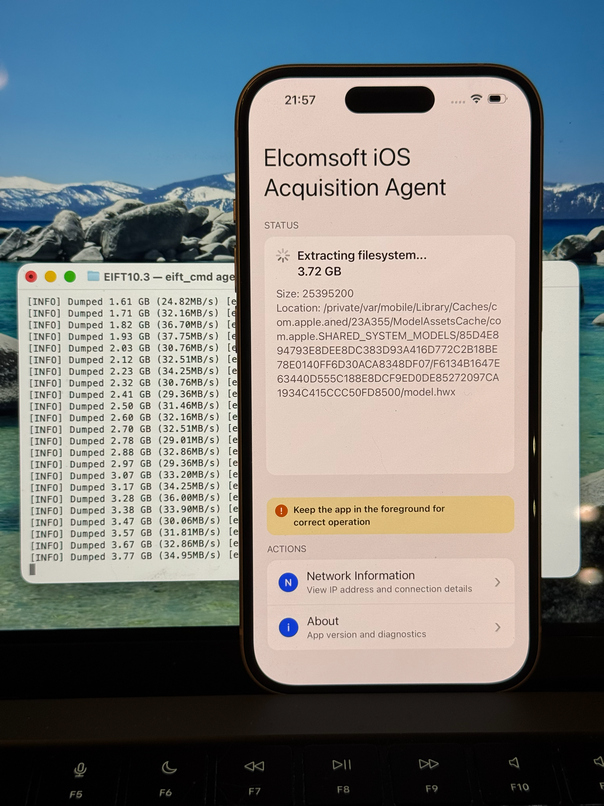
Stated plainly: iOS Forensic Toolkit can now get past Stolen Device Protection. There is a catch, and it belongs up front: this is not a magic unlock, and anyone selling it as one is selling something. What we have built is a way to install the extraction agent without ever pairing the iPhone to the workstation over a USB port. Because the most disruptive thing SDP does to a forensic workflow is place Face ID or Touch ID in front of that pairing step, bypassing the pairing step bypasses the gate. You still need the device passcode, a paid Apple Developer account, and a device you are authorized to examine. With those in hand, SDP is no longer the wall it was a month ago.
This is the solution promised in Forensic Implications of Apple Stolen Device Protection. The how – every command, in order – will appear in a separate technical write-up. This piece covers what the method does, when you would reach for it, and whether it should concern anyone who is not an examiner. (Short version: it should not.)
How extraction typically works
There are several ways to extract information from an iPhone, and all of them are blocked by SDP except for the bootloader exploit (which has limited hardware compatibility). Low-level extraction is the go-to method, delivering a copy of the device Keychain and the full file system image. On recent devices, it requires an extraction agent sideloaded onto the device. You sign a small app, place it on the phone, and let it work, where an exploit exists for the build. The agent is also where SDP first causes problems, because before it can do anything it must get onto the phone – and that used to mean pairing.
The other method is extended logical acquisition – the broadest-reaching road and the shallowest. It produces an iTunes/Finder-style local backup, encrypted or not, and alongside it pulls media from the Camera Roll, shared app files, crash logs, and the Apple Unified Logs. It works on essentially any device and any iOS version, which is why it is often the first thing an examiner tries. But it depends entirely on a trusted pairing with the computer – so SDP blocks it as squarely as it blocks the agent.
So these methods run straight into SDP’s pairing gate; only checkm8 sidesteps it, by operating beneath iOS. That gate is the wall the rest of this article is about clearing.
The wall: agent installation required a trusted pairing
Installing the extraction agent the normal way begins with pairing the phone to the computer – the “Trust This Computer” handshake, the passcode, the key exchange that lets the two talk. SDP changes that single step. Away from a familiar location, the Trust prompt now demands a biometric, with no passcode fallback. (Precisely: away from familiar locations by default, or everywhere if the owner enabled “Always.”)
That is the whole problem in one sentence. Where the owner is absent or uncooperative, or where biometrics are unavailable for legal or procedural reasons, a known passcode no longer creates a new pairing. No pairing, no agent.
There have always been workarounds, but each one runs out:
- A valid pairing record from the owner’s own computer. Seize the suspect’s Mac or PC, recover a live lockdown record, and you can connect without tripping SDP. The snag: these records expire quickly, making this a race rather than a guarantee.
- Bringing the device to a familiar location. Place the phone on the suspect’s kitchen table and most of SDP relaxes. But you must know a familiar location, be able to reach it, and hope the owner did not select “Always,” which closes even that door.
When none of those apply, you were stuck. That gap is what we set out to close.
The alternatives
The idea is simple: do not use the USB pairing at all. There is more than one way to achieve it. For one, Apple has its own channel for delivering developer-signed apps directly to a device, and that channel does not ride the trusted-pairing handshake. The true OTA method. We use it. Then, there is still an over-the-wire method – one that does not require pairing. How? That’s another article – a technical one.
Either way, the flow is similar: the toolkit stands up a temporary local web server with its own certificate. The examiner opens that server in Safari on the iPhone and installs the certificate, so the device trusts the source it is about to install from. The agent – signed on your machine with your Apple ID – installs from that local server. It then comes up and communicates with your computer over a local network link rather than a USB pairing: wired through an adapter, or over an isolated Wi-Fi access point. From there the process is familiar – full file system and Keychain, where an exploit exists for the build.
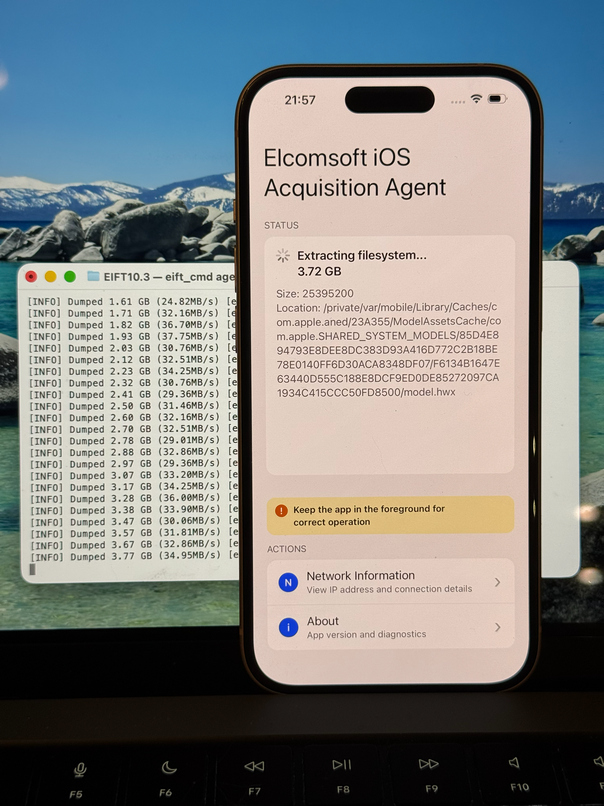
What makes the “bypass” framing fair: from reading the device’s UDID to the final extraction, no step relies on the trusted pairing that SDP guards.
Useful well beyond SDP
SDP is the headline, but a network-based install path earns its keep elsewhere too:
- A flaky or worn data port. When a stable USB session is hard to obtain, the agent can still reach your machine over Wi-Fi, with no reliable physical link required.
- Cases without biometrics. The expert has the passcode but cannot supply a fingerprint or face scan for legitimate reasons.
- No pairing record, no familiar location. Both classic workarounds are off the table and you need another route.
The catch, spelled out
Since we led with it, here is precisely what the method asks of you:
- A paid Apple Developer account to sign the agent.
- The passcode and an unlocked device you can physically handle. Installing the certificate, trusting the profile, and enabling Developer Mode (required on iOS 16 and later, with a passcode confirmation after a restart) all happen on the phone. There is no remote, no-touch version of this.
- A device not locked down by management. On MDM-supervised phones the profile may refuse to install outright, and only the supervisor can change that.
- A lawful basis for all of it – which goes without saying, but we will say it anyway.
In short, this is a tool for an examiner who has authority and the passcode – not for a stranger holding a stolen handset.
Keep it off the internet
One caution carries over from every agent-based job: keep the evidentiary device off the open network throughout. The agent needs to reach only your computer and one specific Apple server; it has no business on the wider internet, where a remote lock, a remote wipe, or an iCloud sync could quietly ruin the extraction. We recommend a hardware firewall – a small dedicated box (a Raspberry Pi suffices) is far harder to misconfigure than a software firewall and removes any chance of the phone slipping online. The full setup is in the technical companion piece.
Does this make iPhones less safe?
Short answer: we don’t think so. Here is why.
SDP was built for one specific villain: the thief who watched you type your passcode, grabbed the phone, and used those two facts to reset your Apple Account password, disable Find My, and drain your saved passwords before you could react. Everything SDP does is aimed at that person.
Our method helps that person with none of it. It does not touch the Apple account or lock the owner out. It rides Apple’s own developer-distribution plumbing and is gated by precisely what a thief lacks: a paid Apple Developer account and our software. A pickpocket is not going to enroll in the Apple Developer Program to read someone’s messages. So the method does not widen the opening SDP was built to close. It gives a lawful examiner an alternative install route, and nothing more.
A footnote: why nothing on iPad?
A genuine oddity. SDP is iPhone-only. As of iPadOS 26.4 there is still no equivalent, even though an iPad with a known passcode is exposed to the same account-takeover scenario. Apple has not explained the omission, so treat what follows as a guess: the shoulder-surf-then-snatch pattern that The Wall Street Journal documented is an iPhone-in-a-bar story. People take iPads out in public less, type passcodes into them less, and the Significant Locations and cellular context SDP leans on is patchier on a tablet. Plausible, unconfirmed. Either way, if there is an iPad on your bench, SDP is not part of the conversation.
Closing note
One editorial note to close. For a company whose marketing leans hard on protecting users from criminals, Apple spends a curious amount of energy obstructing forensic tools like ours – the iCloud side is the clearest example – and rather less, it sometimes seems, on the criminals themselves. Meanwhile we are the ones up at night, reading device profiles and signing agents, working out the next way around the next wall. We like to think we land on the right side of this: for all that is good, against all that is bad.
REFERENCES:

Elcomsoft iOS Forensic Toolkit
Extract critical evidence from Apple iOS devices in real time. Gain access to phone secrets including passwords and encryption keys, and decrypt the file system image with or without the original passcode. Physical and logical acquisition options for all 64-bit devices running all versions of iOS.
Elcomsoft iOS Forensic Toolkit official web page & downloads »
如有侵权请联系:admin#unsafe.sh