- Component Object Model (COM) is a fundamental Windows technology used by legitimate applications for object activation, inter-process communication, automation and language-independent component reuse. Those same qualities make it useful to threat actors.
- Malware frequently uses COM interfaces for lateral movement, execution, download and exfiltration, persistence, evasion, system discovery and automation of built-in Windows and Office functionality.
- Reverse engineering COM-heavy binaries requires researchers to move from opaque GUIDs and indirect vtable calls to meaningful classes, interfaces and method names.
- This post is based on research conducted for presentations at AVAR 2025 conference in Kuala Lumpur and a CARO 2026 workshop in Innsbruck.
Component Object Model (COM) is one of the Windows technologies that analysts regularly encounter but may not always prioritize during triage, as the manual analysis of COM functionality in binary executable files can be labor-intensive.
The post starts with a brief introduction into COM, following how binaries utilizing COM can be analyzed, and some examples of malware families and their usage of COM. The post concludes with a list of further resources.
COM is an application binary interface (ABI) model for reusing software components. COM objects expose interfaces to client applications, and those interfaces can be consumed by multiple programming languages because the contract exists at the binary interface level rather than at a single language runtime level. COM is a fundamental, principal way for components written in different languages to communicate.
Microsoft describes COM as a distributed, object-oriented system for creating binary software components that can interact with each other. COM is also the foundation for technologies such as OLE and ActiveX.
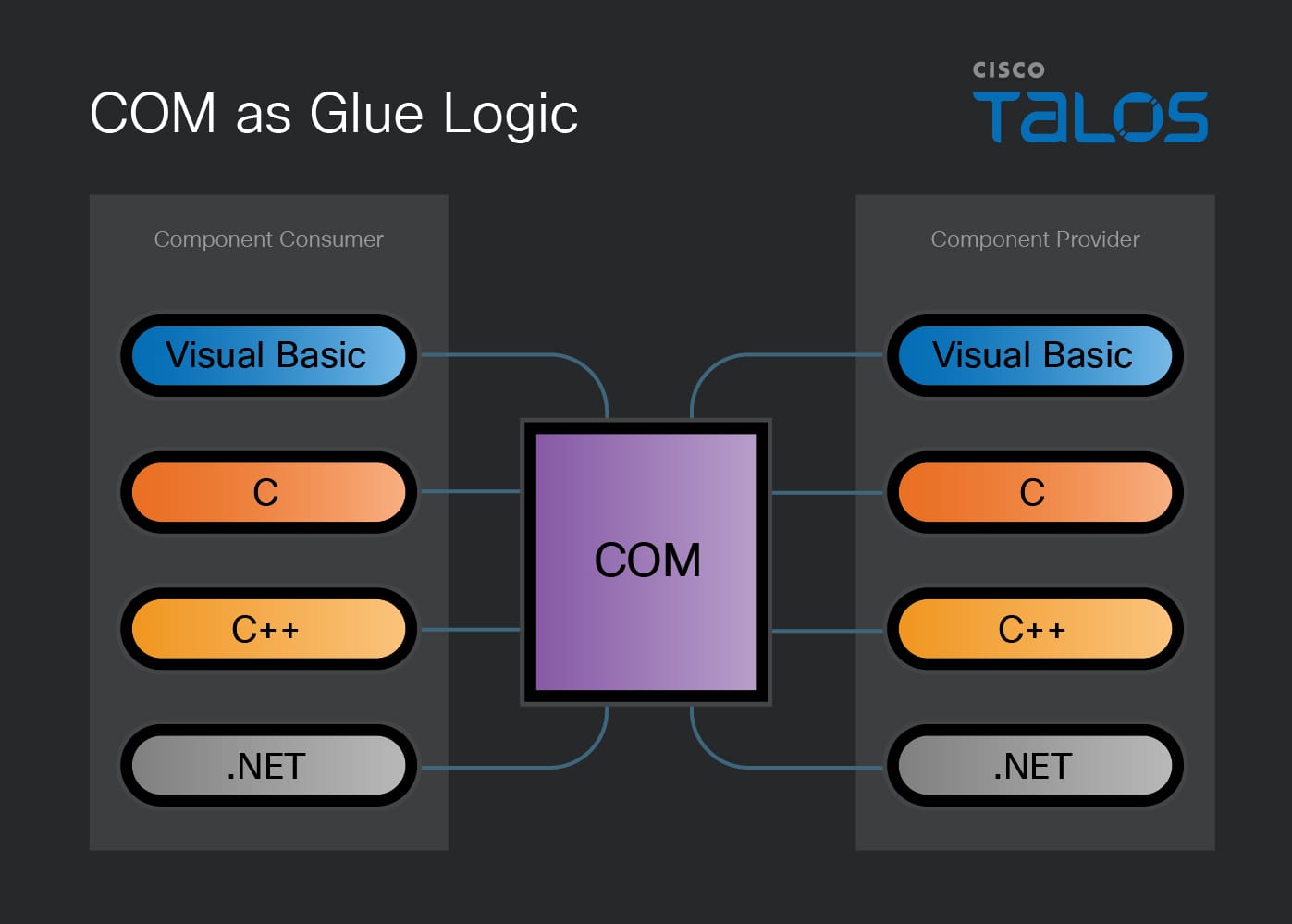
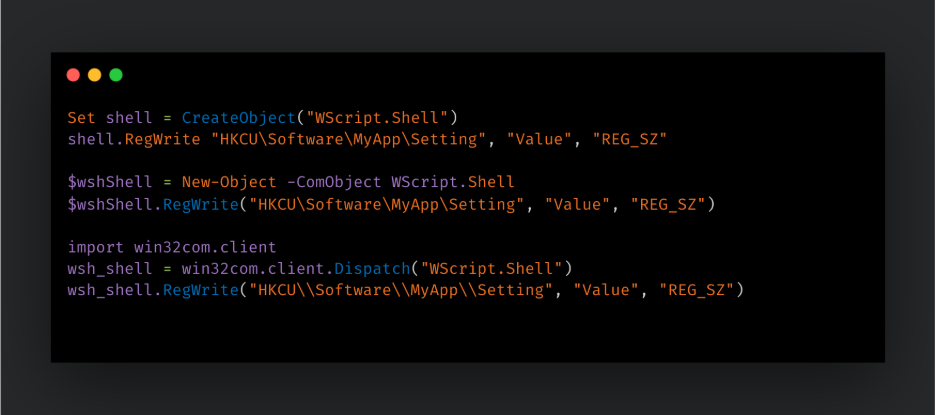
This language independence is visible in common scripting and automation patterns. The same COM object may be created from VBScript, PowerShell, Python, or C/C++. For example, a script can instantiate the WScript.Shell COM object and use it to read or write registry values, execute a command, create shortcuts, or access environment variables — and it can do it in a very similar way using different scripting languages supporting COM automation.
Distributed COM (DCOM) extends COM so a client can activate and use COM objects on another system. At a high level, the local client talks to a proxy, the remote server exposes a stub, and the COM runtime transports the method invocation over Microsoft RPC.
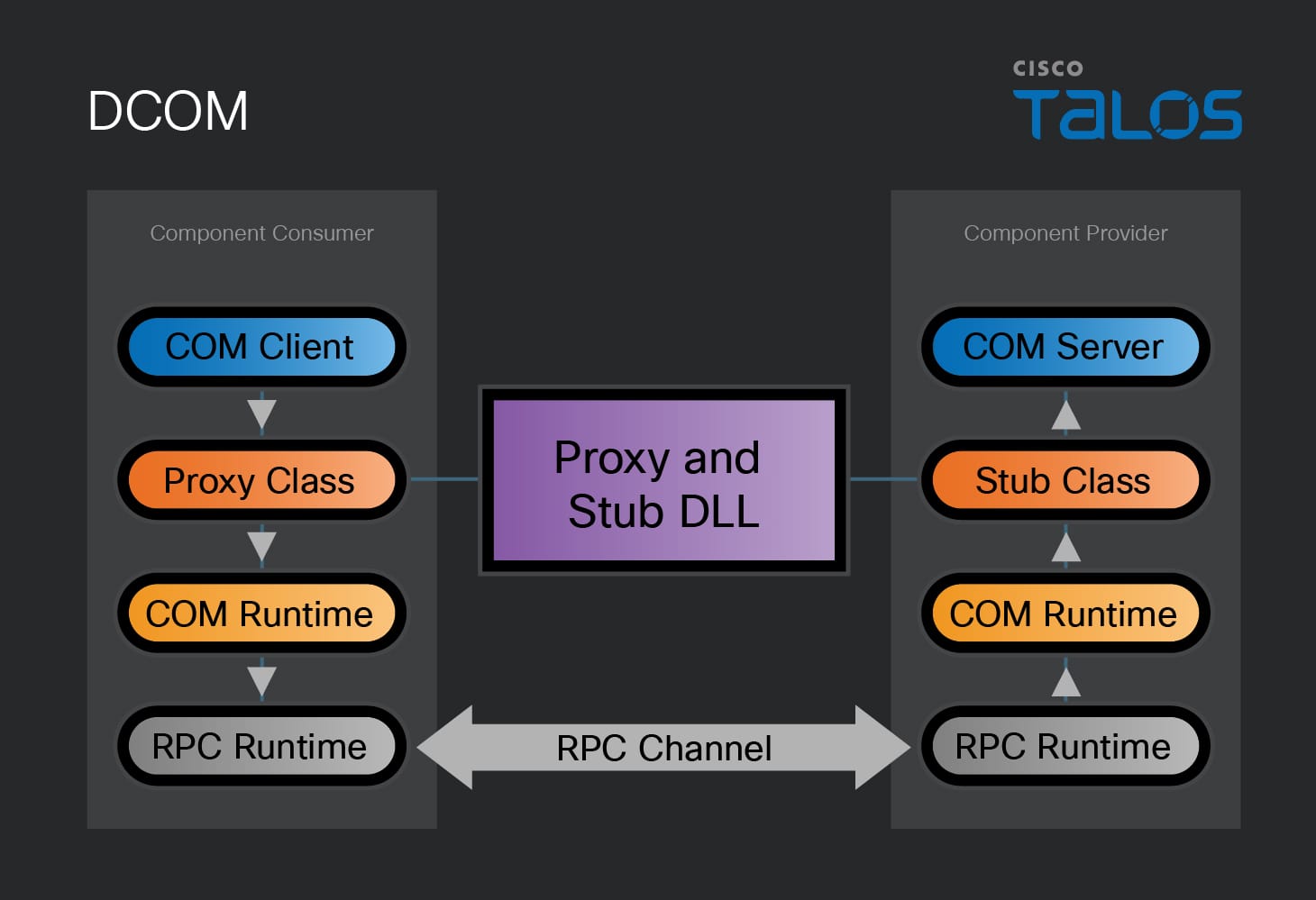
The existence of CoCreateInstanceEx API in a binary, with the appropriate parameters, can be used to distinguish between local COM and DCOM. DCOM extends local COM activation by allowing an object to be associated with a specified remote computer. DCOM is also explicitly represented in MITRE ATT&CK as one of the techniques and is described in Remote Services: Distributed Component Object Model, T1021.003.
Classes, interfaces, and the registry
Classes and interfaces are two foundational COM concepts.
COM classes are templates for creating COM objects. A class is identified by a class identifier (CLSID), a GUID that uniquely identifies the component.
GUID is a 128-bit identifier used to uniquely identify COM-related objects and interfaces. The string representation of a GUID is common in the Windows registry, scripts, and configuration text. It is typically formatted as:
{XXXXXXXX-XXXX-XXXX-XXXX-XXXXXXXXXXXX}
A GUID can also appear as a binary structure in a compiled executable. In a binary, the first three fields are typically stored in little-endian byte order, which is why byte-pattern searches for GUIDs differ from the familiar string form. Readers should be aware that many malware families assemble GUID structure dynamically on the stack before attempting to create a new object in order to make the analysis process harder.
Interfaces are also represented by interface identifiers (IIDs), which also have the GUID's data type. Interfaces define methods an object exposes to clients. The foundational COM interface is IUnknown, which exposes functions QueryInterface, AddRef, and Release. Every COM interface ultimately derives from it.
COM registration data is stored in the Windows registry. Classes can be inspected under HKEY_CLASSES_ROOT\CLSID, while interface registrations can be found under HKEY_CLASSES_ROOT\Interface. On a typical Windows installation, the number of registered classes can easily reach into the thousands and changes based on Windows version, optional components, and installed software.
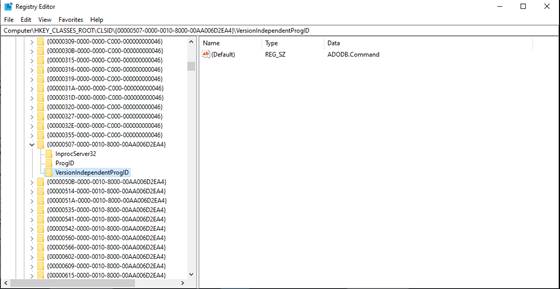
A common example used in malware is the Windows Task Scheduler service. The newer Task Scheduler 2.0 COM class is commonly referenced by the CLSID {0F87369F-A4E5-4CFC-BD3E-73E6154572DD}. The ITaskService interface has IID {2FABA4C7-4DA9-4013-9697-20CC3FD40F85} and provides access to the Task Scheduler service for managing registered tasks. ITaskService::Connect should be called before using other ITaskService methods. Older Task Scheduler 1.0 samples may instead use the ITaskScheduler interface, which appears in the WarmCookie case study below.
A program usually loads a COM class by specifying its CLSID, requests a specific interface by specifying its IID, and receives an interface pointer which points in memory at the beginning of the virtual function table (vtable) for the object. The interface methods are called indirectly through a vtable.
Without type information, the analyst may only see something like:
call qword ptr [rax+38h]
With the correct interface recognized and renamed, the same call can become meaningful, which is our main goal when analyzing malware utilizing COM:
call qword ptr [pTaskServiceVtbl.Connect]
COM clients, servers, and ProgIDs
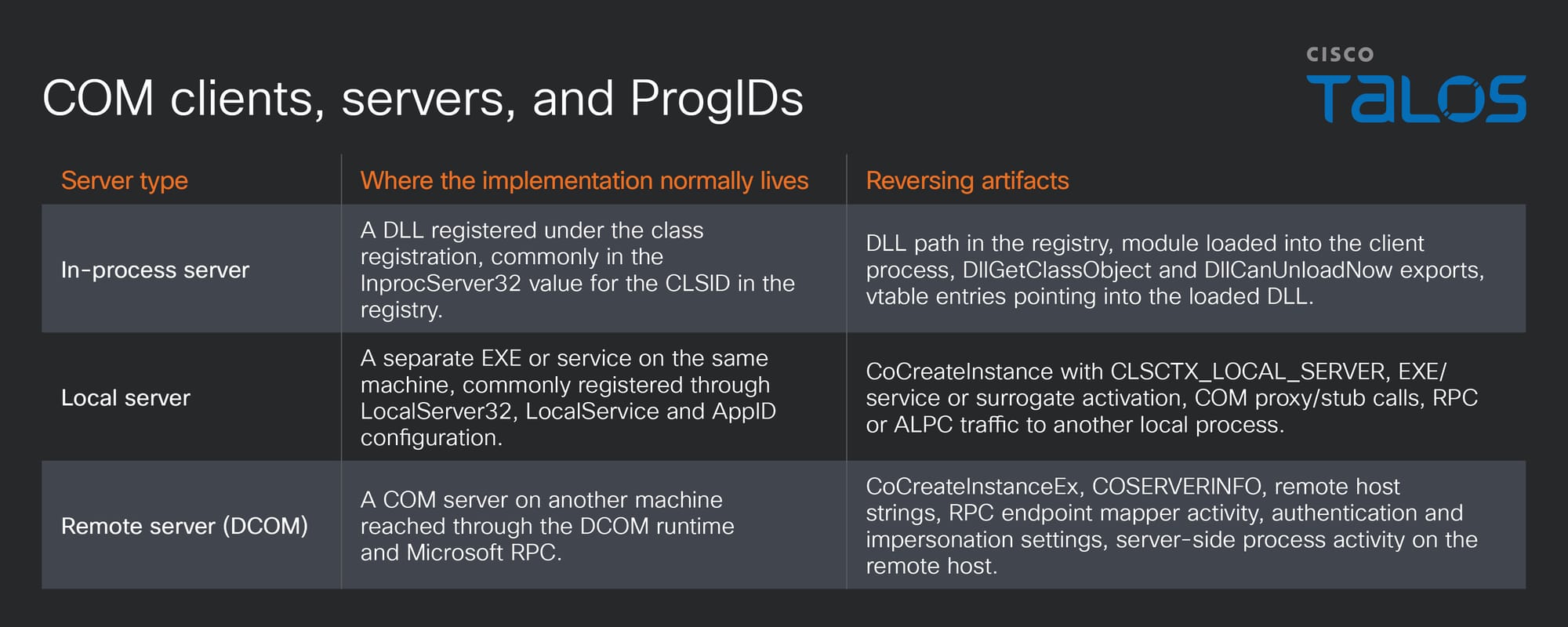
A COM client is any code that obtains a pointer to a COM interface and calls methods through that pointer. A COM server is the component that implements the object behind the interface. The two sides may be in the same process, in different processes on the same host, or on different hosts through DCOM. Malware is most commonly just a COM client. Malicious COM servers are encountered less frequently and are outside of the scope of this blog.
The client asks the COM runtime, implemented in ole32.dll or combase.dll, to instantiate a class (identified by a CLSID) and to return a specific interface (identified by an IID). The dwClsContext argument supplied to activation APIs such as CoCreateInstance tells COM which server locations are acceptable. For reverse engineers, the CLSCTX flags provide a useful context, as they indicate whether the sample is trying to load a DLL into its own process, talk to a local EXE or service, or reach a remote DCOM server.
A ProgID, or programmatic identifier, is a human-readable registry entry that can be associated with a COM class. Examples include WScript.Shell, Shell.Application, Excel.Application, MSXML2.XMLHTTP and WinHttp.WinHttpRequest.5.1. The registry maps a ProgID to a CLSID, and higher-level languages often use the ProgID directly through functions such as CreateObject or PowerShell’s New-Object -ComObject. Native code can call CLSIDFromProgID to resolve the string to a CLSID before activation. In binaries, the analyst may therefore see either a readable ProgID string, a string-form GUID, or the little-endian binary representation of the CLSID.
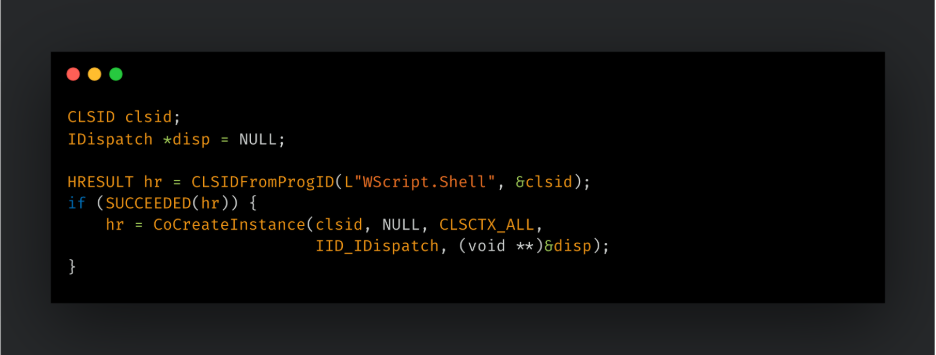
What CoCreateInstance does for an in-process server
A typical native COM client starts by initializing the COM runtime for the current thread with CoInitializeEx or CoInitialize. In code that will communicate across process or machine boundaries, the client may also configure process-wide COM security with CoInitializeSecurity. After that, the client activates a class, receives an interface pointer, calls methods through the interface, and releases the pointer when finished.
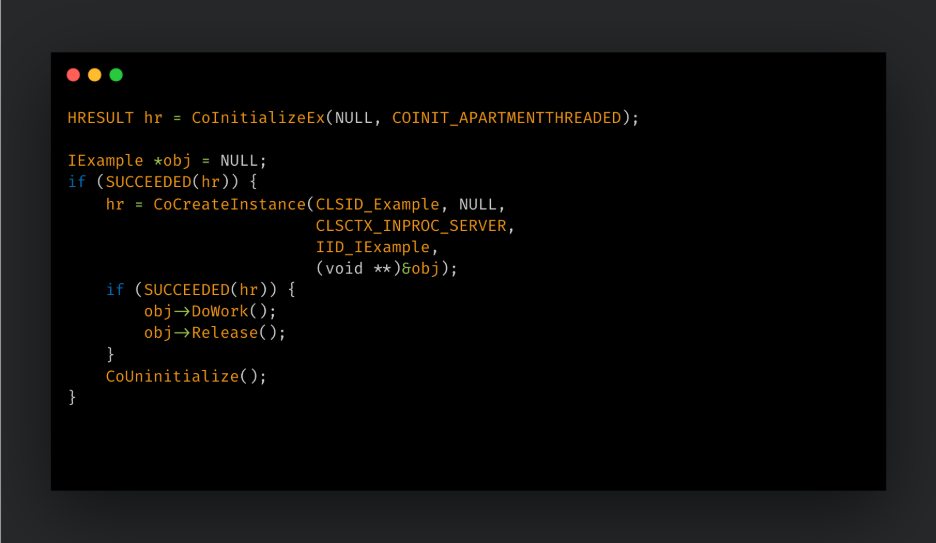
For an in-process server, CoCreateInstance is a convenience wrapper around the class-factory path. COM resolves the CLSID registration, locates the in-process server DLL for the current bitness, loads the DLL if necessary, and asks the DLL for a class object. That class object usually implements the interface IClassFactory. COM then asks the class factory to create the object and return the requested interface pointer.
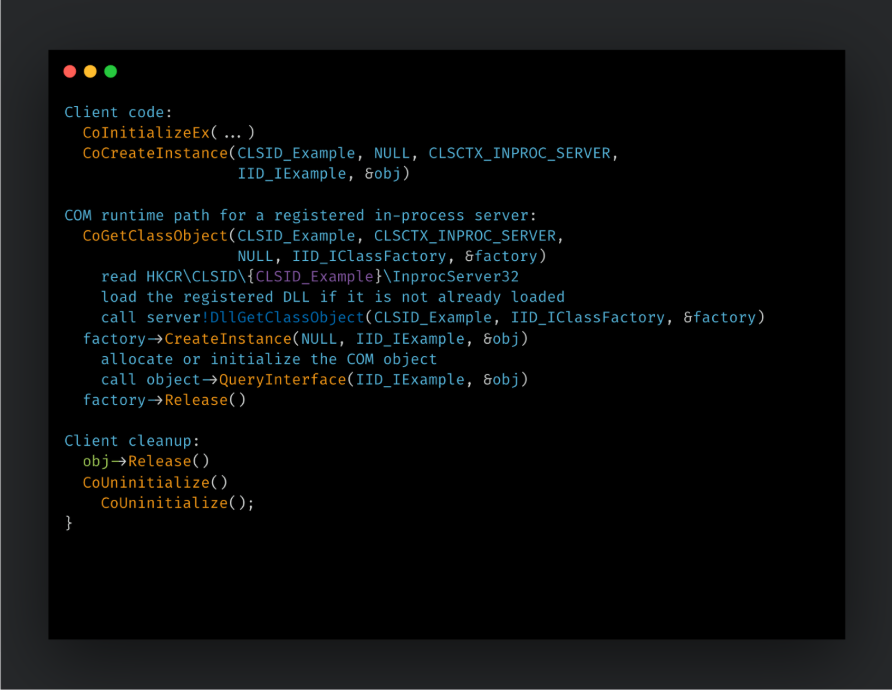
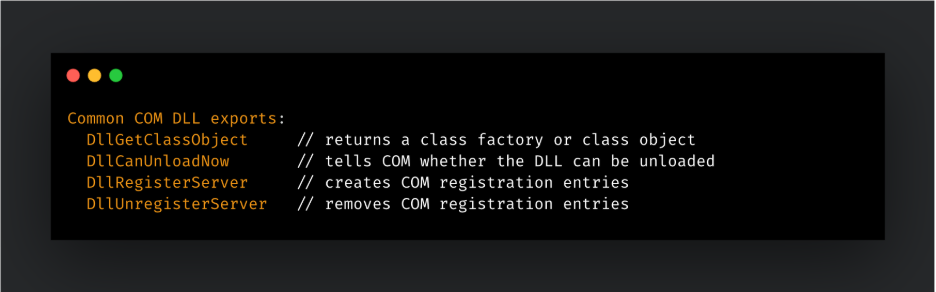
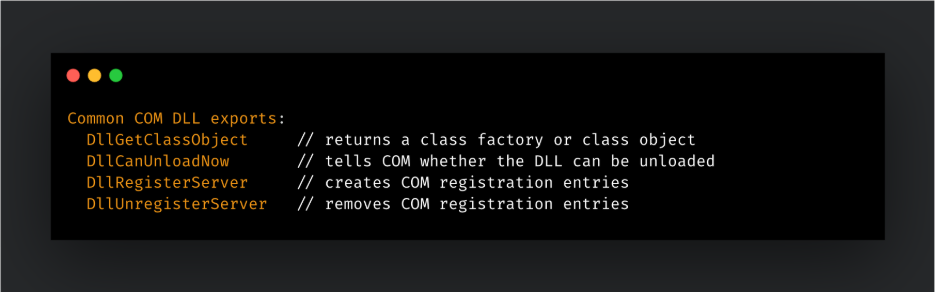
DllGetClassObject is the main activation export and COM calls it to retrieve a class object for the requested CLSID. DllRegisterServer and DllUnregisterServer are self-registration exports used by installers or regsvr32-style workflows to create or remove registry entries; they are not part of the CoCreateInstance call path.
A local-server COM EXE follows the same class-factory idea, but the registration points to an executable or service rather than an in-process DLL. The server process typically registers its class object with the COM runtime, and clients receive an interface proxy when the object lives outside the client process. DCOM extends this model to another machine and adds remote activation, RPC transport, authentication, and impersonation state.
IUnknown, object identity, and vtable layout
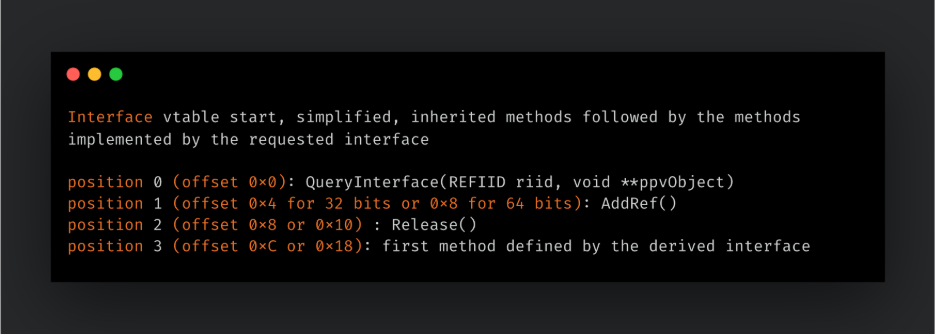
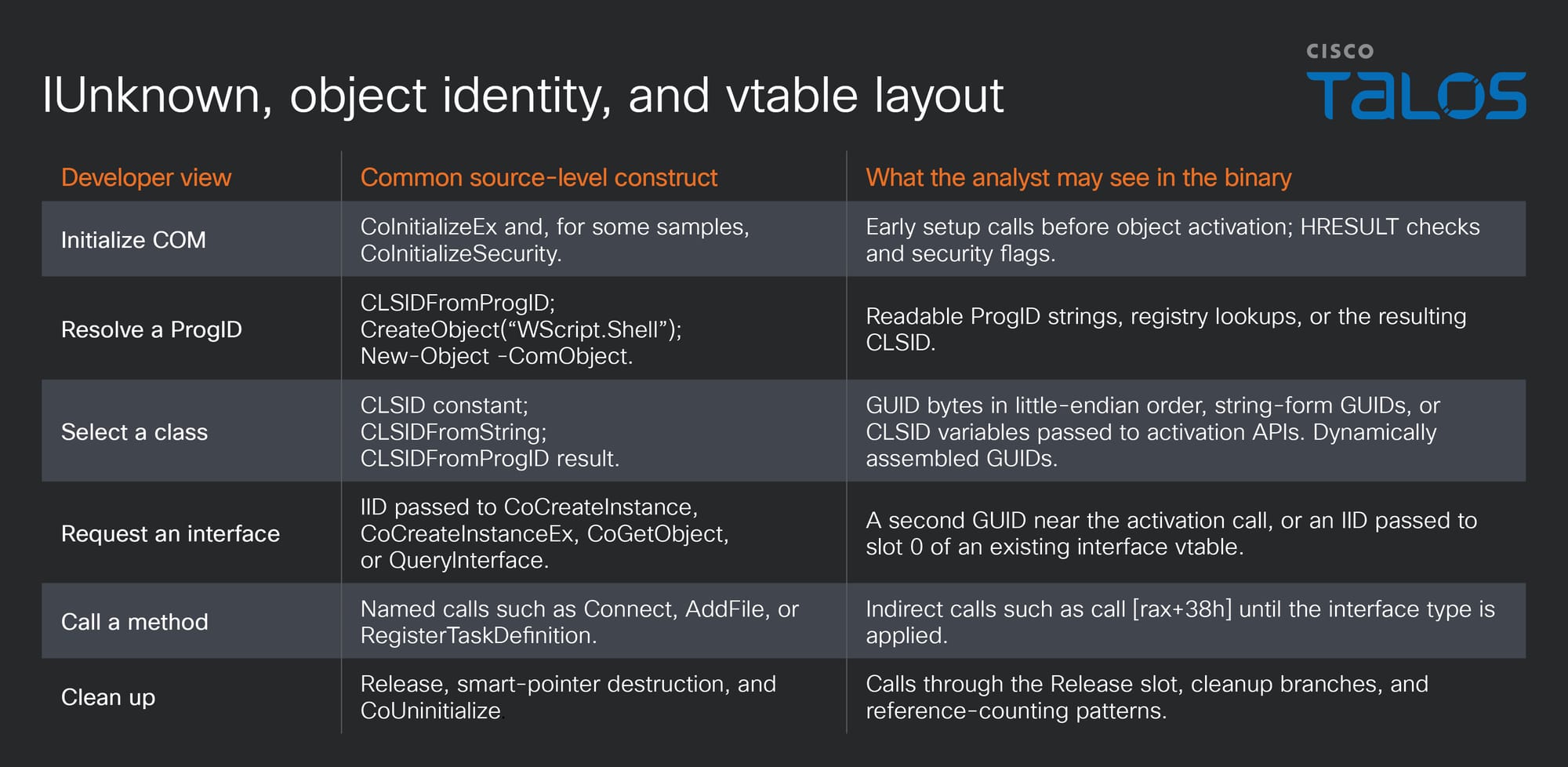
Every COM interface derives from IUnknown. The first three entries in a COM vtable are QueryInterface, AddRef, and Release, regardless of the higher-level interface being used. QueryInterface lets a client ask whether the object supports another interface identified by an IID. AddRef and Release implement reference counting so that objects can manage their lifetime across language boundaries, DLL boundaries and proxy/stub boundaries without relying on a language-specific garbage collector or destructor model.
COM activation and call security
COM has its own security model on top of normal Windows process, token, registry, and file-system checks. Security is most visible for local-server and DCOM objects as activation and method calls cross a COM process or RPC boundary.
Activation security controls whether a client can launch or connect to a COM server. The COM Service Control Manager checks launch and activation permissions when a client requests an out-of-process or DCOM object. These permissions may come from machine defaults or from application-specific AppID configuration such as LaunchPermission. A class can be registered and still fail activation if the caller’s token is not permitted, if remote activation is disabled, if the server is not configured for remote use, or if required marshaling information is unavailable.
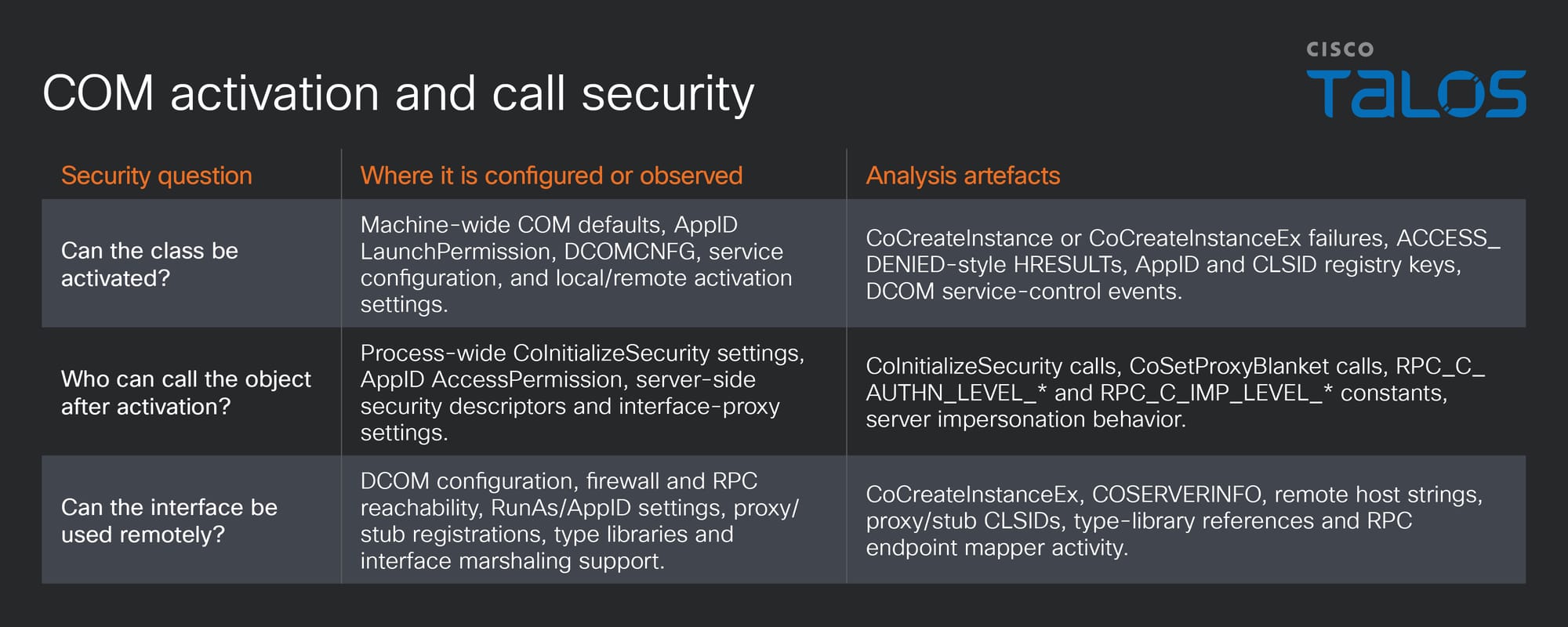
Malware samples that call CoInitializeSecurity or CoSetProxyBlanket are often setting up the identity and authentication context needed for WMI, DCOM, or another out-of-process COM interface. For static analysis, the constants passed to these APIs help identify whether the sample expects local-only access, remote access, impersonation, or delegation.
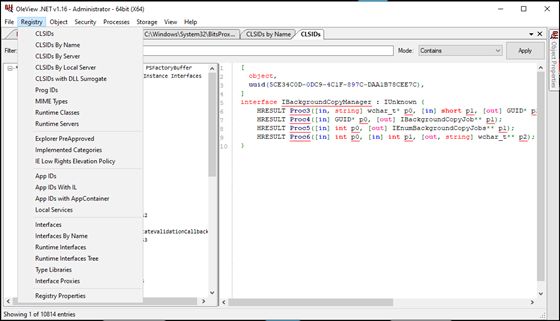
The first step in COM analysis is usually identification of classes and interfaces used by malware and understanding interfaces together with functions present in their vtables. Tools such as ComView and OleView.NET allow researchers to inspect classes, interfaces, type libraries, proxy/stub information, and method layouts registered on a system.
OleView.NET, developed by James Forshaw, is particularly useful since it combines a graphical interface with a PowerShell interface, making it suitable for both manual exploration and repeatable research workflows.
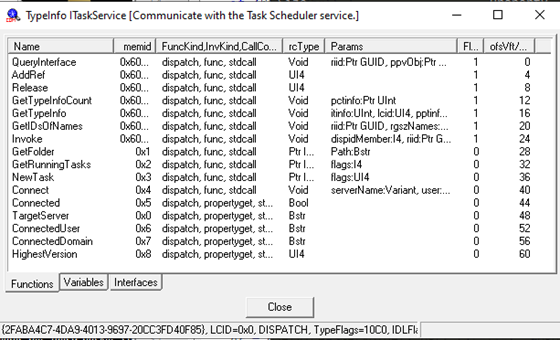
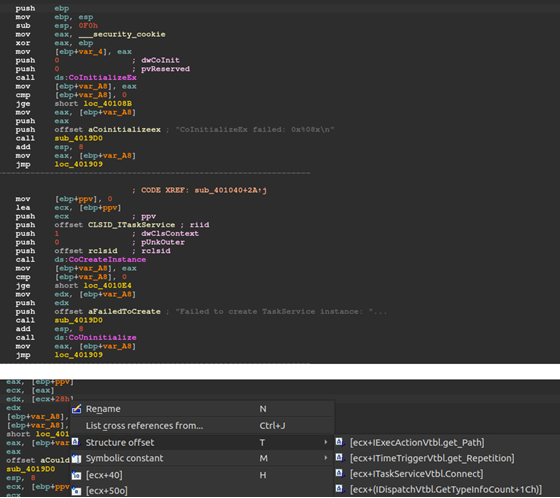
ComView is an older tool still available through internet archive. ComView contains offsets (in decimal) of a function address from the beginning of the vtable, which allows us to identify which functions are being called in the indirect calls observed in compiled executables. In the ComView screenshot below that displays the details of the ITaskService interface, we see that the connect method has offset 40 (28h) from the start of the vtable so any indirect call to a register + offset 28h after a client obtains a pointer to the interface can be transcribed as ITaskService.Connect to improve our understanding of the code functionality.
A manual reversing process would contain the following steps:
- Find calls to
CoCreateInstance,CoCreateInstanceEx,CLSIDFromProgID,CoGetObject,GetActiveObject,IDispatch::Invoke, or related APIs. - Identify the CLSID and IID values passed into those calls.
- Look up the class and interface definitions in the registry, Microsoft documentation, OleView.NET, ComView, or a COM database.
- Map indirect vtable calls to interface methods based on architecture and interface layout.
- Rename types, variables, and calls in the disassembler so the COM workflow becomes readable.
For this research, we created a simple task scheduler sample written in C, which uses COM to create a Windows scheduled task that runs notepad.exe two minutes after it is created. To simplify the development, the sample was generated by a large language model (LLM).
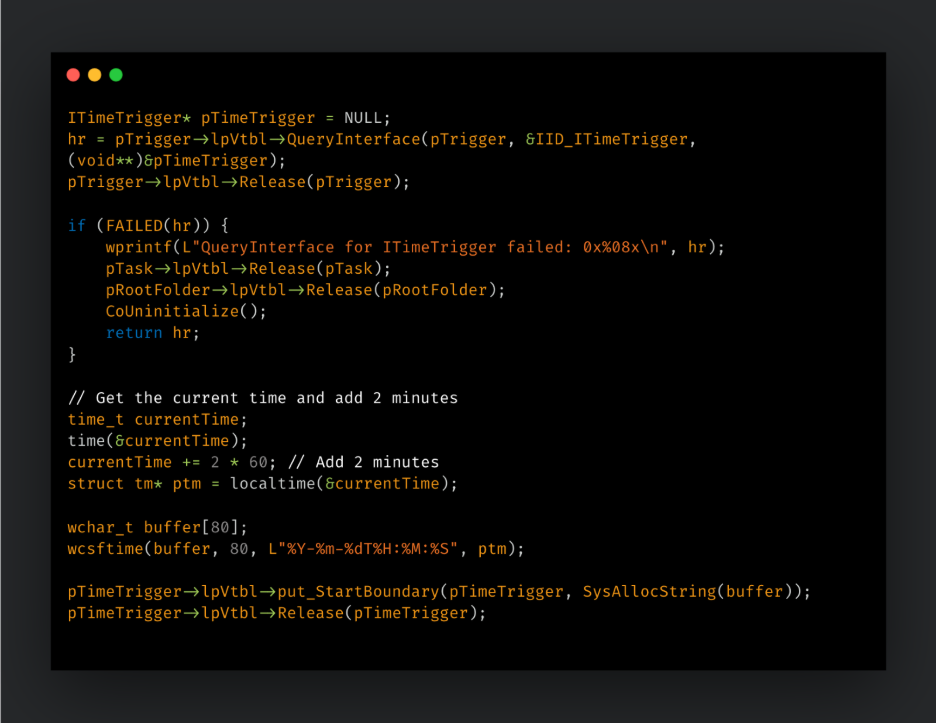
We used our Task Scheduler sample to show how compiled binary code differs from its source code. We then reverse engineered the binary to show that once the ITaskService vtable is reconstructed, calls that initially look like generic indirect calls can be renamed to Connect, NewTask, GetFolder, RegisterTaskDefinition, and related methods.
A faster way to reach the same analysis stage is to use a plugin for your reverse-engineering tool that maps GUIDs to human-readable code. For example, in IDA Pro, the standard COM Helper can identify relevant class and interface IDs and rename locations in the database.
The remaining task for the analyst is to add the required interface’s vtable structure to the list of code structures currently in use. For example, for ITaskService, we can add ITaskServiceVtbl to IDA Pro and apply the type wherever an indirect call is related to the instantiated interface pointer.
Still, having a thorough understanding is recommended, so that analysts can recognize calls to COM related functions and identify related indirect calls in a binary.
Applying the workflow to a Qakbot DLL
Qakbot, also known as Qbot or Pinkslipbot, is a long-running modular banking trojan that has been active since at least 2007 and evolved into a general-purpose malware delivery platform used by financially motivated actors. Early versions focused on credential theft and online banking fraud, but later campaigns added functionality for system reconnaissance, persistence, browser and credential harvesting, email collection, command execution, command and control (C2) communication, payload delivery, and movement inside enterprise environments. Qakbot was frequently distributed through phishing emails, including hijacked email threads, and was used as an initial access and loader component for follow-on malware and ransomware operations.
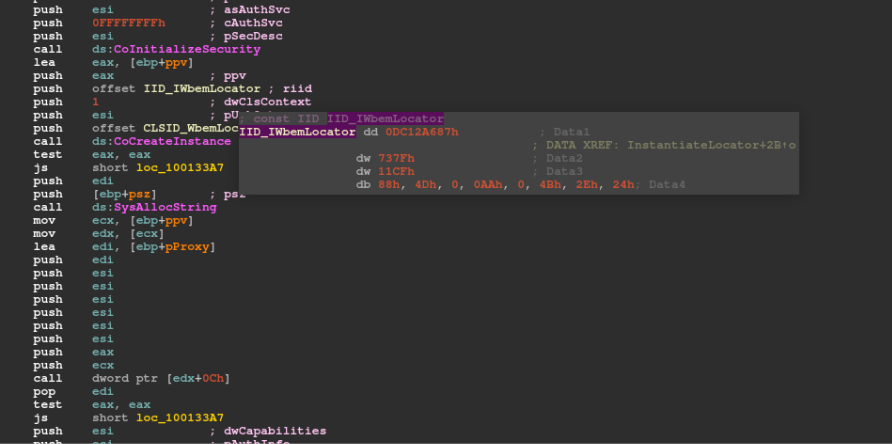
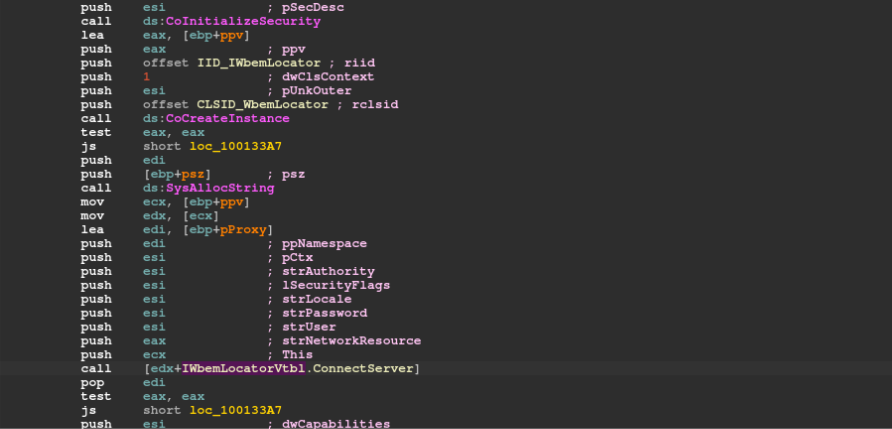
In the Qakbot DLL shown below, CoInitializeSecurity is called before the sample references IID_IWbemLocator, and CoCreateInstance creates an instance of the WMI locator class. The GUID is visible in binary form and can be used for type recovery inside the disassembler.
After the class and interface are identified, the next step is to apply the correct interface type to the returned pointer. In this case, the relevant structure is IWbemLocatorVtbl, and the method of interest is ConnectServer.
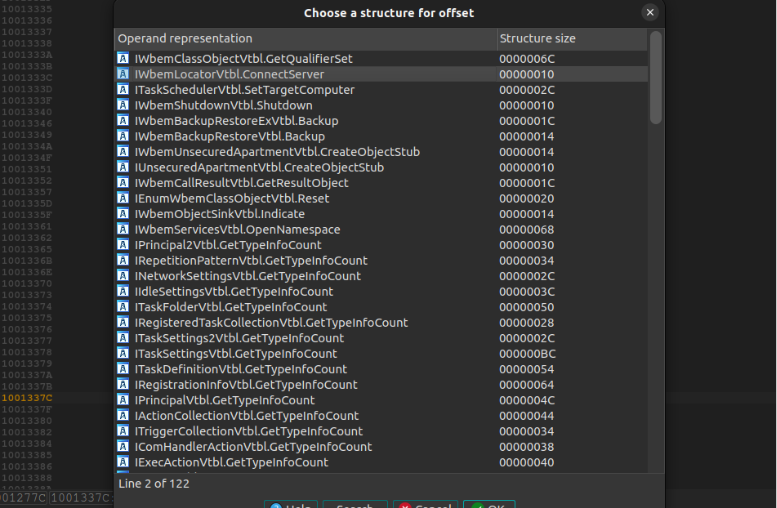
The call through a register and offset maps to IWbemLocator::ConnectServer once the vtable type is applied.
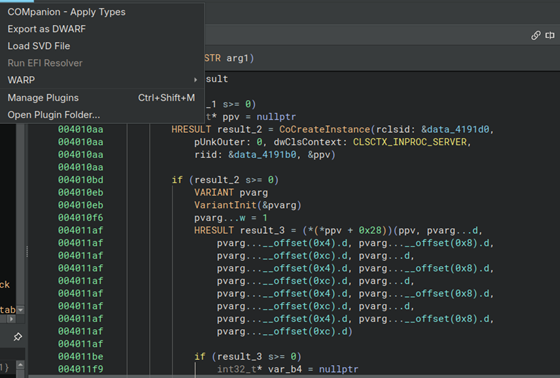
Several plugins and scripts can accelerate this process. IDA includes a default COM Helper plugin, and Airbus CERT’s COMIDA and Frank Boldewin’s COM Code Helper scripts are also useful options. Binary Ninja users can apply similar type reconstruction workflows to make interface pointers and vtable calls easier to read. Recent Binary Ninja releases include COMpanion-related data rendering support.
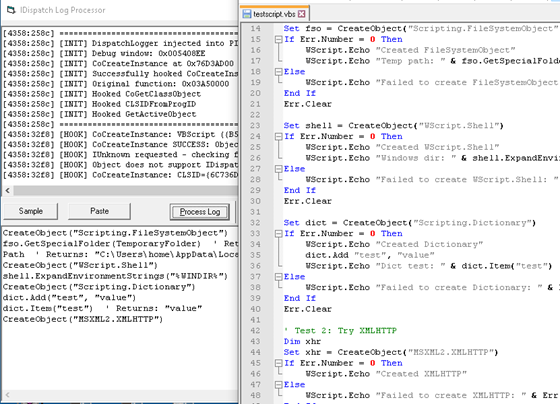
For dynamic analysis, tracing can help by observing COM activation and dispatch calls at runtime. DispatchLogger, written by Talos’ David Zimmer, is one example of a DLL that can be injected into a process to proxy and log COM-related calls, including IDispatch usage. Researchers can hook or place breakpoints on COM-related calls to identify which interface is being instantiated. For IDA Pro users, the file “<IDAROOT>\cfg\clsid.cfg“ can be used as a reference to map a GUID. OleView.NET can also be run inside the analysis environment to help with the mapping. Dynamic binary instrumentation frameworks such as DynamoRIO can also be used for runtime tracing of COM behaviors.
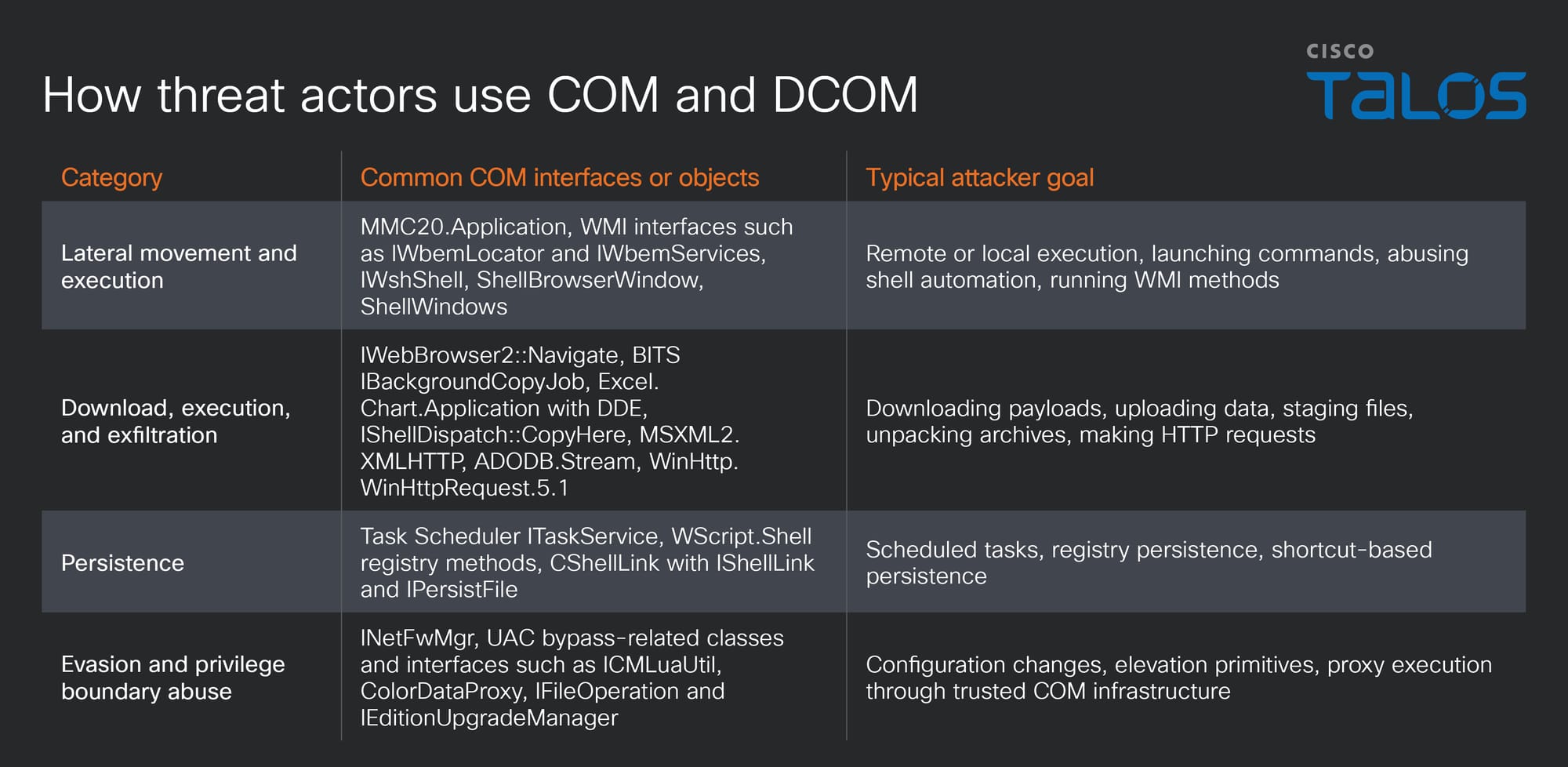
Malicious actors use COM as it provides convenient access to existing Windows functionality and can make static analysis efforts more difficult with the functionality of the sample hidden behind indirect register-based function calls.
The following COM classes and interfaces are useful when triaging samples and building hunting logic.
Hunting for COM interfaces
Static hunting for COM usage starts with known ProgIDs or GUIDs targeted in a hunt. Some binaries contain ProgID strings such as WScript.Shell, Shell.Application, MSXML2.XMLHTTP or WinHttp.WinHttpRequest.5.1. Others contain binary GUIDs without helpful strings. For hunting, we need to be careful about the on-disk byte order for GUIDs because the first three fields are usually stored little-endian in memory and in binaries.
For the Task Scheduler CLSID {0F87369F-A4E5-4CFC-BD3E-73E6154572DD}, the corresponding byte pattern is:
9F 36 87 0F E5 A4 FC 4C BD 3E 73 E6 15 45 72 DD
For the ITaskService IID {2FABA4C7-4DA9-4013-9697-20CC3FD40F85}, the byte pattern is:
C7 A4 AB 2F A9 4D 13 40 96 97 20 CC 3F D4 0F 85
A simplified YARA hunting rule for binaries that reference the Task Scheduler COM class and interface might look like:
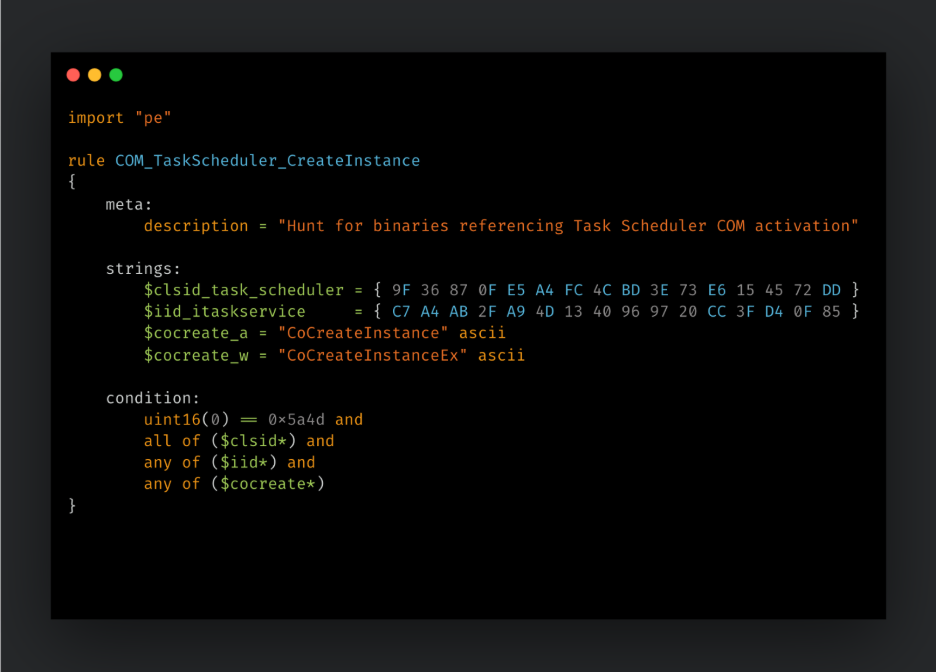
This kind of rule will also find legitimate software, so it typically needs to be tightened with detection names, submission dates, file types, family names, and other context to narrow the output.
Notable malware families and COM
Although there are many malware families utilizing COM, the following case studies demonstrate only a few notable malware families and their interaction with COM interfaces.
Case study 1: Gh0stRAT/SimpleRemoter and Task Scheduler
Gh0stRAT is a long-lived remote access trojan (RAT) whose source code has been publicly available for years, which has made it a convenient base for modified RAT families and actor-specific forks. MITRE ATT&CK describes Gh0stRAT as a remote access tool with public source code that has been used by multiple groups.
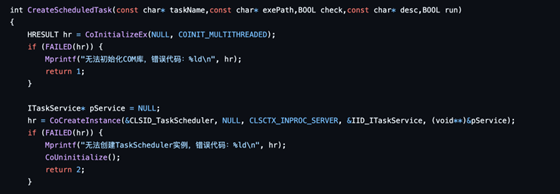
The COM-relevant part of this example is the scheduled task creation logic in the RAT. The code uses Task Scheduler COM interfaces rather than simply invoking schtasks.exe. In process creation telemetry, the task creation may not appear as a direct schtasks.exe launch visible in EDR telemetry as COM calls run inside the malware process.
Case study 2: Attor and BITS
Attor is a Windows-based cyberespionage platform first publicly documented by ESET in 2019, with observed activity dating back to at least 2013. It is a modular implant built around a dispatcher component that manages loadable plugins, allowing operators to tailor functionality per victim. Reported capabilities include screen capture, audio recording, keylogging, clipboard capture, file collection and upload, process/window monitoring, persistence, Tor-based C2 communications, and GSM/GPRS device fingerprinting through AT commands.
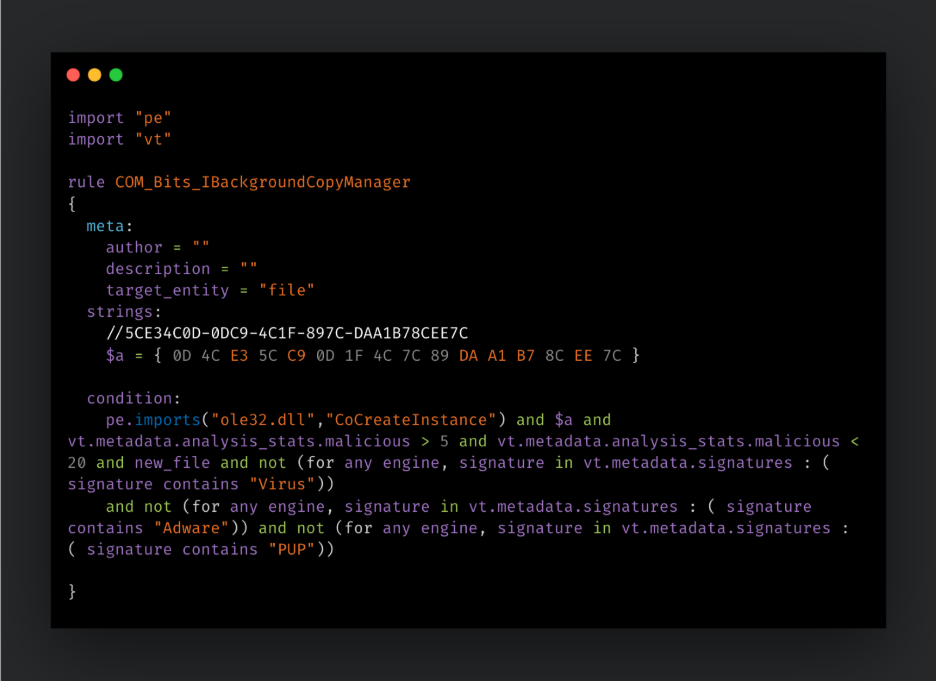
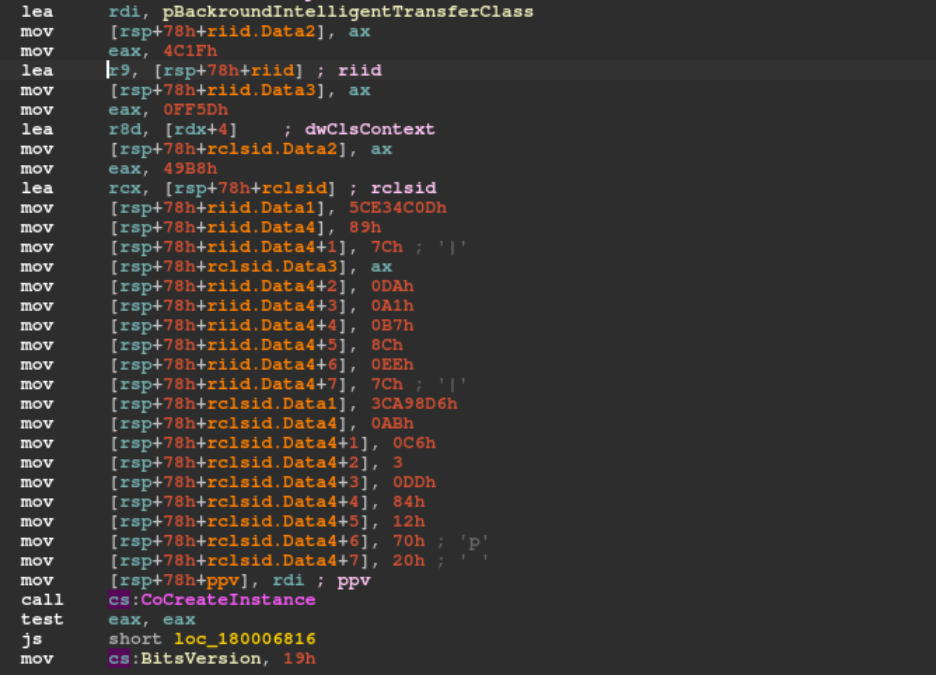
Background Intelligent Transfer Service (BITS) is another COM-exposed Windows service that attackers use, as it provides reliable file transfer functionality and an alternative service for C2 communications that may evade the scrutiny of EDR software.
The IBackgroundCopyJob interface is used to add files to a job, set priority, determine state, and start or stop transfers. Malware using this interface may perform payload download, staging, or exfiltration through the same background transfer service used by legitimate applications.
In the example used here, the Attor plugin uses IBackgroundCopyJob to communicate with a C2 server. The same plugin also contains COM exposed functionality for launching VBScript and PowerShell through COM client code, and through use of IWbemClassObject to enumerate installed endpoint security software.
Case study 3: WarmCookie and Task Scheduler
WarmCookie, also known as BadSpace, is a malware family that Talos reported as emerging in April 2024 and being distributed through malspam and malvertising.
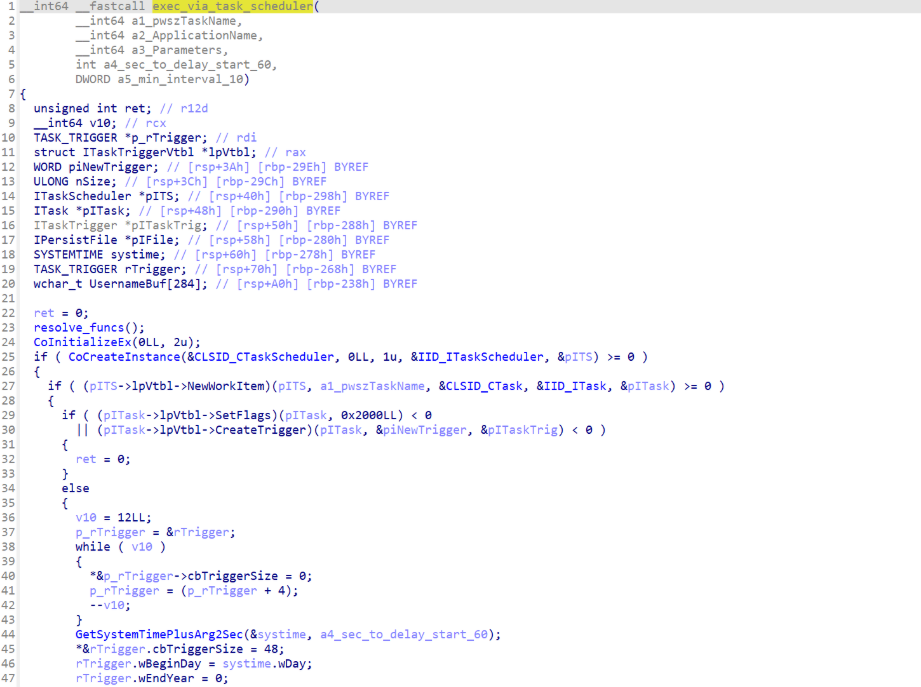
The COM-specific part of the workflow is visible in the decompiled function responsible for persistence. WarmCookie initializes COM, creates the older Task Scheduler 1.0 object using CLSID_CTaskScheduler, and requests IID_ITaskScheduler. It then creates a work item, configures flags and creates a trigger. In the screenshot below, the class and interface identifiers appear before the follow-on task and trigger creation calls.
Conclusion
COM is an integral part of the Windows programming model. As such, it will remain useful to malware authors wishing to utilize existing cross-platform functionality in Windows. COM is often used to hide malicious functionality behind the vtable based indirect function calls but equally for achieving persistence or moving laterally within victim environments.
For threat researchers, the important skill is recognizing when a sample is using COM and then translating the evidence like ProgIDs, CLSIDs, IIDs, and vtable offsets into the human-readable name of the Windows component, interface, and method that are being used.
Analysts in most malware cases do not need to fully master COM to analyze COM-based binary malware. They need enough practical knowledge to identify the client-side workflow, recover interface types, and understand whether the malware is using COM for task creation, WMI access, BITS transfers, shell automation, Office automation, local execution, remote activation, or persistence.
Tools such as OleView.NET, ComView, IDA’s COM Helper, COMIDA, COM Code Helper, COMpanion plugin, and DispatchLogger can shorten the path from an anonymous indirect call to a meaningful API-level action.
- Microsoft Learn: Component Object Model (COM) and DCOM Remote Protocol overview
- Microsoft Learn: COM technical overview and COM clients and servers
- Microsoft Learn: CoCreateInstance, CoCreateInstanceEx, and CLSIDFromProgID
- Microsoft Learn: IUnknown, IDispatch, and COM reference counting
- Microsoft Learn: COM security with CoInitializeSecurity, CoSetProxyBlanket, LaunchPermission, and AccessPermission
- Microsoft Learn: Task Scheduler ITaskService, legacy ITaskScheduler, and BITS IBackgroundCopyJob
- Google Project Zero: OleView.NET tooling updates
- James Forshaw: DCOM Research for Everyone!
- James Forshaw: COM in Sixty Seconds! (well minutes more likely)
- Mandiant/Google Cloud: Hunting COM Objects
- Mandiant/Google Cloud: Hunting COM Objects, Part Two
- Hex-Rays: COM reverse engineering and COM Helper
- Malwarebytes Labs: Observing COM within Malicious Code
- Tools: COM Code Helper, DispatchLogger, COMIDA, ComView