It’s the final week of Q2, and Kali Linux 2026.2 is here - right on schedule ;) We have been heads down since our last release, and we are ready to share what we have been working on. This release is a mix of desktop refreshes, infrastructure improvements, and quality-of-life changes that we think you will appreciate.
The summary of the changelog since the 2026.1 release from March is:
- Desktop Environments - Bump to GNOME 50 and KDE Plasma 6.6
- Helper Scripts Consistency - Consistency to our little launches at starting services
- APT Format - Goodbye
sources.list, hellosources.list.d/kali.source - VM Boot Optimisation - Smaller initrd + faster boot times = happy virtual machine users
- Reboot Warning - Heads-up,
polkitandxrdpupgrades require a system reboot - Kali Kernel Incoming - Staying with 6.19 for now, how to get 7.0 early
- Build Scripts Incoming - Heads-up with some changing on the way
- New Tools - As always, various new shiny packages have been added (9!)
Desktop Environments Updates
As we do roughly every six months, every other Kali release, our desktop environments get a major update. This time it’s for: GNOME and KDE Plasma. Neither brings sweeping changes, but both have put real effort into refining performance and usability across the whole ecosystem.
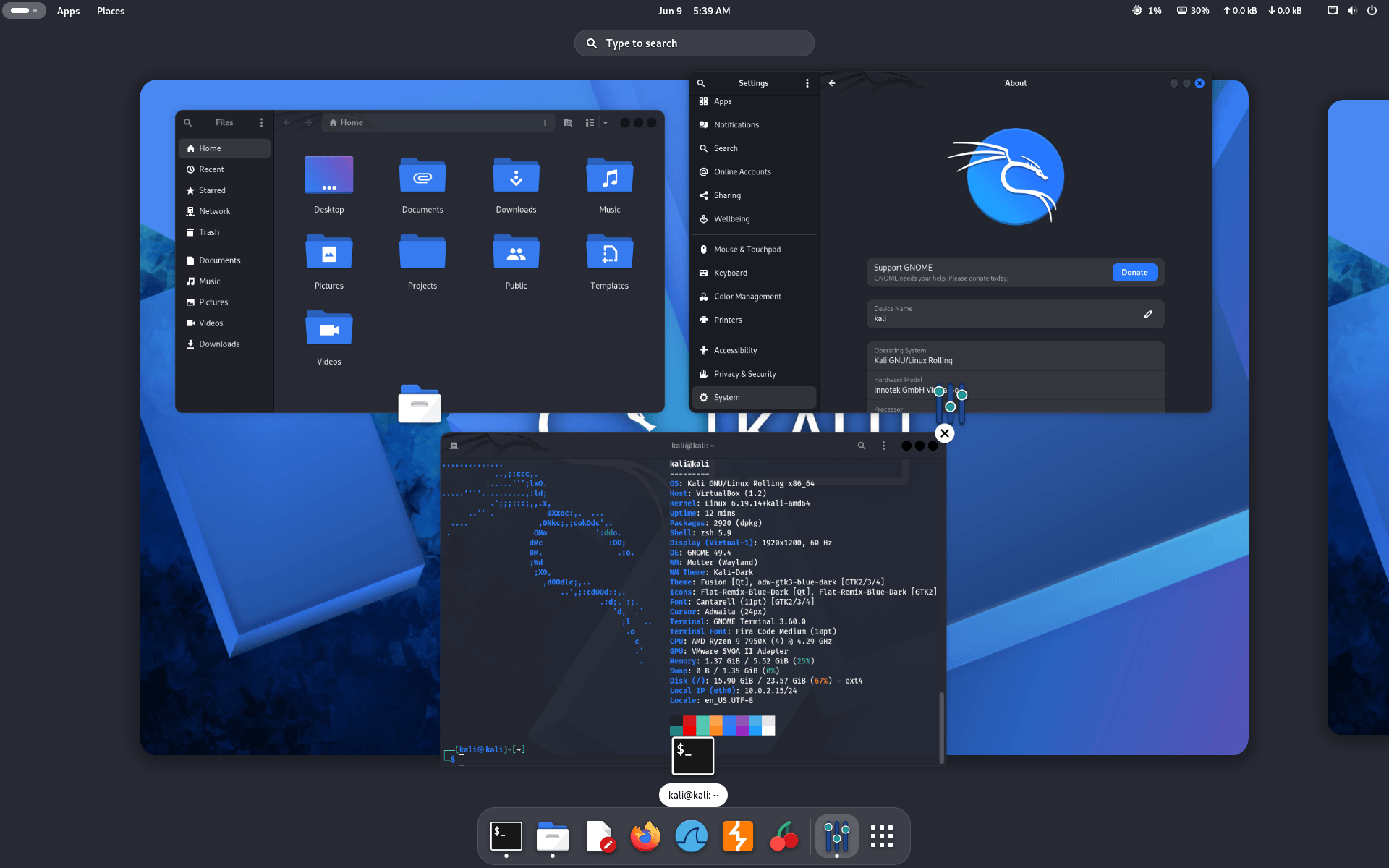
GNOME 50
GNOME 50 brings usability and performance improvements across the desktop. The file manager received significant optimizations, resulting in faster thumbnail and icon loading, improved responsiveness, and reduced memory usage. The desktop also received new accessibility enhancements through a brand-new preferences window, tweaks to the screen reader, and automatic language switching.
Another addition is support for document annotations in the Document Viewer app, making it easier to add text notes and highlights directly to documents.
Here you can read more about all the changes with this new GNOME release: GNOME 50 release announcement.
KDE Plasma 6.6
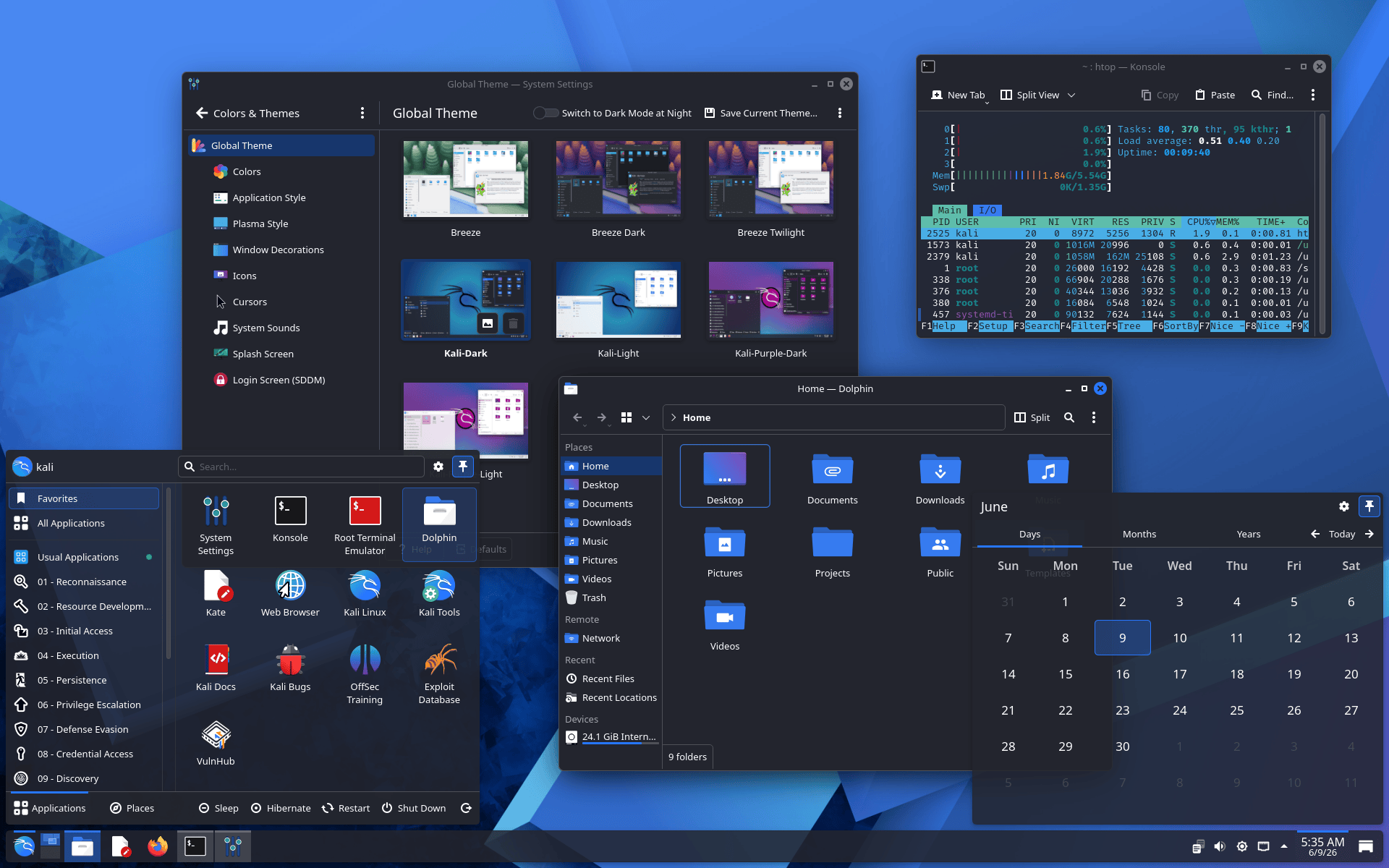
KDE Plasma 6.6 focuses on improving usability and accessibility while introducing several new features, including a new on-screen keyboard, providing a better experience particularly for touch-enabled devices.
The Spectacle screenshot utility can now recognize and extract text directly from screenshots, making OCR functionality available from the desktop. Accessibility has also been enhanced with new color-vision support options, improvements to Zoom and Magnifier, support for Slow Keys on Wayland, and adoption of the standardized Reduced Motion setting.
Here you can read more about all the changes with this new Plasma release: KDE Plasma 6.6 release announcement.
Improved Consistency For Services Helper Scripts
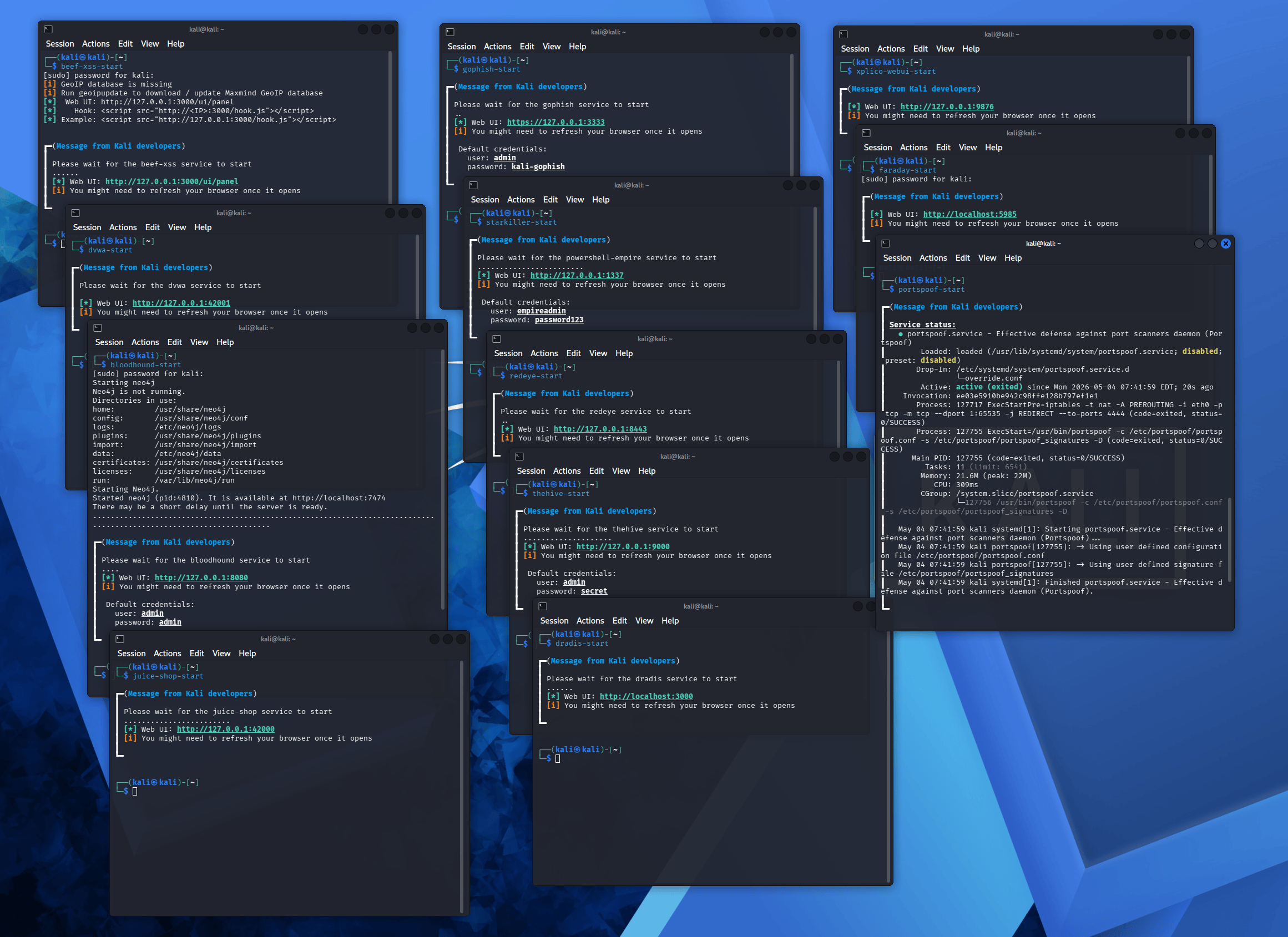
To improve consistency across tools that depend on a service, we have updated our helper scripts. Previously, a tool that required a service might only let you start it (with no way to stop) - and the information displayed back was inconsistent (mixture of service status, how to access, default credentials or nothing at all). With this change, multiple packages have been updated to use these new scripts, which now handle the following tasks:
- Manage the service - start/stop
- Check if the service is already running - avoiding starting it twice
- Show the service status
- Show any default credentials
- Show how to access it - such as if it’s a web UI, the URL (and bonus, automatically open it in the browser!)
We also make sure that any Kali packages which include a service use <tool>-start/<tool>-stop for their command names.
Hopefully this makes the little things a little easier.
APT Gets A New Sources Format
Since the beginning of time, the APT sources for Kali Linux were configured in the file /etc/apt/sources.list. This file tells APT from where to update your system, and it’s so fundamental that pretty much everyone (that is, Kali users) knows this file and its content:
┌──(kali㉿kali)-[~]
└─$ cat /etc/apt/sources.list
# See https://www.kali.org/docs/general-use/kali-linux-sources-list-repositories/
deb http://http.kali.org/kali kali-rolling main contrib non-free non-free-firmware
Well, it’s a “once in a distro lifetime” kind of thing, and here it is - /etc/apt/sources.list is retired, in favor of the new file /etc/apt/sources.list.d/kali.sources:
┌──(kali㉿kali)-[~]
└─$ cat /etc/apt/sources.list.d/kali.sources
# See https://www.kali.org/docs/general-use/kali-apt-sources/
Types: deb
URIs: http://http.kali.org/kali/
Suites: kali-rolling
Components: main contrib non-free non-free-firmware
Signed-By: /usr/share/keyrings/kali-archive-keyring.gpg
All the freshly-installed systems will be configured as such. Existing systems won’t be changed. Both files are equivalent and work just the same. However, in the near future, APT will warn if the old file is in use, and will suggest modernizing it.
Note that, for those in the know, this isn’t anything new: both formats have existed for a long time now, and you could use either one or the other. What’s happening is that the default is slowly changing, from the old “one-line-style” to the new “deb822-style”. This is happening in Debian and in Debian-derivatives like Ubuntu. Kali is just following suit.
And for the curious, there’s a very complete and detailed manual page:
┌──(kali㉿kali)-[~]
└─$ man sources.list
No More Graphics Firmware Pre-installed For VM Use-cases
Kali has had a long tradition of pre-installing a lot of firmware in its images. The upside is that users didn’t need to know what firmware they needed to install for their hardware to work: it was already there. And the downside, obviously, was that all the firmware that wasn’t needed was nevertheless installed and taking space for nothing.
It worked for us so far, in the sense that we don’t get too many bug reports related to missing firmware. But lately the changing landscape of graphics firmware forced us to re-evaluate this decision.
The issue with graphics firmware is that it just keeps growing bigger, and right now having it installed for NVidia, AMD and Intel GPUs takes almost 300 MB. But what’s even worse: some bits and pieces of these firmware packages need to be loaded very early, and therefore they are also installed in the initrd (note: the initrd, or initramfs, is this “minimal” system that is loaded early on by the kernel at boot time). And lately, the Kali initrd peaked at around 200 MB, mainly due to graphics firmware. What does that mean in practice? A bigger initrd means slower boot time, and can potentially fill up your /boot partition if ever it’s too small.
So we thought we could improve the situation for VM users here: the vast majority probably don’t need graphics firmware, ever. The only use-case we can think of is a VM with a dedicated GPU + GPU passthrough enabled. If you’re in this case, you might need graphics firmware.
So, what changed in practice, you may ask?
- Pre-built VM images don’t come with graphics firmware anymore
- Installer images now detect if installation happens in a VM, and in that case graphics firmware is not installed
As a result, the initrd is down to 60 MB for VM users, and the boot time is cut by ~3x (tested for QEMU VM on a Linux host, your mileage may vary). That’s a massive improvement in boot time.
For baremetal users: nothing changed, so you still get a 200 MB initrd with all graphics firmware pre-installed. If you’d like to optimize, it’s on you to uninstall the firmware that you don’t need. A word of caution though: make sure to know what you’re doing, because removing graphics firmware that is needed might leave you with a system without graphics after reboot.
Disruptive Package Updates
We’ve got some slightly disruptive updates in this release.
polkit: a reboot is required
The update of the polkitd package requires a reboot, otherwise trying to start GUI applications as root will fail with cryptic error messages.
There’s an indication of this reboot requirement in the output of apt full-upgrade, when the polkitd package is updated. It’s just not very obvious, the hint is buried with the rest of the logs:
┌──(kali㉿kali)-[~]
└─$ sudo apt update && sudo apt full-upgrade
[...]
Setting up libpolkit-gobject-1-0:amd64 (127+really127-0kali1)…
Setting up libpolkit-agent-1-0:amd64 (127+really127-0kali1)…
Setting up polkitd (127+really127-0kali1)…
Upgrading to this polkitd version requires a reboot, please reboot the system when convenient.
Created symlink '/etc/systemd/system/sockets.target.wants/polkit-agent-helper.socket' → '/usr/lib/systemd/system/polkit-agent-helper.socket'.
[...]
After a reboot, and if ever you still can’t run applications as root, make sure that polkit-agent-helper is started:
┌──(kali㉿kali)-[~]
└─$ sudo systemctl enable --now polkit-agent-helper.socket
If you’re still having issues, reach out on our bug tracker.
xrdp: a reboot is required
In this Kali release, we updated xrdp and xorgxrdp to the v0.10 series. xrdp is an open-source Remote Desktop Protocol server: you might use it if you connect to your Kali instance remotely. If you’re an xrdp user, you’ll need to reboot after this upgrade.
For those who run Kali in Hyper-V, using the Enhanced Session Mode: you’re an xrdp user, even if you didn’t know it! We did our best to ensure a smooth transition, and yet we got reports that xrdp wasn’t functional after the upgrade. If ever you’re in this case, you can try to run kali-tweaks, and in the Virtualization section you can try to disable, and then enable again the Hyper-V Enhanced Session Mode. That might fix the issue. Don’t forget to reboot!
As always, if you’re still having issues after that, feel free to reach out on the Kali bug tracker.
Linux Kernel For This Release: 6.19
Regarding the version of the Linux kernel to include in this release of Kali, it’s been a tough decision.
On one hand, we’d like to release with the latest version of the Linux kernel, due to all the recent vulnerability disclosures (Copy Fail/CVE-2026-31431, Dirty Frag/CVE-2026-43284 & CVE-2026-43500 and others ). On the other hand, when the 7.0 kernel reached Debian, there were reports of incompatibilities with the NVidia DKMS drivers .
We decided to release with a 6.19 kernel to avoid breaking NVidia users. At the same time, for those who prefer to get the latest kernel and don’t care about NVidia compatibility, we have the kernel 7.0 ready for you in kali-experimental. Make sure to check our documentation that explains how to enable the kali-experimental repository. The 7.0 kernel is also available in kali-rolling, so you can just update your whole system and get the latest packages from kali-rolling.
A Sneak Peek: Build Scripts
Our build scripts are what we use to produce every Kali image - ARM SBCs, Base (Installer and live ISOs), Cloud, Containers, VMs, WSL & NetHunter/Pro. Each lives in its own repo, and over time they have each grown in slightly different directions. For the next release, Kali 2026.3, we are doing a consistency pass across all of them: same structure, same conventions, same behaviour throughout.
As a result of these changes, some CI pipelines or workflows may need tweaking.
This release brings 9 new tools (to the network repositories). As always, we have been busy adding to the arsenal:
- arsenal-ng - Go-based command library equipped with 200+ cybersecurity cheat-sheets
- hydra-gtk - [Re-added] Very fast network logon cracker - GTK+ based GUI
- legba - Multiprotocol credentials bruteforcer / password sprayer and enumerator
- oletools - Analyze MS OLE2 files and MS Office documents
- penelope - Powerful shell handler
- shell-gpt - Command-line productivity tool powered by AI large language models
- tailscale - Secure connectivity platform
- tookie-osint - OSINT information gathering tool for finding social media accounts
- uro - Declutter URLs for crawling/pentesting
There has also been numerous packages updates and new libraries as well. We also bump the Kali kernel to 6.19.
Kali NetHunter Updates
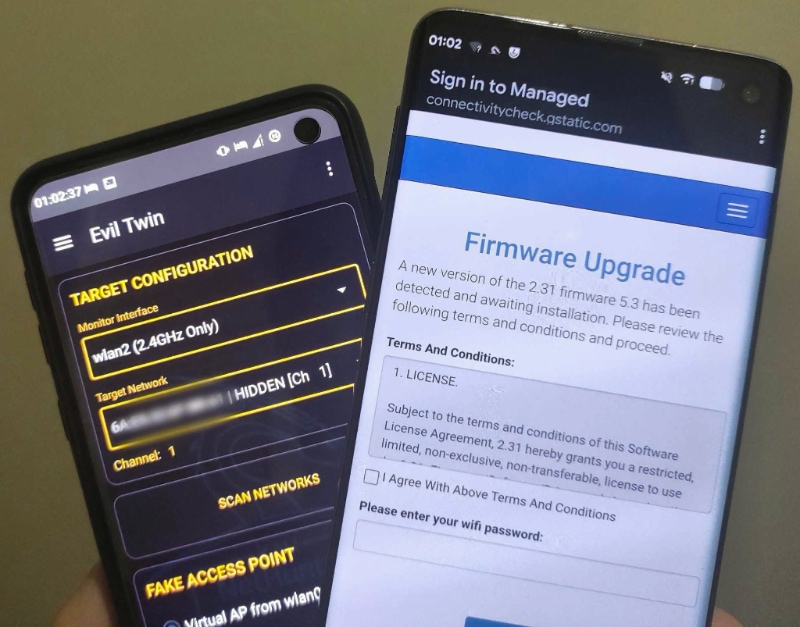
We have a tremendous amount of news for the lovers of mobile hacking! The Kali NetHunter app launches instantly now, various bugs have been fixed with the custom commands and chroot manager . A new EvilTwin (Wi-Fi Fake AP) tab has been added with password verification captive portal, which brought along a really needed iptables fix. So now after using Wifipumpkin3 or EvilTwin, Android Hotspot will work properly. Huge thanks to the incredible work by @dr.rootsu. The kernel flasher tab has also received a refresh.
However, this release’s spotlight is on the beginning of the Qcacld-3.0 injection patch wave.
The Qcacld3.0 Injection Story
We finally came to a milestone, shout-out to all the developers that worked on injection through the years!
@kimocoder easily spent more than anyone else on this goal. His original injection implementation came to life, on a specific device: the OnePlus Nord (AC2003). You can find the commit here. Then @Loukious came in the mix and his modifications made it to work on other devices with this port. Finally, @cyberknight777 did some housekeeping, removed unnecessary changes, logging, and restored the correct authorship while attributing @Loukious as co-author. The result, this patch is the almost universal one which brought many devices into the injection world, starting with the ones below for both kernel 4.x and 5.x versions:
- OnePlus 7 (LineageOS 23.2)
- OnePlus 9 / 9 Pro
- OnePlus Nord
- POCO X3 Pro
- Redmi Note 10
- Samsung A73
- Xiaomi Mi A3 (LineageOS 23.2)
- Xiaomi Poco X3 NFC (PixelOS Android 16)
- Xiaomi Redmi Note 8
Wifite On TV
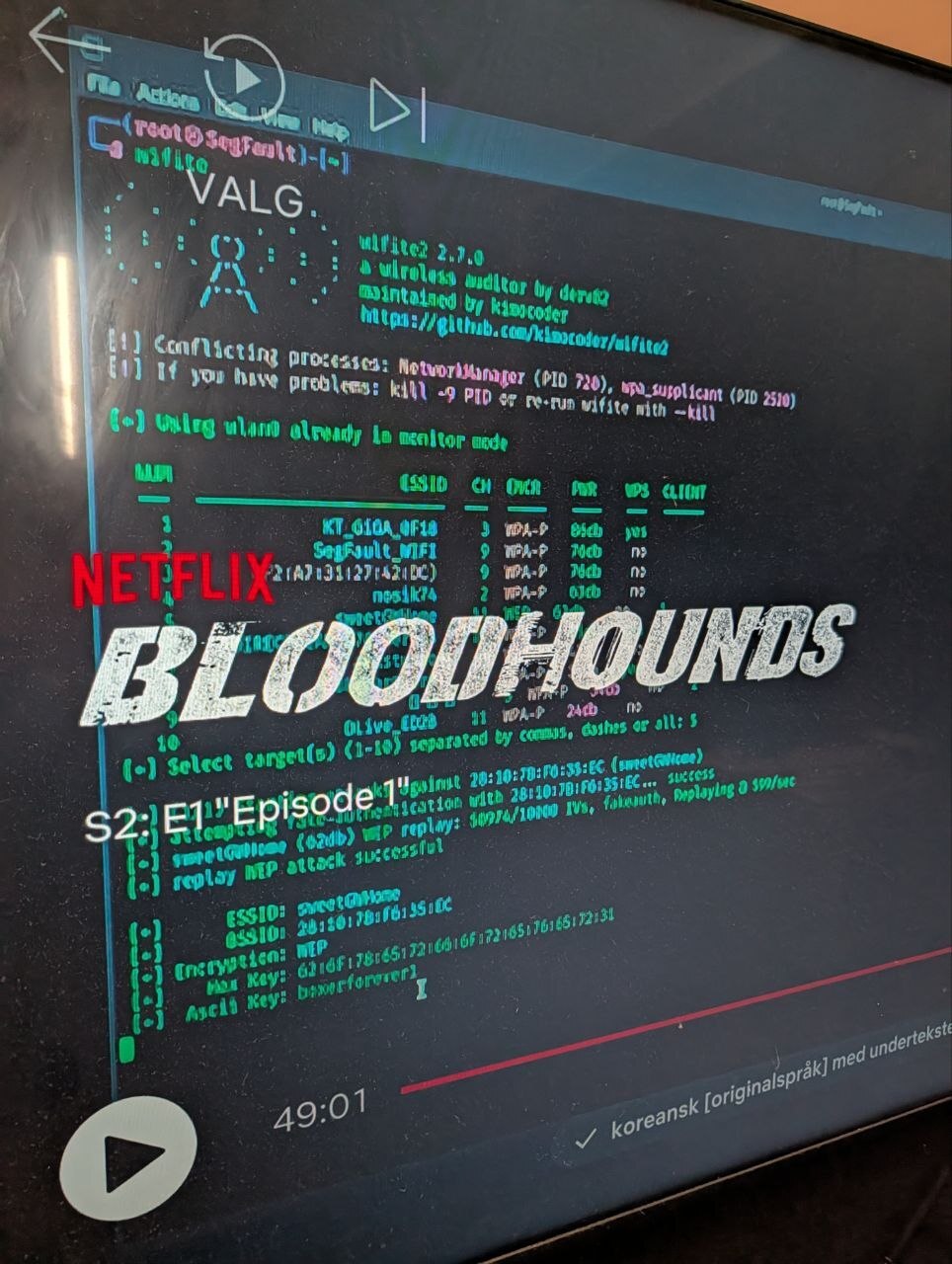
In the meantime, his continuous work on improving wifite caught some attention - spotted on Netflix twice. Not bad!
Magisk Standalone Kernel Installer
The kernel flasher tab (still experimental on some devices) is back in a new shape, giving a hint for the possible future look for the NetHunter app.
The Magisk standalone kernel flashing support is now here - you can simply open any newly built kernel installer zip in the Magisk app that was built using the kali-nethunter-installer.
New Kernels
In addition to the kernels that now support the qcacld3 injection, there are several new versions and phones:
- Google Pixel 6a (LineageOS 23.2)
- Redmi 5A (crDroid 14)
- Samsung Note 20 Ultra (Android 13)
- Samsung S10 (LineageOS 23.2)
- Samsung S10 5G (LineageOS 23.2)
- Samsung S10+ (LineageOS 23.2)
- Samsung S10e (LineageOS 23.2)
NetHunter Pro
Kali bare metal now on more phones! New devices added in build thanks to the awesome work by @Max Furman:
- Fairphone FP5 (QCM6490) (fp5)
- Google Pixel 3 (SDM845) (blueline)
- Google Pixel 3a (SDM670) (sargo)
- Google Pixel 3a XL SDC panel (SDM670) (bonito-sdc)
- Google Pixel 3a XL Tianma panel (SDM670) (bonito-tianma)
- Google Pixel 4a (SDM730) (sunfish)
- LG G7 ThinQ (SDM845) (judyln)
- LG V35 ThinQ (SDM845) (judyp)
- Samsung Galaxy S9 China (SDM845) (starqltechn)
- SHIFTphone 8 (QCM6490) (otter)
- Sony Xperia 10 III (SM6350) (pdx213)
- Sony Xperia XZ2 (SDM845) (xperia-tama-apollo)
- Sony Xperia XZ2 Compact (SDM845) (xperia-tama-akari)
- Sony Xperia XZ2 Premium (SDM845) (xperia-tama-akatsuki)
- Xiaomi Mi 10T Lite (SM7225) (toco)
- Xiaomi Mi 9 Pro 5G (SM8150) (tucana)
- Xiaomi Mi 9T Pro Samsung panel (SM8150) (davinci-samsung)
- Xiaomi Mi 9T Pro Visionox panel (SM8150) (davinci-visionox)
- Xiaomi Mi Mix 2S (SDM845) (polaris)
- Xiaomi Poco X3 Huaxing panel (SM7150) (surya-huaxing)
- Xiaomi Poco X3 Tianma panel (SM7150) (surya-tianma)
- Xiaomi Redmi Note 10 Pro (SM7150) (sweet)
NetHunter Podcast Episode 3
@yesimxev and @Kristopher Wilson joined for a discussion about NetHunter in cars, and leveraging AI for Bug Bounty projects and more.
Kali Website Updates
Since our last release, Kali 2026.1, we have been keeping the website and documentation up-to-date. Here is a quick summary of what has changed.
Kali Documentation
Most of the documentation updates this cycle are around NetHunter device support and the new APT sources format. Pages which got something more than a tweak:
- Creating A Custom Kali ISO (updated)
- Handling common APT problems (updated)
- Installing NetHunter on the Samsung Galaxy S10 (updated)
- Installing NetHunter on the TicWatch Pro 3 (updated)
- Installing NetHunter on the TicWatch Pro (updated)
- Installing NetHunter on the Xiaomi Mi A2 (updated)
- Installing NetHunter on the Xiaomi Mi A3 (updated)
- Kali NetHunter (updated)
- Kali Network Repositories (/etc/apt/sources.list) (updated)
- Kali’s Default Credentials (updated)
- Submitting Bugs for Kali Linux (updated)
We also want to say a little thank you to the following for their work on the sites:
Anyone can help out, anyone can get involved!
New Kali Mirrors
We welcomed 1 new mirror during this release cycle, but that’s a significant one: our first mirror in Africa! Hoping that many others will follow ;)
The mirror is located in South Africa, online at mirror.africloud.com. It is sponsored by AFRICLOUD, and was setup thanks to Oluniyi Ajao.
If you have the disk space and bandwidth, we always welcome new mirrors.
Get Kali Linux 2026.2
Fresh Images
So what’s stopping you? Go and get Kali already!
If you cannot wait for the next release, we also produce weekly builds which include the latest packages at the time of download, meaning fewer updates needed on first boot. These are automated builds rather than QA’d releases like our standard release images, but we still welcome bug reports on them. The earlier we catch issues, the sooner they get fixed.
Existing Installs
Using Kali already? Great! You can keep it up-to-date by doing:
┌──(kali㉿kali)-[~]
└─$ sudo tee /etc/apt/sources.list.d/kali.sources << 'EOF'
Types: deb
URIs: http://http.kali.org/kali/
Suites: kali-rolling
Components: main contrib non-free non-free-firmware
Signed-By: /usr/share/keyrings/kali-archive-keyring.gpg
EOF
[...]

┌──(kali㉿kali)-[~]
└─$ sudo apt update && sudo apt -y full-upgrade
[...]

┌──(kali㉿kali)-[~]
└─$ cp -vrbi /etc/skel/. ~/
[...]

┌──(kali㉿kali)-[~]
└─$ sudo reboot -f
Remember, we recommend doing a reboot for this release!
You should now be on Kali Linux 2026.2. We can double check this by doing:
┌──(kali㉿kali)-[~]
└─$ grep VERSION /etc/os-release
VERSION="2026.2"
VERSION_ID="2026.2"
VERSION_CODENAME="kali-rolling"

┌──(kali㉿kali)-[~]
└─$ uname -v
#1 SMP PREEMPT_DYNAMIC Kali 6.19.14-1+kali1 (2026-05-05)

┌──(kali㉿kali)-[~]
└─$ uname -r
6.19.14+kali-amd64
NOTE: The output of uname -r may be different depending on the system architecture.
As always, if you run into anything broken, please report it. We will never be able to fix what we do not know is broken! And Social networks are not bug trackers!
Want to keep up-to-date easier? We’ve got you!